

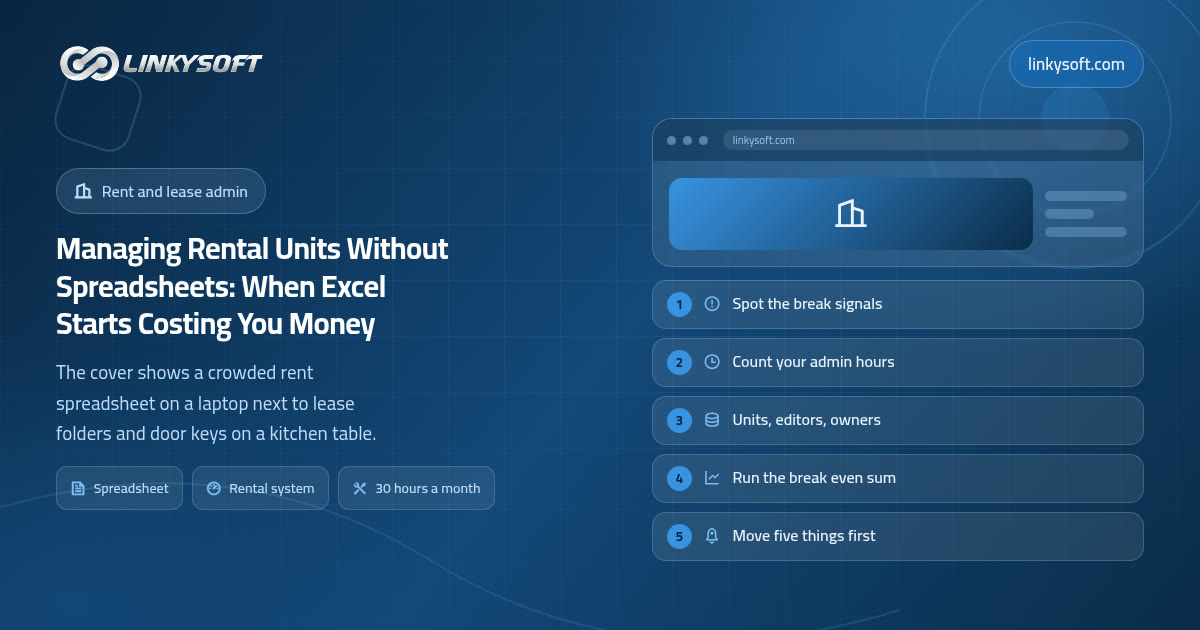
Your spreadsheet is not the problem yet
If you look after a small number of rental units and one spreadsheet holds all of it, you probably do not need to buy anything at all. We tell people that most weeks, and it costs us work, but it happens to be true. Below roughly 15 to 20 units, with exactly one person editing the file, and leases that only change when somebody actually moves out, a spreadsheet is the right tool for the job and swapping it for software would be spending money to solve a problem you do not yet have.
The reasons it works so well at that size are worth saying out loud, because they are the same reasons any replacement has to beat. It costs nothing beyond software you already pay for. Everyone in the office already knows how to use it, so there is no training and no resistance. It changes shape in seconds, which means when you suddenly need a column for parking spaces or a note about a broken boiler, you add one and carry on. And when you want to see everything at once, it is all there on a single screen.
Two words come up constantly in this article, so let us fix them now in plain terms. A unit is one rentable thing: a flat, a shop, a desk in a shared office, a bay in a warehouse, a room. A portfolio is simply all the units that one person or one company looks after, whether they own them or manage them for somebody else. Nothing more complicated than that.
What this article gives you is not a sales pitch but a set of measurements. The warning signals, the hour counts, the costs that hide inside an ordinary working week, and the arithmetic to run against your own numbers, so that instead of guessing you can put an approximate date on the month your spreadsheet stops paying for itself. If that date turns out to be two years away, that is a perfectly good outcome and you should close this page and go back to work.
The four jobs a rental business does every single month
Strip away the property talk and a rental business does four things over and over, every month, in the same order. Everything else is decoration.
The first job is collecting the rent and matching every payment to the right lease and the right unit. That sounds trivial until you remember the tenant who pays half now and half on payday, the one who transfers two months at once because they are travelling, the one whose bank reference is their brother's name, and the one who pays the exact amount but four days early so it lands in the previous month's statement. Matching money to leases is the single most time consuming thing most small landlords do.
The second job is chasing whoever has not paid, on a schedule, and keeping a record of what was said and when. The chasing part is obvious. The record is the part people skip, and it is the part that matters, because when a payment is disputed months later, a dated list of what you sent and when you sent it is what settles the argument in your favour.
The third job is taking maintenance requests, getting the work done, and attaching a real cost to each one. Without that cost attached to the unit, you know what a property earns but not what it keeps, which is how people carry a unit for three years without noticing it eats a third of its rent in repairs.
The fourth job is watching dates: lease renewals, notice periods, scheduled rent increases, insurance and safety certificate expiry, deposit returns with their legal deadlines. Dates are quiet. Nothing beeps when one passes.
Here is the idea the rest of this article rests on. A spreadsheet stores the record of those four jobs, but it performs none of them. It does not collect anything, chase anybody, open a repair ticket or warn you about a date. That means all four still run on a human being remembering to look, which is completely fine when there are twelve units and one person, because that person can hold twelve units in their head. It becomes genuinely risky at sixty, because nobody holds sixty units, ninety dates and two hundred payment lines in their head, and the file will not tell them what they have forgotten.
The signals that your spreadsheet has already broken
People rarely notice the moment a spreadsheet stops working, because it never stops working all at once. It degrades, and the degradation shows up as small annoyances that feel like normal business. These are the ones we see most often.
- The file name symptom. Your master file is called something like rent_final_v3_amended.xlsx, and there are two different copies of it sitting in a chat group because somebody sent a version to somebody else on a Tuesday. Nobody is certain which one is current.
- You cannot answer the simplest question quickly. Ask yourself right now who owes you money and how much, in total, today. If answering that takes more than a minute and involves opening three tabs and adding things up by eye, the file has stopped being a system and become an archive.
- Month end eats a full working day. Worse, that day is spent matching bank lines to tenant names rather than deciding anything, so a day of skilled attention goes into clerical work that produces no decision at the end of it.
- A dispute you cannot answer. A tenant says they paid, or that the deposit deduction was never agreed, and you have no dated record that nobody could have edited afterwards. So you settle to keep the peace, and you tell yourself it was only a small amount.
- A date that lives in one head. The renewal in March, the increase due in June, the certificate that expires in October: real, important, and written down nowhere. When that person is on holiday or off sick, the business genuinely cannot see it.
The honest framing is this. If three or more of those describe your week, the spreadsheet has already broken. You simply have not been sent the bill yet, because the costs arrive later and separately, in the form of an empty month here and a written off arrears figure there, and by then nobody connects them back to the file.
What the broken spreadsheet is quietly costing you
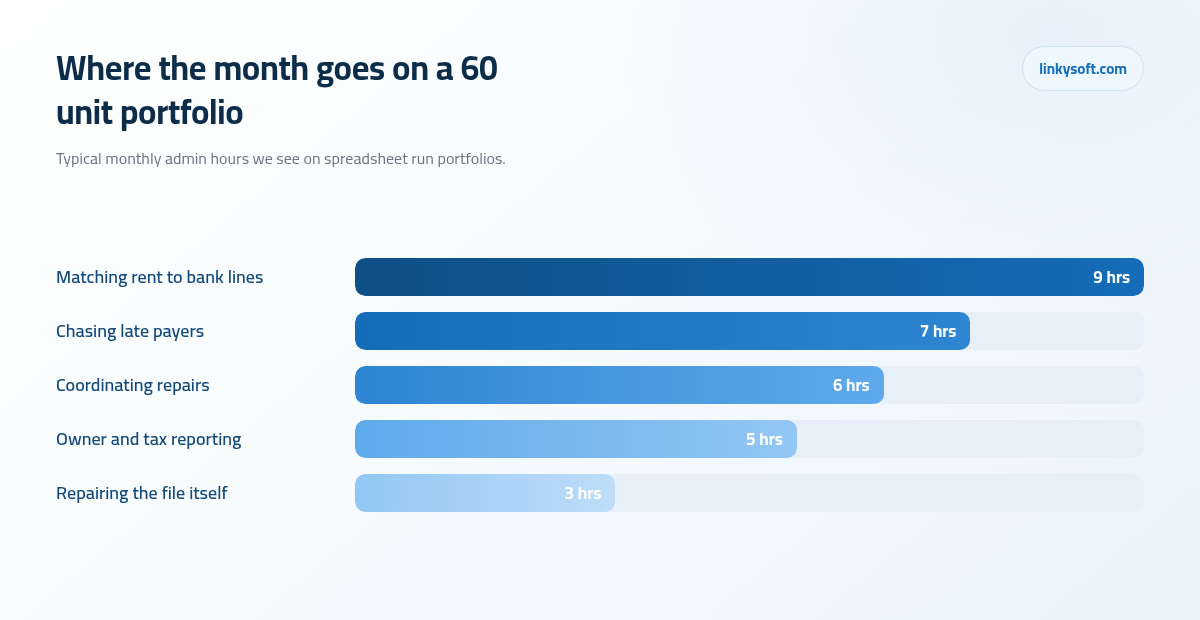
Let us put numbers on it, using a portfolio of 60 units because that is the size where the strain usually becomes visible. In practice, across the clients we work with, a portfolio that size takes 25 to 35 hours a month of pure administration when it is run on spreadsheets. That is not a published statistic and we are not going to dress it up as one, it is simply what we keep seeing when we sit with people and count. The split is roughly 9 hours matching rent payments to bank lines, 7 hours chasing late payers, 6 hours coordinating repairs, 5 hours on owner and tax reporting, and about 3 hours spent repairing the file itself: fixing a formula somebody dragged over, restoring a deleted row, reconciling two versions.
Now turn the hours into money, deliberately conservatively. Cost that time at 12 an hour of staff time, which is modest for anyone competent enough to be trusted with the rent roll, meaning the master list of every unit, who is in it and what they pay, and 30 hours a month comes to about 360 a month, or roughly 4,300 a year. The currency does not matter, use your own and the sum still works. What matters is that almost nobody has that figure in a budget anywhere, because the hours are hidden inside somebody's ordinary salaried week rather than arriving as an invoice. Redo that sum with your real hourly rate and your real hour count before you believe ours.
Then there are the costs that never show up as hours at all, and these are usually larger. One lease renewal missed by a week can turn into an empty month, and on a unit at 500 a month that is 500 of lost rent plus typically another 150 to 400 to clean, list and re let it, which means a single forgotten date often costs more than a whole year of software for that unit. Scheduled rent increases are the quietest loss of all: an uplift of 3 to 5 percent on 30,000 of total monthly rent is worth 900 to 1,500 a month, and in portfolios run on spreadsheets we routinely find 5 to 15 percent of leases whose increase date simply passed without anybody acting on it. Late fees that were contractually owed and never applied belong on the same list.
Speed of collection is worth a line too. Chasing by hand typically clears late rent in 12 to 20 days, whereas a fixed reminder ladder, meaning a set sequence of messages 3 days before the due date, on the due date, then 3 and 7 days after, usually brings that down to 5 to 9 days. On 30,000 of monthly rent with about 12 percent of it late, roughly 3,600 arrives around 8 days sooner, and since 8 days is a bit over a quarter of a month, that is close to 960 sitting in your account rather than somebody else's, every single month.
None of this is meant to alarm you. Most of this money was never noticed precisely because it was spread thinly across twelve months and a hundred small moments, which is exactly why it survives for years.
The break points: units, people, owners and odd leases
There is no single number at which a spreadsheet fails, because four different things push against it at once. It helps to think of them as four separate axes.
Unit count. Under about 20 units, comfortable. Between 20 and 50, it still works, but mainly because one person remembers things, which is a form of borrowing against the future. Above about 50, it becomes unreliable in a way you cannot defend to an owner or an auditor, because you can no longer prove what the file said last March.
The number of people editing. This is the real break point, and it is not a unit count at all. Once two people edit the same file, we see version conflicts appear within 4 to 6 weeks, and they almost always surface the same way: two different arrears figures for the same tenant, produced by two colleagues on the same afternoon, and no way to tell which is right. Shared cloud files delay this, they do not prevent it, because the conflict is about who decided what, not about who saved last.
Whose money it is. The moment you report to somebody else, an owner, a business partner, an investor, a brother in law with two flats in the block, you need an audit trail. That phrase just means a record of who changed what and when, which nobody can quietly edit afterwards. A spreadsheet cannot give you one, because its whole nature is that any cell can be changed by anyone without leaving a mark.
Complexity. Mixed residential and commercial terms in one portfolio, staged or stepped rents that change mid lease, more than one currency, sublets, service charges billed separately from rent. Each of these turns a simple monthly amount into a small calculation, and a spreadsheet handles small calculations by growing extra columns that only one person understands.
Being high on any single axis is enough on its own. A person with 14 units and three co owners to report to needs a system more urgently than a person with 45 units they own outright and manage alone, because the first one has an accountability problem and the second one only has a workload problem.
What replaces a spreadsheet, explained without the jargon
In one sentence: a rental management system is one shared record of your units, tenants, leases, money and jobs, which everyone who needs it sees at the same time, from a phone or a laptop, without sending files to each other.
In practice it is made of a few plain pieces, and none of them is complicated once you see what it is for.
- A register of units and leases with their real dates, so the system knows a lease ends on the 14th of March.
- A rent schedule, which simply means the system creates each month's charge for each lease by itself rather than waiting for you to type a row.
- A receipt for every payment, recorded against one specific charge rather than against a name.
- One arrears screen that answers who owes what today, in one place.
- Maintenance tickets, each with a status and a cost, so repairs stop living in your messages.
- A document store for contracts and identity papers, so the lease is attached to the lease rather than sitting in an email from 2023.
- Owner statements, which are simply the report you already produce by hand each month, generated instead.
Three words come up constantly in demos, so here they are without the wrapping. A portal is a private page a tenant logs into to see their own account, their charges, their receipts and their repair requests. Automation is a rule the system follows so nobody has to remember, for example creating the March rent charge on the first of March. A reminder ladder is that fixed sequence of messages before and after a due date we described earlier.
Most of this runs in an ordinary browser, which is what people mean by systems that live in a browser rather than on one computer, and it matters because it removes the whole question of who has the file. If it later turns out that your caretakers and tenants would genuinely use something on their phones, the same underlying record can feed a phone app afterwards, though we would not start there and most portfolios never need one.
Be clear about the limits too. A system will not make a bad tenant pay, it will only make it obvious sooner and give you a clean record when you act. It will not tell you which repairs are worth doing on a tired unit, because that is a judgement about your money and your market, and no software has an opinion worth having about it.
Five things the system must do on day one, and six that can wait
The fastest way to waste money here is to buy or build everything at once. Five things have to work from the first week, and they are the same five for almost everybody.
- The unit and lease register, with real start dates, end dates and rent amounts.
- The rent schedule with a receipt for every payment, including part payments.
- One arrears screen that answers the who owes me what question without any adding up.
- Maintenance requests with a status and a cost attached to the unit.
- A document store for contracts, identity papers and certificates.
Six things can wait, comfortably, without hurting anybody: online card payments, integration with your accounting software, a tenant mobile app, self service logins for owners, electronic signatures, and any kind of automated reporting or forecasting. Every one of those is genuinely useful eventually. None of them is worth delaying the first five by three months.
The reason is behavioural rather than technical. A system that does five things well gets opened every day, and daily use is what makes the data trustworthy. A system that does twenty things badly gets abandoned around month three, everyone quietly returns to the sheet, and now you are paying for both. We have been called in to rescue that situation more than once, and it is always the same story.
So here is a test you can apply to any feature anyone requests, including your own requests. If it does not touch rent, arrears, dates or repairs, it belongs in phase two. That single rule will save you more money than any negotiation over price. It applies to the fun ones especially, and if you want to see how much of your week actually disappears into handling repairs and contractor coordination, that is usually the thing worth fixing before anything glossy.
Ready made or built for you: the honest comparison
For most people reading this, ready made software is the right answer, and we would rather say so than sell you something. If your leases are standard residential agreements, you work in one currency and one country, you have under roughly 200 units, and there are no unusual arrangements about splitting money with owners, then an off the shelf product will do the job for a fraction of the cost of anything built for you, and it will do it next week rather than next quarter.
A system built for one business genuinely earns its cost in a smaller set of situations, and they are usually about the shape of the business rather than its size. Local payment habits are the most common: cash collected in person, bank transfer receipts sent as photographs, post dated cheques held in a drawer and banked on a date. Language is another: Arabic and other right to left interfaces done properly, rather than an English screen flipped over and left with the numbers in the wrong place. Then there are owner profit splits and commission rules that no product anticipated, mixed commercial terms with stepped rents and service charges, and the need to join a system the business already runs so that data does not get typed twice.
The money, compared honestly. Ready made rental software usually runs at 1 to 3 per unit per month with a minimum charge of around 20 to 50 a month, so 60 units lands somewhere near 60 to 180 a month, which is roughly 700 to 2,200 a year. A system built for one business is more often 6 to 12 weeks of work, then hosting of 20 to 60 a month afterwards, plus 10 to 20 percent of the build cost each year for changes and support. Run those against each other and the crossover on money alone sits somewhere around 150 to 200 units, above which per unit pricing starts to look expensive next to a fixed annual support figure. Below that line, a build has to be justified by something the subscription genuinely cannot do, not by cost.
Two traps catch people repeatedly. The first is paying per unit for empty units, because most subscriptions count units, not occupied units, so a bad quarter costs you twice. Ask before you sign. The second is buying a large platform for one feature you will use twice a year, usually a reporting feature that impressed somebody in a demo. If you want to see what a purpose built system actually looks like in daily use, our case studies show a few, and it is worth saying that at Linkysoft we turn this work away fairly regularly, because when a 40 unit landlord describes standard leases in one currency, the honest answer is a subscription and a good afternoon of setup.
What it costs, how long it takes, and when it pays for itself
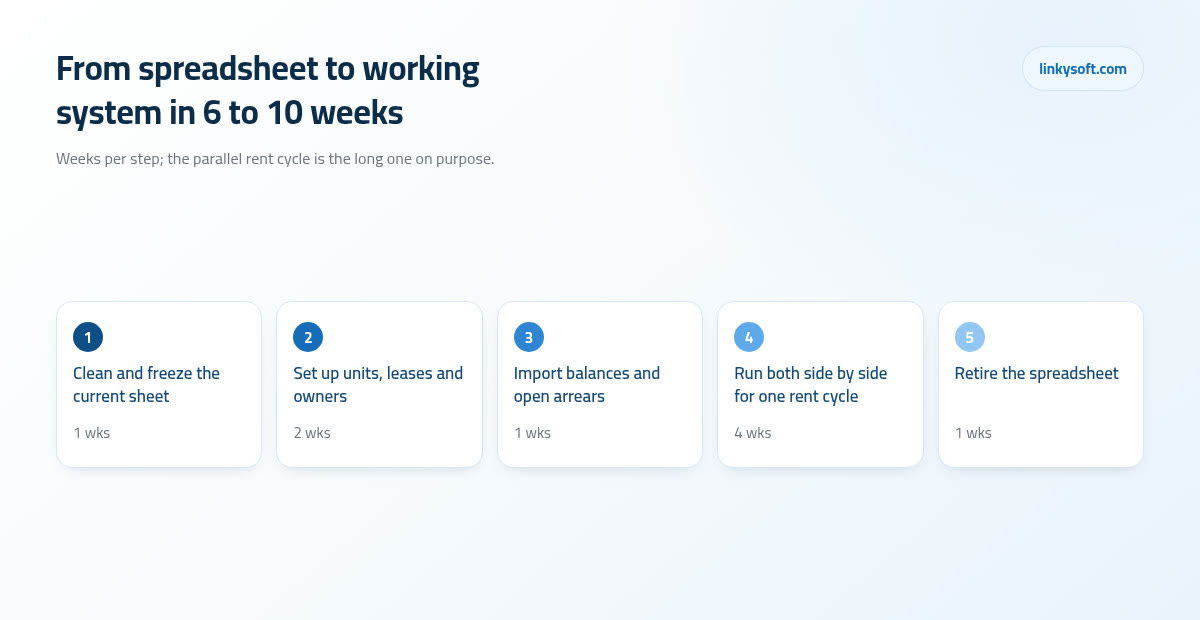
Timelines first, because they are the thing people misjudge. A first working version for a single owner portfolio is typically live in 6 to 10 weeks. Once you add multiple owners, owner statements and online payments, it stretches to 3 to 5 months, mostly because money moving between parties needs to be right rather than fast.
Costs on both sides, laid out so you can compare like with like. On the subscription side: a per unit monthly fee with a floor, so small portfolios pay the floor. On the build side: the one off build cost, hosting of 20 to 60 a month, and the yearly percentage for changes and support that people almost always forget to budget, which is where projects turn sour two years in when a small change has no money behind it.
Now the break even sum, in numbers small enough to check on a phone. Say the system removes 15 of those 30 monthly admin hours, which is a realistic rather than optimistic assumption. At 12 an hour that is 180 a month of time returned. A subscription at 120 a month therefore pays for itself inside the first month, which is why the subscription decision is usually easy. An 8,000 one off build against the same 180 a month takes roughly 3 to 4 years to pay back on saved hours alone. Count one avoided empty month and the rent increases you would otherwise have missed, and it moves closer to 2 years. That is the honest picture, and if a supplier tells you a custom build pays for itself in six months on efficiency alone, ask them to show you the arithmetic.
There is a third option people forget, and sometimes it wins. Keep the spreadsheet and buy back the hours with a part time bookkeeper, four to six hours a week. That typically costs more per month than a subscription and far less than a build, and it is genuinely the right answer when your problem is purely volume of work: one editor, no owner reporting, no missed dates, just too much to do. It is the wrong answer the moment the problem is accountability, because a second pair of hands on a file that keeps no history simply produces mistakes faster.
Moving a year of history across, and getting people to use it
Migration is where these projects succeed or quietly fail, and almost all of it is preparation rather than technology. Clean the sheet before anybody builds anything. Six columns have to be genuinely correct: unit reference, tenant name, lease start, lease end, rent amount, and current balance. Everything else can be tidied later, but those six are the spine.
Expect 5 to 10 percent of your rows to need a human decision rather than a rule. A tenant recorded under two spellings who is obviously the same person, a unit numbered twice after a refurbishment, a deposit with no date attached, a balance that nobody can explain. Budget roughly one afternoon of somebody's time per 100 units for that cleanup, and do it with the person who knows the history, not with whoever is free.
Set a cutoff date and carry opening balances forward rather than importing every historical payment. Three years of transactions do not need to move, they need to be findable, so keep the old file as a read only archive that anyone can open. That single step removes most of the emotional resistance, because nothing feels deleted.
Then run the old and the new side by side for exactly one rent cycle, and then stop. One month proves the numbers agree. Running both for three months is the single most common way these projects fail, because people keep the spreadsheet as a comfort blanket, the two drift apart, and the sheet wins by default since it is the one everybody trusts.
On your own people: budget about 2 to 4 hours of training plus one rent cycle of hand holding, appoint one named owner of the data who decides what is correct when two records disagree, and adopt one rule without exceptions, which is that if it is not in the system it did not happen. A repair agreed in a corridor and never entered is a repair nobody will pay for.
On tenants, be realistic. Portal use reaches about 40 to 60 percent in the first three months and 70 to 85 percent by the end of the first year, and only if every reminder message carries the link. Keep the messaging channel your tenants already use as the front door rather than demanding they change habits, and redirect gently when somebody rings about a leak: thank them, tell them you are logging it now while they are on the phone, then say that next time the form gets it to the plumber faster because it reaches him directly. People move when the new way is quicker for them, not when it is quicker for you. If you want more on how collection and reminder timing works in practice, that is where the fastest wins usually sit.
How to decide this month, in five questions
Answer these five with a yes or a no, today, without researching anything.
- Do you manage more than 50 units?
- Does a second person edit the file?
- Do you report money to somebody else, an owner, a partner or a family member?
- Does administration take more than 20 hours a month?
- Have you missed a renewal, an increase or a certificate date in the last twelve months?
If the answer is no to all five, stay on the spreadsheet, and spend an hour buying yourself another year with three small improvements: keep exactly one file with one named owner, lock the columns that contain formulas so nobody drags over them, and save a dated backup copy on the first of every month so you can always see what the file said in March.
If the answer is yes to two or more, start with the five day one features rather than shopping for a full platform, because the difference between five things used daily and twenty things used never is the whole ball game. The first practical step costs nothing: export your sheet, go down it row by row, and count how many rows would need a human decision before they could move anywhere. That number tells you the real size of the job better than any quote will.
And if you want a second opinion on which side of the line you sit, talk it through with us at no obligation. Linkysoft has spent enough time inside other people's rent rolls to tell you quickly whether you need a subscription, a bookkeeper, or something built, and we will say so plainly even when the answer is the one that earns us nothing.