Delivered Is Not the Same as Finished
The handover meeting is one of the good days. The screens work, the training is done, somebody takes a photograph of the team, and everyone goes home feeling that a long project has finally landed. Then comes the next morning, which is the day that actually matters, because that is when your receptionist types a real patient's name into a real field, your warehouse manager posts a real stock count, and your accountant runs the first report that a real customer will be billed from. Up to that point the system was a demonstration, and from that morning it is a business tool, so it starts behaving like one.
What follows is noisier than most owners expect. In the systems we hand over, the first month after go live usually produces somewhere between 25 and 40 support messages, and that is normal rather than alarming. The number then falls quickly: around 16 in month two, about 9 in month three, and from month four onwards it settles at 4 to 8 a month, provided the staff were trained properly rather than shown the system once in a hurry. So if you were told to expect silence and you get forty messages instead, nothing has failed. Real people are meeting real edge cases for the first time, and most of those messages turn out to be questions rather than faults.
Somewhere in the middle of that first month you will meet the word warranty, so it is worth being precise about what it means. Most build contracts include 30 to 90 days of free fixing, and what that covers is defects, meaning things that were built wrong against what was agreed in writing. It does not cover new requests, even small and reasonable ones, because "can we also record a second phone number" is new work rather than a repair. It does not cover data entry mistakes either, so if a member of staff types a price with the decimal point in the wrong place, putting that right is a service rather than a warranty claim. And it does not cover changes forced on you from outside, such as a payment provider switching off the connection your checkout uses, because nobody built that wrong. The world simply moved.
Which brings us to the question this article exists to answer. Once the warranty ends, somebody has to be responsible for this system every single month, for years, and that responsibility does not quietly disappear because no one named it out loud. Linkysoft hands systems over and then keeps them running, so what follows is the shape of that first year written out with the hours and the money in it, including the parts where the right advice is to buy less than we would happily sell you.
The Four Kinds of Work That Never Stop
Maintenance sounds like a single activity, which is exactly why budgets for it are so often wrong. It is really four different kinds of work sharing one line on an invoice, and once you can see them separately the price stops feeling arbitrary.
The first is fixing what broke, and it looks like a monthly sales report printing the wrong total because a discount was being counted twice. The second is keeping up with the outside world, which looks like your payment provider announcing that the old connection is being switched off in nine months, so the checkout has to be rewired even though nothing about your business has changed. The third is improving what people ask for, which is the receptionist who needs a second phone number field because half your patients give a mobile and a landline. The fourth is preventing problems before they arrive, and this one is invisible by design: the orders table quietly grew to two million rows, searches that used to take half a second began taking six seconds, and somebody noticed and fixed it before a single member of staff complained.
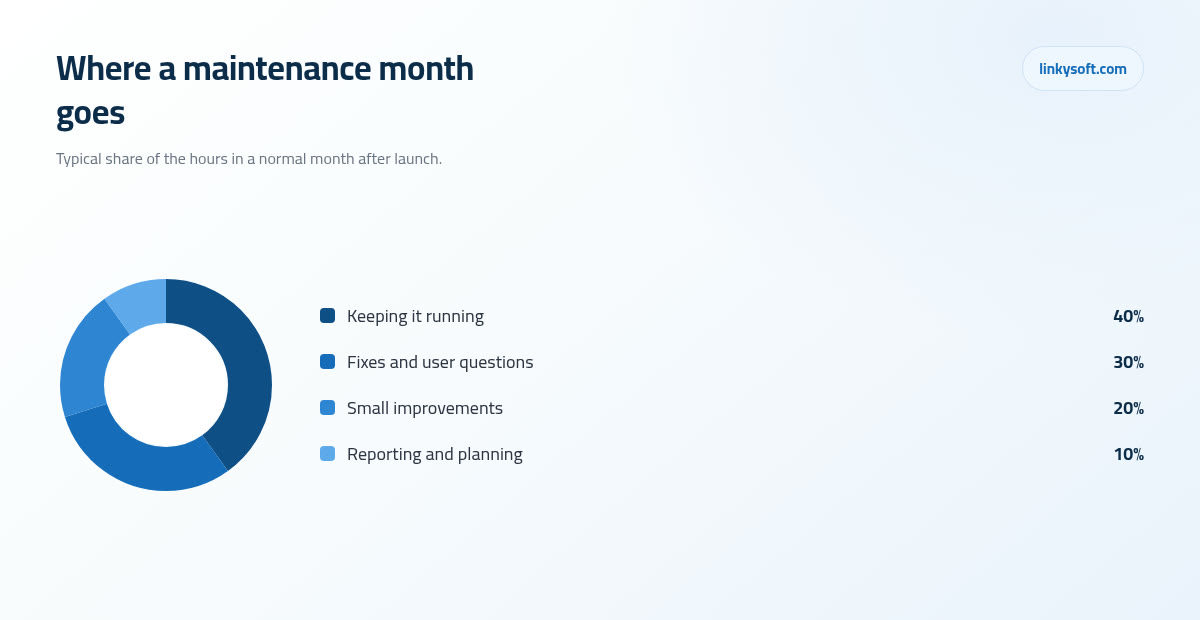
Here is the part that surprises most owners. Across a normal maintenance month, only about 30 percent of the time goes on fixes and user questions, while roughly 40 percent goes on keeping the system running, meaning updates, monitoring, backups and security patches. Another 20 percent goes on small improvements, and the remaining 10 percent on reporting and planning what comes next. The largest slice, in other words, is the work nobody ever sees, because when it is done well nothing happens at all.
This matters more than it sounds to the budget conversation, because an owner who believes maintenance means bugs will reason that a well built system should need almost none, and will therefore read any maintenance quote as padding. Twelve months later that same owner is startled by an invoice covering an emergency upgrade to the software their system is built on top of, an expired certificate and a dead payment connection, none of which were bugs and all of which were entirely predictable.
The World Changes Even If You Never Touch a Line
This is the idea at the centre of the article, and it is the one that is hardest to believe until you have lived through it: software decays while sitting perfectly still, because everything around it keeps moving. Browsers update roughly every four weeks, and phone operating systems ship a major new version once a year. Your code has not changed at all, but the ground underneath it has.
Mobile apps show this most brutally, because there the rule is written down. The app stores raise their minimum build requirements once a year, so an app left untouched for 12 to 18 months usually needs 20 to 60 hours of work before it can be published again, even when not one feature has changed and nothing is broken for the people who already have it installed. Owners hear that and reasonably suspect they are being upsold, but it is simply the price of the shop door staying open, and it is one of the first things we explain to anyone asking us about mobile app development.
The same clock runs underneath your website or internal system. The engine your software sits on, meaning the version of the programming language it is written in together with the framework, which is the ready made set of building blocks your developers started from instead of writing every part by hand, carries an official support life of roughly two to three years. After that it stops receiving security fixes, and hosting companies eventually stop offering it at all, so you should plan on one engine upgrade every two to three years at somewhere between 15 and 60 hours depending on the size of the system. Done on schedule it is a quiet weekend of work, whereas done in a panic after your host sends a two week deadline it costs several times more and always lands in your busiest month.
Then there are the outside services your system leans on. Payment gateways, shipping companies, SMS providers and mapping services all retire old connections eventually, and most of them are decent about it, giving 6 to 12 months of notice by email. The real problem is who reads that email, because it arrives at whichever address was used when the account was opened, often a developer who left two years ago, and it sits unread until the morning the checkout stops taking money. Somebody has to be reading those messages, and that somebody has to be named.
The cheapest item on this whole list is also the most punishing when it is missed. Your security certificate, the thing that makes the padlock appear in the browser, has an expiry date: a free one lasts 90 days and renews itself automatically, while a paid one usually lasts a year and does not. Checking that renewal takes a few minutes, but the moment a certificate expires the entire site goes dark for every visitor at once, and their browsers put a red warning in front of them saying your site is unsafe. We have watched a shop lose a full trading day to a certificate that cost nothing at all to keep alive.
What Maintenance Really Costs, With the Arithmetic Shown
The rule of thumb across the industry is that annual care runs 15 to 25 percent of what the system cost to build, and rather than leave that sitting as a percentage, here is the sum written out. A system that cost 30,000 USD to build typically needs 4,500 to 7,500 USD a year to stay healthy, which works out at roughly 375 to 625 USD a month. That is the entire calculation, and you can run it against your own build price in about ten seconds.
Where you land inside that range is not random, because four things decide it. The first is how many outside services the system talks to, since every payment gateway, courier connection and accounting link is another thing that can change without asking your permission. The second is whether money moves through it, because anything touching payments carries a higher standard of testing and a much shorter tolerance for downtime. The third is whether there is a mobile app attached, which adds the yearly store requirements described above. The fourth is how many people use it every day, because a hundred users find problems that eight users will never stumble into.
Separate from human time there are the plain running costs, which some suppliers quietly fold into a single monthly figure. For a small business system, hosting usually runs 40 to 200 USD a month, the domain name 10 to 40 USD a year, an Apple developer account 99 USD a year and a Google developer account a one off 25 USD. Spread the yearly items across twelve months, add them to the hosting, and the machines alone come to roughly 50 to 215 USD a month before anybody's time is counted, so ask for them as separate lines, because a supplier who will not itemise them is usually adding a margin to them.
One last translation, because percentages are easy to argue about and hours are not. In most markets a 500 USD a month retainer buys somewhere between 4 and 10 hours of skilled time, depending on where the team sits and how senior the people are. So when two maintenance quotes land on your desk, do not compare the prices at all; ask each supplier how many hours their price contains and what happens to hours you do not use. A cheaper retainer with three hours inside it is not actually cheaper.
Who Actually Keeps It Alive: Four Honest Options
There are four realistic ways to own this work, and none of them wins in every situation, so what follows is how we would describe them to a friend rather than to a prospect.
The team that built it, on a retainer
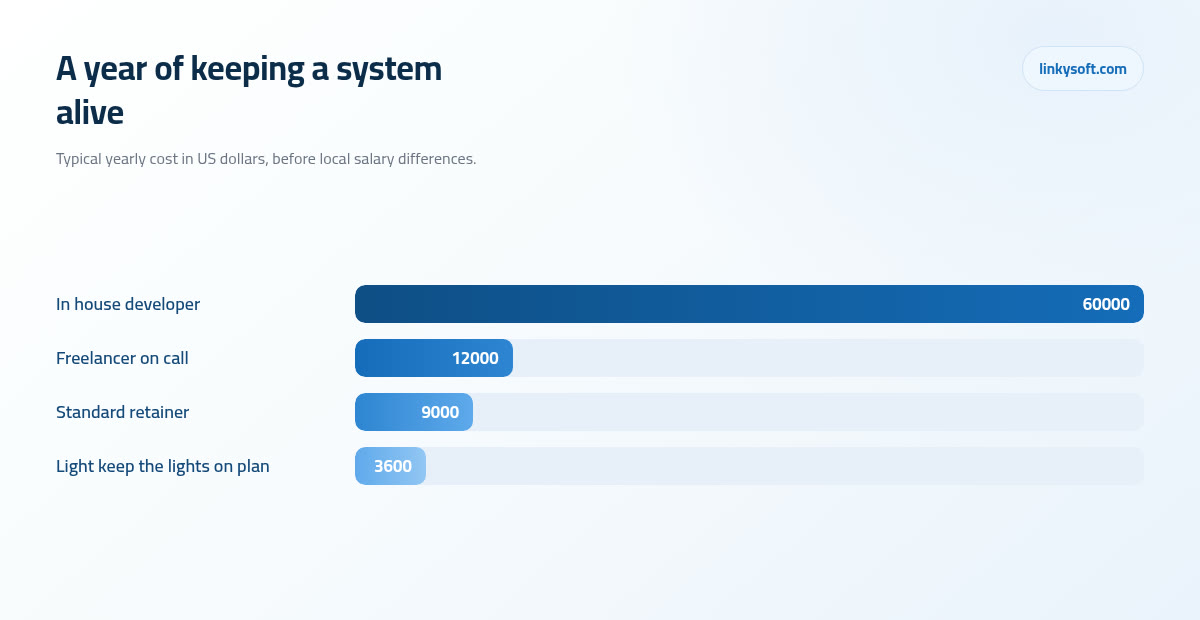
The fastest option is keeping the original team on a monthly retainer, and the reason is knowledge rather than loyalty: they already know why that strange rule exists in the invoicing code, so a fix that would cost a stranger a day of reading costs them an hour. A standard retainer with change hours included sits at around 9,000 USD a year for a mid sized business system. The honest weakness is dependence, because you are tied to one supplier's availability and pricing, which is precisely why the contract must let you leave with everything: the code, the accounts, the written documents, and an agreed number of handover hours already priced in. A supplier who resists that clause is telling you something useful about how they intend to keep your business.
A freelancer on call
The next option is a trusted individual who answers when you call, and buying genuine availability rather than best efforts usually costs around 12,000 USD a year. The hourly rate is often lower than an agency's, so almost everybody assumes this is the cheap corner of the table, and on the four figures in this article it simply is not: 12,000 USD sits above the 9,000 USD retainer and well above the 3,600 USD light plan, second only to putting somebody on the payroll. What the extra money buys is one named person holding time open for you, which is worth having as long as you know that is what you are paying for. The real weakness is concentration, because everything now rests on one individual who gets ill, takes holidays, and eventually moves on to something else. When they go, the knowledge goes with them, so this only works well when the handover package described later in this article genuinely exists.
Hiring somebody in house
A full time developer inside the business is the strongest option and by far the most expensive one. Once salary, taxes, equipment, holiday and management time are all counted, the true annual cost of a mid level developer lands between 35,000 and 90,000 USD depending on the country, with something near 60,000 USD being a fair planning figure in many markets. That only makes sense when the system changes weekly and sits at the centre of how the business earns money, because a single developer maintaining a stable system will spend most of the year underused and will usually leave out of boredom.
Doing nothing until it breaks
The fourth option is to keep no arrangement at all and call somebody when something goes wrong, and we will say plainly that this is a legitimate choice for a small internal tool that five people use to track holiday requests. We will say just as plainly that it is a bad choice for anything that takes payments or holds customer data, because the rescue job always costs more than the year of care would have: an unfamiliar team charges emergency rates, works without documentation, and does it while your business is losing money by the hour.
For most small and mid sized businesses the honest answer is a retainer with the team that built the system, with a written exit clause so the choice stays reversible. That is how we structure the ongoing arrangements behind the web applications we build, and it is also why our contracts spell out the handover rather than burying it.
The Handover Package You Must Own Before the Final Invoice
Whichever of the four options you choose, there is a package of things that must be in your name before you pay the final invoice, because after that you have very little bargaining power left. Print this list and tick it off.
- The domain name and its DNS settings, which are the address book telling the internet where your site actually lives, registered to your company rather than to the agency.
- The hosting or cloud account, owned and paid for by your company, with the developer added as a user you can remove.
- The source code, kept in a repository your company controls, a repository being the online storeroom that holds the code along with a record of every change ever made to it, rather than a zip file emailed on the last day.
- Database and server access details, stored properly in a password manager that two of your people can reach.
- A written note of every licence the system uses, what it costs, and when it renews.
Then there is the one that catches out almost every small business. Every third party account the system depends on, meaning payment, email sending, SMS and maps, must be registered on a company email address and never on a developer's personal one, because those accounts hold your money and your customers' data. We have been called in to help businesses who could not change their own bank details because the payment account was in the name of an agency that had stopped replying, and untangling that takes weeks of paperwork rather than hours of work.
Insist as well on two written documents, both in plain language rather than technical shorthand. The first explains how to put a change live, step by step. The second explains what to do when the site is down at nine in the evening: who to call, where the backups are, and how to tell the difference between a hosting failure and a code failure. Both should be written so that a competent stranger could follow them without ringing the author, because one day that is exactly what will happen.
If you need an argument for why this is not optional, use the arithmetic. Preparing a proper handover package takes 8 to 16 hours at the end of a project, while a new team arriving without one needs 40 to 120 hours simply to read and understand the system before it can safely change a single line. That gap is paid by you, at emergency rates, at the worst possible moment, which is why a good handover is the cheapest insurance in the whole project.
Backups and Security Are Subscriptions, Not Purchases
Every backup policy comes down to two questions that have nothing to do with technology. How much work can you afford to lose, and how long can you afford to be closed? If losing a day of orders would be painful but survivable, a daily automatic backup is enough; if losing an hour would be serious, you need more frequent copies. If being closed for four hours would cost you a fortune, you need a tested way of getting back quickly rather than a folder of files somebody will figure out under pressure. For most small businesses the sensible answer is a daily automatic backup plus at least one copy kept somewhere other than the main server, because a fire, a billing dispute or a compromised account can take the server and its backups together.
The rule that matters most is easy to say and widely ignored: a backup is not a backup until somebody has actually restored one. Test a real restore every quarter, into a separate copy of the system, and time it. Restoring a database under 5 GB usually takes between 10 and 40 minutes, which is a useful number to know before the day you need it. In systems we take over from other teams, roughly one in four backup jobs turns out to be incomplete or quietly failing, and in every one of those cases somebody had been reading a green status light for months. The schedule is not the safeguard; the tested restore is.
Security has a similar rhythm to it. A normal web application is built partly from outside code written by other people, and once the indirect pieces are counted there are usually between 300 and 1,200 of them in a single system. Think of them as suppliers: most are fine, but over a year you should expect 5 to 20 of them to publish a security update, of which 1 to 3 will be serious enough to apply within 24 to 72 hours. Nobody can watch that by hand, which is why the monitoring belongs in the maintenance arrangement rather than in somebody's good intentions.
The human side is where most real breaches actually begin, and it costs almost nothing to fix. Switch on two step login for every administrator without exception, remove staff accounts on the day people leave rather than at the end of the quarter, and review who holds admin rights twice a year. That last review is always uncomfortable and always worth it, because the list is invariably longer than anyone remembers. If you want the fuller picture, our cybersecurity work starts from exactly these habits, and we have written more about practical security for small teams elsewhere on this blog.
Response Times: What to Ask For, and What Not to Pay For
Support contracts are full of the word severity, which means nothing until it is written in your own language with your own examples. Critical means money has stopped: checkout is down, staff cannot log in, the whole site is unreachable. Major means the system works but something important is wrong, such as the daily report showing the wrong column or one branch being unable to raise invoices. Minor means it is annoying but nothing is at risk, like a button sitting slightly out of line or a spelling mistake on a form.
Once those are defined, realistic targets are easy to write into a contract. Ask for a one hour response to anything that stops money, four hours or the same business day for a major problem, and two to three business days for cosmetic work. Note the word response rather than resolution, because an honest supplier commits to picking up the phone and starting inside those windows, while a supplier promising to fix any problem within an hour is either charging you for a large standby team or is about to disappoint you.
Now the part most articles will not tell you, because it reduces the invoice. Round the clock cover typically costs 2.5 to 3 times what business hours cover costs, and the reason is simple arithmetic rather than greed: covering nights and weekends properly needs a rota of at least three people, and those people have to be paid whether or not your system misbehaves. A clinic that closes at six in the evening almost never needs that. Business hours cover with a weekend emergency number is usually the right purchase, and the money saved is better spent on the change hours that actually improve the system.
Two small things make support work in practice, and neither costs anything. Name one person on each side, so there is somebody accountable rather than a shared inbox nobody owns, and agree one channel where requests are logged. Support that arrives through personal chat messages, three different phone numbers and the occasional corridor conversation always ends in the same place, which is nobody being sure whose problem it was and no record of what was promised.
The Small Changes That Decide Whether People Keep Using It
Here is the thing that quietly decides the return on your entire investment. Software that fights the way your staff already work gets abandoned, not with a formal decision but slowly, as people drift back to the spreadsheet they trust, and a system nobody uses costs exactly the same to host as one everybody loves. The small changes made in the first year are usually what settles which of those you own.
The shape of year one is fairly consistent. Expect 30 to 60 change requests, which sounds like a lot until you realise that most are small, and of those only 10 to 15 will measurably change how much the system actually gets used. The skill is telling those apart, and it is why a quarterly change budget of 10 to 20 hours covers most of what matters, provided it is spent on the requests that remove friction rather than the ones that were shouted loudest.
To spend it well you need to measure three things, and none of them requires special tools. Count how many staff log in each week, because a falling number is the earliest warning you will get. Count how many records get created, since that tells you whether the system is being used for real work or only for the parts nobody can avoid. And time one common task, comparing how long it takes now against how long the old way took, because that single comparison is the honest answer to whether the project worked.
One practical habit is worth more than any of this. Book a training refresher at about week six and write a two page guide for new staff, because most support tickets in month two are not faults at all: they are people who were shown something once during a busy week and have since forgotten it. An hour of retraining routinely removes a dozen tickets, and it costs a fraction of what those tickets would. Our case studies include several systems whose real gains arrived in the months after launch rather than on the day of it.
When the Cheaper Option Is the Right One
This is the section that decides whether you should trust the rest of the article, so here is where we tell clients to spend less. For a stable internal tool used by five people, something like a holiday tracker or a small stock list, a light keep the lights on plan of roughly 3,600 USD a year is the correct purchase. That buys the updates, the backups, the certificate renewals and a few hours for the occasional question, and anything larger is money you are spending to feel safe rather than to be safe.
Another cheap move is replacing part of a custom system with an off the shelf product wherever the ready made version is genuinely better. Accounting is the clearest example, and email marketing is a close second, because both are solved problems with mature products that cost a few hundred a year and update themselves. Every function you hand to a product is a function you no longer maintain, so the custom part stays small, focused on the thing that actually makes your business different, and cheap to keep alive.
There are also times to spend more rather than less, and they follow one test: what does a bad day cost? Anything that carries revenue directly, anything holding regulated information such as patient or payment records, and anything your customers touch without a member of staff standing next to them deserves proper cover, because a single bad day in any of those categories can exceed a full year of maintenance. That is not a sales argument; it is the same arithmetic applied honestly in the other direction.
Finally, a warning about the most expensive reflex in this business. When a system starts to feel dated, the instinct is to rebuild it, and in most cases 20 to 40 hours of targeted improvement to the three screens people complain about will buy back years of life for a fraction of the price. A rebuild belongs on the table only when the running cost of the old system genuinely exceeds the cost of a new one, or when the thing it was built for no longer resembles what the business does. Linkysoft has talked more than one client out of a rebuild they had already budgeted for, which is a bad quarter for us and a good decade for them.
Your First Twelve Months, and What to Put in the Contract
If you want a rhythm to follow rather than a philosophy, here is the one we use, and it fits on a single page.
- Weeks one to four: intensive cover, fast answers, and somebody watching the system daily while the noisy first month works itself out.
- Month two: a training refresher for staff and the first proper batch of fixes, grouped together rather than released one at a time.
- Month three: the first real restore test from backup, plus the first small improvements chosen from what people have actually asked for.
- Month six: a review of the outside code the system depends on and a look at speed, before either becomes a problem.
- Month nine: a roadmap conversation about the next year, held while there is still time to budget for it.
- Month twelve: renewal, and a check on which versions of the engine and the operating system you are running before support for them runs out.
Five terms are worth insisting on in any maintenance agreement, and none of them is unreasonable to ask for. A named contact on both sides, so there is always somebody accountable. Written response targets by severity, in the plain language described earlier. A short monthly report saying what was actually done, which takes a supplier twenty minutes and tells you whether you are getting value. Clarity on whether unused hours roll over into the next month, because that single sentence changes the real price. And an exit clause that includes a full handover with the hours already agreed, so that leaving is a process rather than a fight.
The message underneath all of this is simple enough to carry away. The question was never whether your system needs care, because it does, in the same way a vehicle needs servicing whether or not you enjoy paying for it. The only real questions are who is responsible for that care and how much you have decided to spend on it, and both of those are answered far better before the final invoice than after the first outage.
If you would like to talk any of it through, including the awkward parts like whether your current arrangement is worth what you pay for it, we are happy to look at your situation and say plainly what we would do. You can reach us through our contact page, and if you would rather read a little more first, there is more on maintenance and life after launch across the rest of our blog.