Spreadsheets are not the enemy, and here is what they genuinely do well
Before anybody tries to sell you a system, the humble spreadsheet deserves a fair hearing, because it has earned its place on almost every desk in almost every business. It costs next to nothing, it is already installed, everyone on your team has used one since school, and when you decide on a Tuesday morning that you want to start tracking something new, you add a column in ten seconds without raising a ticket or asking anybody's permission. No custom built system on earth can match that for speed or for price, which is exactly why nearly every business starts in a spreadsheet, and why a good number of them should stay right where they are.
Three words carry the rest of this article, so let us pin each one down in a single plain line. A spreadsheet is a file of cells that you type into by hand, and it will accept whatever you type. A database is a store that keeps each fact only once and refuses any value that breaks the rules you set for it. A system is that database wrapped in the screens, buttons and rules your team actually works in, so nobody ever has to look at the database itself.
The test that follows is not whether your workbook looks untidy, because plenty of untidy sheets are doing perfectly honest work. The real question is whether the sheet has started charging you rent, and it collects that rent in three currencies: hours, money and risk. So if you manage a clinic with four people on reception, or you run a shop where two members of staff both believe they know what is in the stockroom, this is written for you rather than for a technical buyer. The figures below are written as plain numbers so you can read them in whatever currency you bank in, since the ratios behave the same way everywhere.
The line between a file and a system, in plain words
Four differences separate a file from a system, and not one of them is technical.
- One copy of each fact. A customer's address lives in exactly one place, so there is never a second version quietly disagreeing with it.
- Rules that refuse bad data. A cell will happily accept a delivery date in 2035, a price of zero or a phone number with nine digits, whereas a system stops all three at the moment somebody types them.
- A permanent record of changes. You can see who changed what and when, instead of a number that has quietly become a different number since Friday.
- Many hands at the same moment. Ten people can work at once without anybody waiting for the file to be free.
Here is the same difference in a form everyone recognises. In a workbook, one customer's phone number can be typed four different ways across four tabs, with a space here, a country code there and a digit missing on the fourth, and absolutely nothing complains. In a system that number exists once, so every screen showing it shows the same value, and correcting it in one place corrects it everywhere. That is the whole of what people mean when they talk about data accuracy, with the jargon taken out.
None of this is about being modern, and you should be a little suspicious of anybody who frames it that way. It is only about which of those four things your business genuinely needs this year. If the honest answer is none of them, close this article, go back to work, and put the money into something that will move your revenue instead.
Sign one: the same fact lives in three files and none of them agree
You notice this one in the meeting rather than in the file. Somebody says the stock count is 412, somebody else says it is 380, and the next twenty minutes go on working out which spreadsheet is right instead of deciding what to order. The same thing happens with revenue at month end, when the sales sheet, the invoice sheet and the accountant's figure form a triangle that nobody can square.
The mechanism behind it is simple and it is nobody's fault. Every export, every emailed attachment and every copy saved as final_v3 forks the truth into a new branch that then drifts on its own, and the checking work grows faster than the number of files. Two copies need one comparison, three copies need three, and four copies need six, so by the time five versions are floating about, somebody is doing ten comparisons to answer a single question.
One marker settles the argument for good. If you now keep a spreadsheet whose only job is to reconcile other spreadsheets, you have already built yourself a database by hand and you are maintaining it in the most laborious way available. The work is real and somebody is being paid for it, but it produces nothing new, because reconciliation only restores confidence in numbers you already paid to collect once.
Sign two: one person has become the system
The quickest diagnostic in this whole article takes ten seconds and costs nothing, and it is simply this: what stops if one named person is away for a week? If the answer is that invoicing waits, or stock ordering waits, or nobody can produce next week's rota, then the knowledge that runs your business is sitting in that person's head and in their formulas rather than in your company.
That is a risk with a date attached, because the formulas, the hidden columns, the colour rules that quietly turn a late row red and the little recorded command that runs five steps at the press of a button all leave the building when they do, usually with two weeks of notice and a handover meeting that covers roughly a fifth of what matters. The replacement then inherits a workbook rather than a job, and it shows in the training time. Teaching a new hire an inherited workbook typically takes three to six weeks of shadowing before anybody trusts them with it unsupervised, while a screen that offers only the correct next step and quietly refuses the wrong ones gets somebody useful in two to five days.
There is a quieter cost sitting next to that one. The person who owns the sheet becomes the answering service for it, so their day fills up with colleagues leaning over the desk to ask what the current number is, and every one of those interruptions costs them the thread of whatever they were actually hired to do.
Sign three: you are paying for hours of copying every week
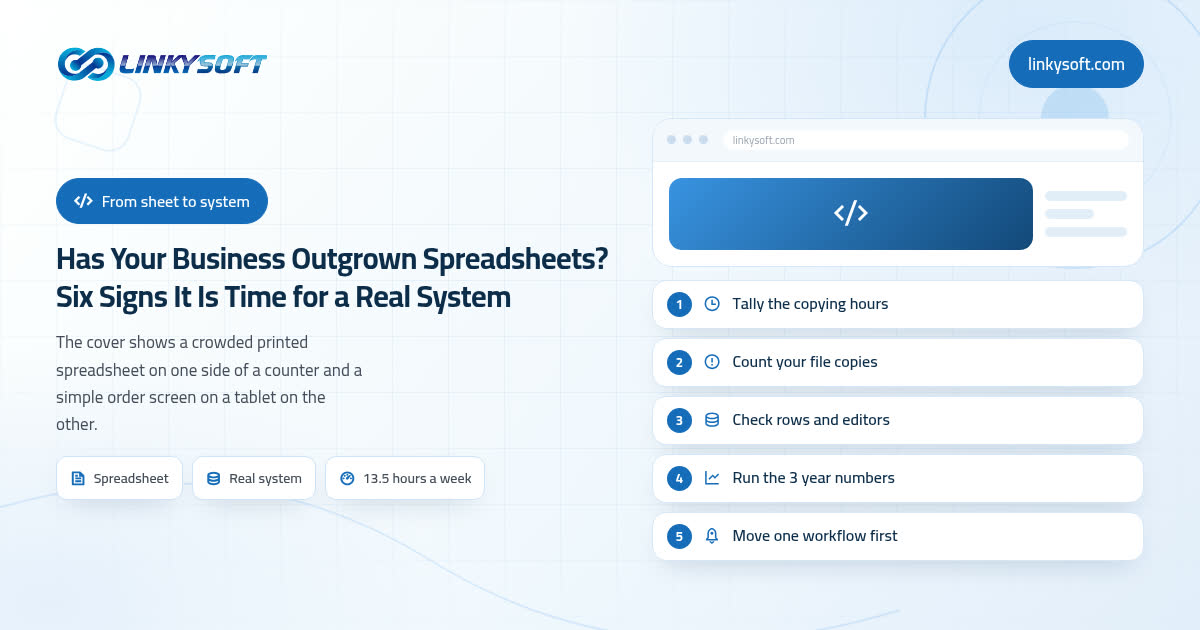
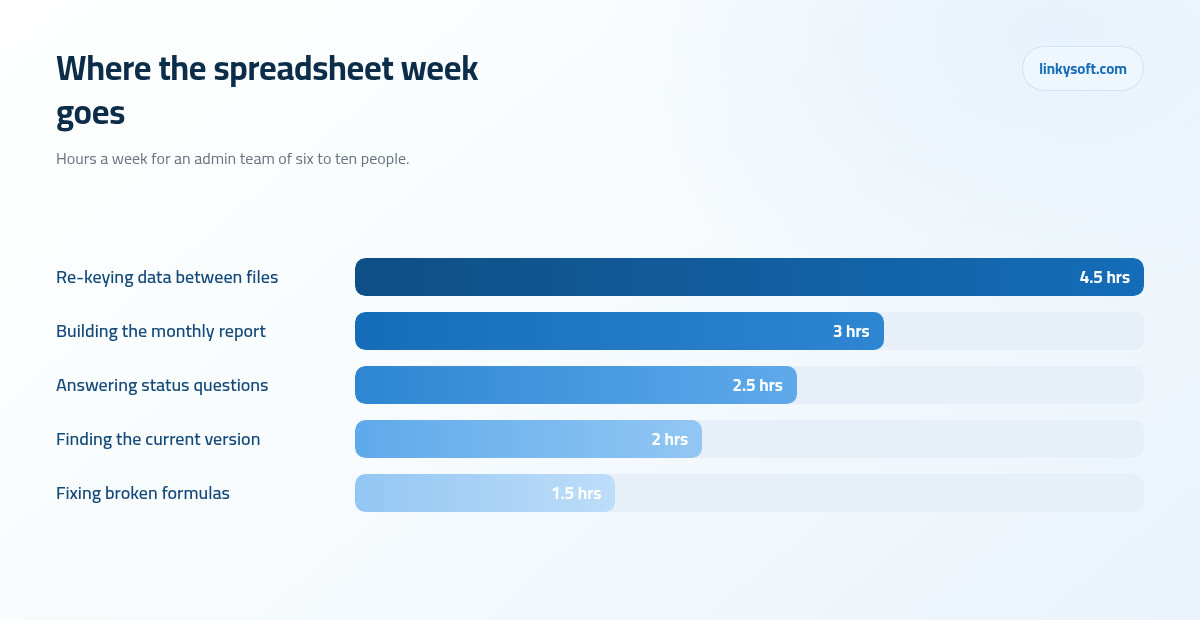
This is where a vague feeling of being busy turns into something you can put a price on. Across an admin team of six to ten people, the spreadsheet handling we typically measure comes to about 13.5 hours a week, and it breaks down in a way most managers recognise straight away: roughly 4.5 hours re-keying the same information from one file into another, 3 hours assembling the monthly report, 2.5 hours answering questions that are really requests for a number, 2 hours hunting for the current version of something, and 1.5 hours repairing formulas that broke when somebody inserted a row.
Bring that down to a single desk and the arithmetic is easy to check yourself. Somebody who spends 45 to 90 minutes a day moving data between files loses 4 to 7 hours a week, which is 190 to 340 hours a year once you allow for holidays. At a loaded cost of 20 to 25 an hour, meaning salary plus the employer costs that sit on top of it, that one desk is costing you somewhere between 3,800 and 8,500 a year in copying alone, and copying is the single activity in your business that no customer would ever agree to pay for.
Before you spend anything at all, measure it. For five working days, ask the two or three people closest to the data to keep a tally on a sheet of paper, writing down only the minutes they spend moving information rather than deciding something with it. Add the five days up on Friday afternoon. The total is almost always higher than everybody guessed, and it is the number that should decide whether the second half of this article is worth your time.
Sign four: a single mistake now costs real money
There is a specific moment when a spreadsheet stops being a notebook and becomes the ledger, and it almost always passes without anybody noticing. It is the moment the file starts deciding things: what a customer gets charged, how much stock gets ordered, which member of staff is owed what. Up to that point a typing slip is an annoyance you tidy up on Monday, and after it, a typing slip is money leaving the building.
The classic failure deserves describing precisely, because everyone who has done it recognises the feeling. Somebody sorts one column to tidy it up without selecting the columns beside it, so the names shuffle into a new order while the amounts stay exactly where they were. Every row now pairs the wrong customer with the wrong figure, nothing turns red, no warning appears, and the file looks neater than it did five seconds earlier. The error surfaces weeks later, usually through a customer who has been billed for somebody else's order.
We are not going to quote a study at you, so here is what we see in the workbooks clients actually hand us. Any sheet that has been edited by three or more people over the course of a year almost always contains at least one cell where a formula was overwritten with a typed number, normally because somebody wanted the total to match and fixed it the fast way. From that day on, that cell never updates again, and it sits quietly in the middle of a column everybody still trusts.
The expensive part is never the correction itself, which takes two minutes once you find it. It is the credit note, the refund, the apology call to a customer who will now check every invoice you send for the next year, and the hour of trust that the whole episode costs you.
Sign five: you cannot say who changed what, or prove it later
It is worth knowing what your cloud drive's version history actually gives you, because most people assume it gives considerably more. Typically it holds about thirty days of file level snapshots, so it can tell you the file changed on Tuesday and roughly who had it open at the time. It cannot tell you which cell changed, who typed the new value, or what the old value was, and thirty days is a very short memory when a question about an old order arrives four months late.
A system records the same event completely differently, and it does so without anybody having to remember to. It writes a permanent line saying that this field changed from this value to that value, by this person, at this minute, and that line cannot be quietly edited afterwards. In a dispute, that single line is the whole of your evidence.
You do not need any of this until, suddenly, you need it badly, and the occasions are always much the same: a customer disputing the price they were quoted in March, a supplier insisting the delivery was 40 units when your sheet says 36, an accountant or an insurer asking about a figure from last year, or a larger client sending over a security questionnaire before they will sign, one of whose questions is who in your business can see and change customer records. That is a far easier question to answer when the answer is not "anybody who has the file". A spreadsheet is usually all or nothing, so the moment you share it, the part timer who only needs to add an order can also read your margins, your salaries and your entire customer list, and if that sentence made you uncomfortable, the practical side of who can see and change your records is worth ten minutes of your afternoon.
Sign six: your team queues for the file, or quietly works in copies
Shared editing has a comfortable ceiling, and it sits lower than most people expect. Around three people editing the same sheet, with a few thousand rows in it, works perfectly well and always has. Once five to eight people need it every day, the polite queueing starts, then somebody takes a private copy so they can get on without treading on a colleague, and within a month you are back at sign one with four versions of the truth.
Then there is the speed wall, which is easier to spot because you can feel it in your hands. A workbook heavy with formulas that grows past 20,000 to 50,000 rows starts taking 20 to 60 seconds to open, and another 20 to 60 seconds to save, every single time. Ten opens a day is up to twenty minutes of somebody watching a progress bar. A proper database answers the same question across hundreds of thousands of rows in well under a second, which is not a small improvement in degree, it is a different experience of the same working day.
The last limit is the one your shop floor already knows about. A wide sheet is unusable on a phone, because the columns run off the edge of the screen and nobody can tap the right cell with a thumb, which is precisely why field engineers, delivery drivers and stockroom staff drift back to paper and hand their notes in on Friday. A screen built for a handset, with four fields and one big button, is what closes that gap, and it is the reason so many of these projects end up including a straightforward mobile application for the people who are not sitting at a desk.
What moving actually costs, and how long it takes
What stops most businesses is not the price, it is the picture of a year of silence followed by something nobody asked for. So here is the shape of a sensible first version, counted in weeks.
- One to two weeks mapping how the work really happens, which is always a little different from how the manual says it happens.
- Five to eight weeks building the first version.
- One to three weeks cleaning and importing your existing data.
- Two to four weeks running the new system and the old spreadsheet side by side.
- One week to switch the sheet off.
Added up, those steps put most first versions at ten to eighteen weeks from the first proper conversation to daily use. What goes inside that first version matters even more than its length, and the right size is one workflow end to end, with four to eight screens and two or three types of user. Not every department, not every report anybody has ever asked for, and certainly not a rebuild of everything at once, because a first version that tries to cover the whole business is the most reliable way to arrive late with something nobody trusts.
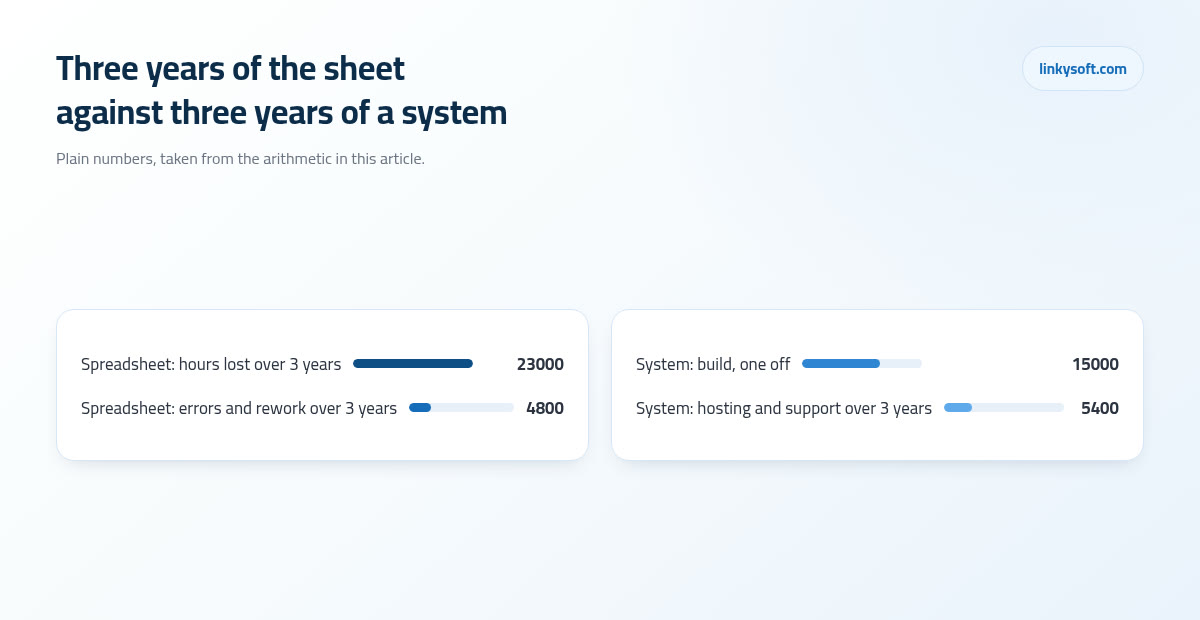
Now the money, for a small team, over three years, with every number in the open. On the saving side, recovering 8 hours a week at 20 an hour across 48 working weeks is 7,680 a year, so about 23,000 over three years, and avoided errors and rework usually add roughly another 4,800. On the cost side, a first version of this size runs about 15,000 to build, with hosting and support at around 5,400 across the same three years, which is 20,400 in total. Recovered time alone gives you back 640 a month, which covers the whole 20,400 at around month 32, and once you count the 4,800 of avoided errors alongside it the same total is covered at around month 26.
There is a third option that deserves exactly the same treatment, which is renting software by the person. Twelve users at 30 a month is 360 a month, 4,320 a year and 12,960 over three years, and that is a perfectly sensible number to pay for something that works. The thing to watch is the direction of travel, because a per seat price climbs with every hire, every seasonal temp and every price review your supplier decides to run, whereas a build you own does not. Run both lines forward to the headcount you expect in year three before you choose, and if you want to see what a build of this size actually involves, our page on custom web applications lays it out.
When we tell clients to stay on spreadsheets
This is the part most articles on the subject leave out. There are clear conditions where the spreadsheet is still the right tool, and saying so is a better use of the meeting than selling somebody a project. Under roughly 500 live records, with fewer than three people editing, covering a single workflow, or with a process you are still changing every month, stay where you are. That last one carries the most weight, because you cannot build a system around a process that has not settled yet, and if you try, you will pay twice: once to build it and once to change it three months later.
Work through the cheap middle first, and mean it. A shared cloud spreadsheet with the formula columns locked so nobody can type over them, plus validation on the three or four fields people always mistype, removes a surprising share of the pain for the price of one careful afternoon. Above that sits ready-made software at roughly 20 to 40 per user per month, which is honestly the better answer more often than a custom build is, because somebody else has already solved your problem and keeps solving it for you every time the rules change.
Two conditions flip the decision the other way. The first is when your process is the thing your customers actually pay you for, since standard software will push you to work like everybody else and that is the opposite of what you are selling. The second is when every ready-made tool you trial needs three workarounds and a side spreadsheet to fit how you work, which simply recreates the original problem with a monthly bill attached to it. At Linkysoft we have talked more than one client out of a build for exactly those reasons, sometimes scaling a project down to a single screen and sometimes suggesting they spend the budget on a better ready-made tool and come back in a year, and there is more of that thinking in our writing on choosing software.
How to move without stopping the business
If the decision does come out in favour of a system, how you move matters as much as what you build. Rule one is that you do not rebuild everything, so pick the single workflow that hurts most, which is usually the one people complain about in every meeting, ship that one properly, and leave the spreadsheet in place for everything else until the new screen has earned the right to replace more of it.
Run the two side by side with rules everyone understands. For two to four weeks the work goes into both, and once a week somebody compares the totals that matter: the invoiced amount, the stock figure, the order count. You switch the spreadsheet off when the mismatches are under one percent and, just as importantly, when every remaining difference has an explanation somebody can say out loud. A parallel run without that weekly comparison is not a safety net, it is just twice the work.
Be realistic about the import as well, because this is where optimistic plans come apart. Between 5 and 15 percent of the rows in a legacy workbook need a human decision rather than a rule: two records that might or might not be the same customer, a missing start date, an order that was half entered and never finished. Nobody can automate a judgement call about your own business, so budget one to three weeks of somebody's attention for it and treat it as a real part of the project rather than a button somebody presses on the Friday.
One last thing to insist on, whoever builds it for you. Ask for a plain export button in the finished system, so any table can be pulled out as a spreadsheet whenever you want it. It keeps your data yours, it keeps your supplier honest, and it makes the next decision, whatever that turns out to be, entirely your own. If it helps to see how this has gone for businesses in a similar position, our case studies walk through a few of them, and if you would rather talk it through with somebody who will tell you plainly when the answer is to keep the sheet, Linkysoft is one message away on our contact page.