Who has to succeed at using it, and why that one answer decides everything
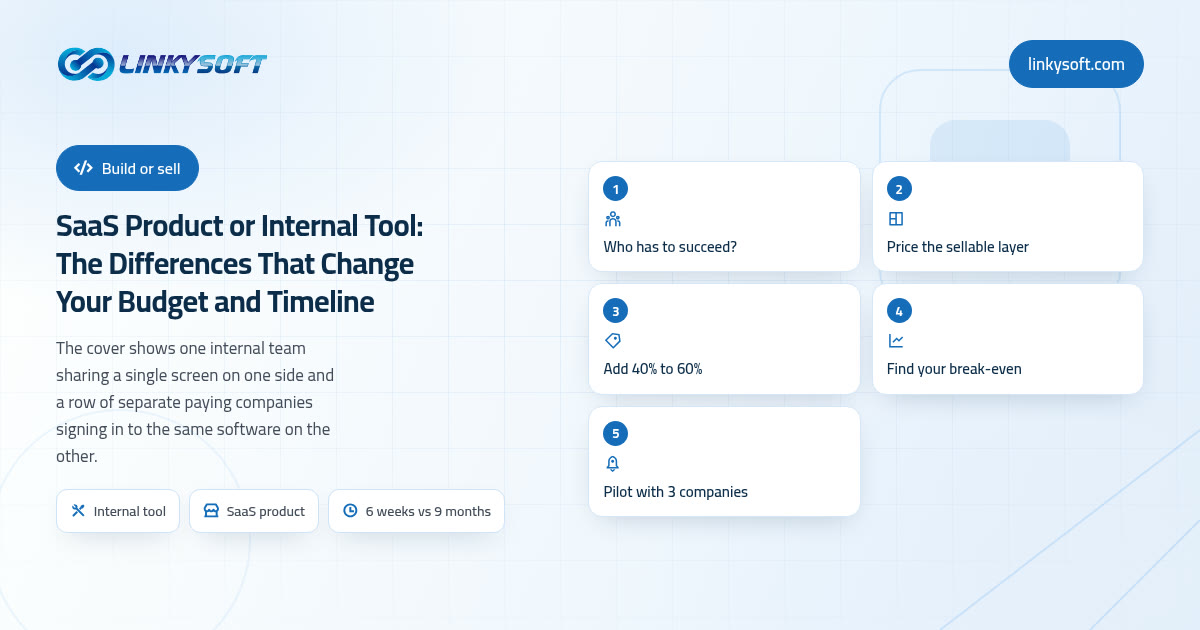
There is a single question sitting underneath every conversation about whether to build a product or a tool, and it has nothing to do with technology. Ask yourself who has to succeed at using the software. If the answer is your own staff, you can put eight people in a room, spend forty five minutes walking them through the screens, and answer questions for a fortnight until it clicks. If the answer is a stranger in another country who will never meet you, never sit in that room and never send you an email before deciding, then the software has to do all of that explaining by itself, on the first screen, in under ten minutes, or the trial quietly expires and you never find out why.
Three terms come up constantly here, so let us pin each one down before we go any further. A SaaS product is software that other companies pay you a subscription to use, month after month, the way you pay for your accounting package or your booking system. An internal tool is software that only your own staff ever opens, which nobody outside the payroll will ever see. And multi-tenant simply means many separate companies safely sharing one system without ever seeing a single row of each other's data, which sounds obvious right up until somebody has to build it.
That one difference in audience reshapes almost every decision that follows. An internal tool is allowed to assume knowledge, so it can call a screen Batch 3 Reconciliation because everyone in the building knows what batch 3 is, and when somebody gets stuck they lean across the desk and ask the colleague who has done it two hundred times. A product has no colleague to lean on, which means every label, every empty screen and every error message is quietly doing the job that a person used to do, and the ones that fail to do it show up later as cancelled trials nobody can explain.
What follows is not a feature comparison but the arithmetic we actually run with clients, so by the last section you can put both paths on a single sheet of paper, price them, and say honestly which one you are funding.
The same screens, two very different builds
Start with the part that genuinely is the same, because it is larger than most people expect. Both paths need the core screens where the real work happens, the database underneath them, the reports your managers will ask for within a month, a search that finds things quickly, and permissions so that a junior member of staff cannot approve a refund. If you wrote the feature list on a whiteboard this afternoon, most of it would be identical on both sides, which is precisely why two very different quotes coming back against that same list feels like somebody is trying it on.
Here is what only the sellable version needs, and every item on this list has to exist and work before a single customer can pay you anything:
- Self-serve sign-up, so a new company can create their own account at midnight without you being awake.
- Plans and trials, with limits that are genuinely enforced the moment somebody exceeds them.
- Card payments, with invoices, tax handling, retries on failed cards and the polite emails that chase them.
- Per-customer settings, because company A wants two approval steps and company B wants none at all.
- An admin console for your own team, so support can look inside a customer account without asking a developer.
- A status page and monitoring, so paying customers hear about an outage from you rather than from each other.
- Help pages and in-app guidance that stay current as the software keeps changing.
- Refunds, cancellations and data export handled properly, because a bad exit becomes a public review.
- Email that survives spam filters, since a password reset sitting in a junk folder is a lost customer.
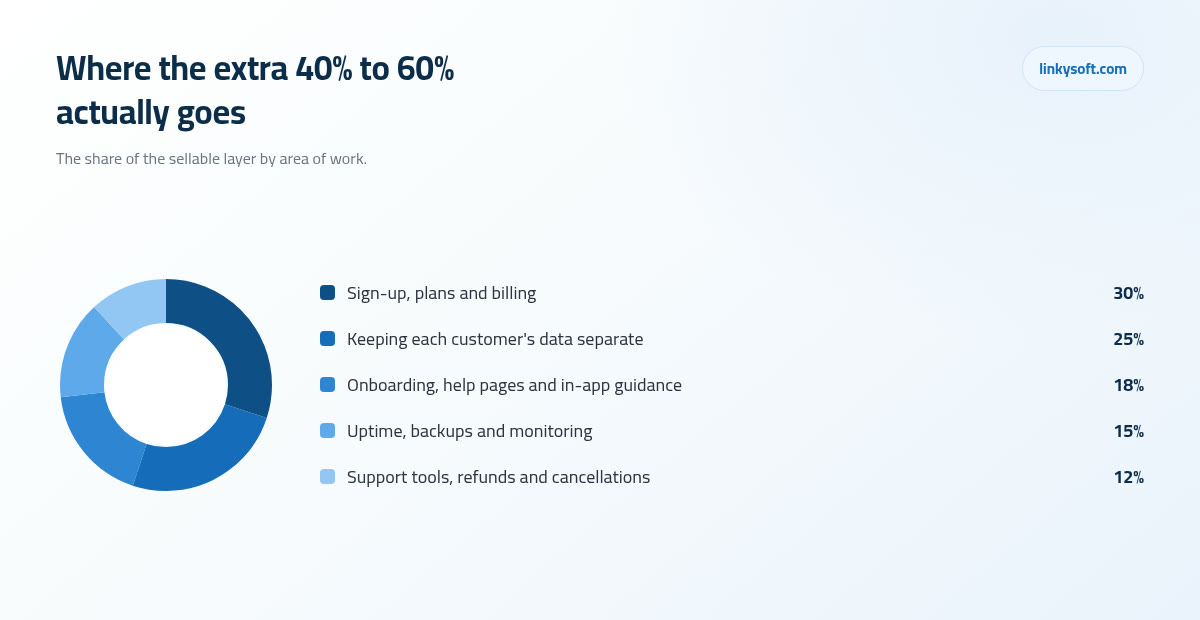
Across the sellable projects we deliver, for every ten hours that go into the core screens another four to six go into that second list, which is work no internal tool ever needs and no feature list ever shows. That is the honest reason one whiteboard can produce two very different prices, and it is also why a system built purely for your own operation, the kind of purpose-built business system that finally replaces the pile of spreadsheets, gets your team working software far sooner and for far less money.
If you want to know where that extra spend actually lands, it divides roughly like this.
Multi-tenancy, explained without the jargon
Picture a building you own with forty locked units inside it. Each tenant holds one key that opens their own unit and nothing else, the walls between units are real walls, and there is exactly one caretaker with a master key who can enter any unit at all, which is why that caretaker has to be trusted absolutely and watched carefully. That is multi-tenancy in a sentence. Your product is the building, each paying company is a tenant, and the whole job is making certain that no key ever opens the wrong door, not once, not when the system is busy, and not when somebody changes a number in a web address to see what happens.
There are two common ways to build those walls, and neither one is more correct than the other. In the first, every customer's records sit in one shared database and every single row carries a marker saying which customer it belongs to, so every question the software asks has to include that marker or it hands back somebody else's data. In the second, each customer gets a separate database of their own, which makes the walls thicker and makes one customer's data easy to export or delete, at the cost of far more moving parts every time you release a change. As a rule of thumb, a separate database per customer suits a small number of large clients who care deeply about isolation, while one shared database suits a large number of small customers where the cost per account has to stay low.
Why should a clinic manager or a shop owner care about any of this? Because it changes what a mistake costs. A bug in an internal tool inconveniences exactly one company, and that company is you, so you phone the developer, apologise to your own staff and carry on with the afternoon. The same bug in a product reaches three hundred companies at the same minute, and your inbox usually learns about it before your monitoring does. It is also the single hardest thing to add after the fact, which is why we come back to it near the end of this article when we talk about keeping the door open.
Two budgets side by side, with the arithmetic shown
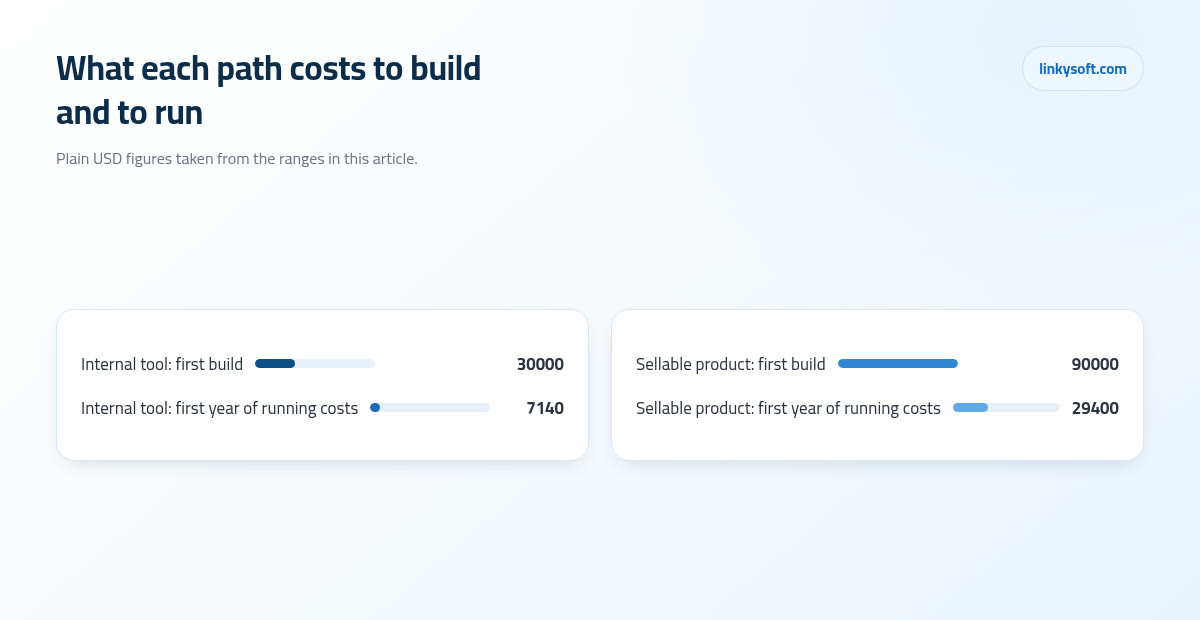
Take a realistic shape: one business process handled end to end, used every day by a team of between ten and forty people. Built as an internal tool, that typically takes six to ten weeks and lands somewhere between 12,000 and 45,000 USD. Inside that figure sits the discovery work to pin down how the process actually runs rather than how the manual claims it runs, the screens themselves, the reports, staff roles and permissions, importing whatever lives in the old spreadsheets, and enough training to get people off the old way for good.
Rebuild that very same feature list as something a stranger can buy and the sellable layer adds 40% to 60% on top of the core, so the identical process comes out between roughly 17,000 and 72,000 USD. Everything on that second list has to exist before the first payment can be taken, and nobody subscribes to half a sign-up flow.
Almost nobody stops there, though, because a stranger buys a whole job rather than one step of it, so the first version we price as a sellable product covers a good deal more ground than the internal tool did and runs five to nine months at 60,000 to 140,000 USD. The arithmetic itself holds wherever you start: take the cost of the core screens and add 40% to 60% for the sellable layer, so a 45,000 core lands between 63,000 and 72,000 once a stranger has to be able to buy it. If a proposal on your desk does not show that uplift somewhere, it has not been costed as a product at all, and those are the ranges Linkysoft quotes against, because we would far rather show you the working than hand you one confident number.
Which brings us to quotes that look suspiciously kind. When somebody offers to build your SaaS for 15,000, they are usually not lying, they are simply pricing the first list and not the second, so billing, onboarding, customer separation and the admin console sit outside the scope you signed. The build finishes, you discover you cannot take a payment, and the second invoice arrives to fix that. Before you compare two numbers, compare what is inside them, and if you want more on how figures like these are put together, our writing on pricing goes through it line by line.
How long until real people use it, and what done actually means
Done means two completely different things on these two paths, and confusing them is how timelines slip without anybody noticing. An internal tool is done when your team stops opening the old spreadsheet, which is wonderfully easy to observe, because either they have moved across or they have not. A product is done when a stranger can find it, understand it, sign up, pay and get real value out of it without anybody on your side touching a thing, which is a far higher bar and takes considerably longer to clear.
The calendar usually runs like this. Six to ten weeks gets you to first internal use, then another three to six months builds the sellable layer on top of it, and then a genuine beta, meaning a live trial opened to five to fifteen friendly customers, before you publish public pricing. Those beta customers are not a formality, they are the only honest test of whether a stranger can succeed without you in the room, and they find the awkward corners you would never have guessed at on your own.
Our practical advice, even when the goal has been a product from the beginning, is to put a narrow version in front of one real team first. Two weeks of genuine daily use rewrites a plan more honestly than any workshop can, because people stop describing what they think they do and simply do it in front of you. It also gives you something working to show early customers while the rest is still being built, which is worth a great deal when you are asking anyone to believe in a thing that does not exist yet.
A word on where time actually goes, because it is rarely where people expect. The main screens tend to land close to the estimate. What overruns is importing the old data with all its half-finished records and its two versions of the same customer, the edge cases in permissions that nobody mentioned until the finance manager saw the screen, and the first attempt at billing, which is always fiddlier than it looks from the outside.
The bills that start the day after launch
Software carries a monthly cost the way a delivery van carries fuel and insurance, and this is the part first-time budgets most often leave out entirely. An internal tool used by thirty people commonly sits at 40 to 150 USD a month for hosting, because it is one system, used in one time zone, with predictable load and modest storage. A product serving around five hundred paying customers commonly sits at 400 to 1,500 USD a month once you count backups, monitoring, transactional email and the spare capacity you keep in reserve so that a busy Monday morning does not turn into an outage.
On top of hosting, budget 15% to 25% of the original build cost every year for maintenance alone. That is not new features, that is keeping what you already have working while browsers change, while the ready-made blocks of code your software is assembled from, the ones developers call frameworks, put out security fixes that somebody has to apply, and while card networks change their rules underneath you. On a 90,000 product that comes to 13,500 to 22,500 a year before anybody adds a single new screen, and a business that has not planned for it tends to discover the number at the least convenient moment.
Payment fees deserve a line of their own, because a percentage hides real money. At roughly 2.9% plus 0.30 per charge, a 29 USD subscription nets about 27.86, so you give up about 1.14 per customer per month. A thousand active subscriptions therefore hands over somewhere in the region of 1,140 USD a month, every month, before you have paid for a single server, and that is far better known while you are setting your prices than afterwards.
Uptime is the last of these bills, and it makes more sense in minutes than in the usual talk of nines. A 99.9% target allows about 43 minutes of downtime a month. For an internal tool those 43 minutes are genuinely harmless if they fall at 2am, since everybody is asleep and nobody notices. For a product with customers in other time zones the same 43 minutes land in the middle of somebody's working afternoon, and they will certainly tell you about it.
Support, onboarding and documentation: the department nobody budgets for
In the first year, support tends to run between 0.3 and 0.8 messages per paying customer per month. Three hundred customers therefore produce somewhere between 90 and 240 messages a month, and once you add up reading, investigating, replying and the occasional small fix, that is 15 to 40 hours of somebody's working month, every month, indefinitely. It does not fade as you grow, it grows with you, which is why products that succeed usually hire for it well before they feel ready.
Onboarding separates the two paths just as sharply. An internal tool can be taught in a single forty five minute session with a colleague on hand for the awkward parts, so the software is allowed to be a little unfriendly at the edges. A product has roughly ten minutes to teach itself before somebody gives up, and in our experience a clear first run does more for conversion than another feature would, because the feature only matters to people who got far enough in to find it.
Then there is documentation, which is a continuing job rather than a week bolted on at the end. A small product typically needs twenty to forty help pages kept current, plus release notes when things change, and the emphasis belongs firmly on kept current, since outdated help generates more tickets than no help at all. A customer who follows instructions that no longer match the screen writes you a much longer and much angrier message than one who simply asks a question.
This is one place where an assistant that answers the repeat questions genuinely earns its keep, because the same few questions come back week after week in different words, and a well-built AI assistant can take those while a person handles everything else. It is worth remembering too that the public website doing the selling is its own project with its own budget rather than a page you add on the final Friday, so plan the marketing site as a separate piece of work. For more on getting that first run right, we have written about onboarding in its own right.
Will it pay for itself? Break-even you can do on paper
Let us work a product example slowly, with every step visible. Say the build cost 90,000 and you sell at 45 USD a month. After card fees, hosting and the share of support that each customer causes, you keep roughly 70%, which is about 31.50 per customer per month. Divide 90,000 by 31.50 and you get roughly 2,860 customer-months, and that single number is the whole answer: 240 customers held for a year, or 120 customers held for two years, before the build has paid for itself. Not 240 sign-ups, note, but 240 customers who stay.
That word held is where churn walks into the room. Monthly cancellation on small-business software commonly sits between 3% and 6%, so at 5% a month you replace your entire customer list in roughly twenty months. That is the figure which surprises people most, because it means selling never stops and the marketing budget is a second budget standing alongside the build rather than a rounding error at the bottom of the page. A great many good products fail here rather than in the code, which is why how you reach customers deserves as much planning as how you build the thing, and why the best software in a category does not automatically win it.
The internal tool deserves exactly the same honesty. Twelve staff each saving three hours a week is thirty six hours a week, and across the forty six working weeks left once holidays and quiet spells are taken out, that comes to about 1,650 hours a year, which at 20 USD an hour is roughly 33,000 USD of time. Set against a 30,000 build that reads like payback inside the first year, and it genuinely can be, but only on one condition: those hours have to be redeployed to work that produces something. If the three hours a week are simply felt as relief and nothing new gets done with them, the saving is real for morale and invisible on the accounts, so decide in advance what those hours are actually for.
Holding other people's data raises the bar
The moment the data in your system belongs to other companies rather than to you, the standard changes, whether or not you were ready for it. You now need backups that have actually been tested, a record of who accessed what and when, the ability to delete a customer's data on request within a stated time, a named person who is responsible when something goes wrong, and contracts that promise specific things you must genuinely be able to keep. None of that is optional once you are taking money.
In practice we turn that into concrete habits rather than reassuring words, and there are four of them.
- Daily backups, with a restore rehearsed for real twice a year, because an untested backup is a hope rather than a plan.
- A target of being back on your feet within about two hours of an outage starting.
- Two step login for every administrator, without exception and without a friendly exception for the founder.
- Separate credentials for the live system and the test system, so that nobody demonstrates a new feature on real customer data by accident on a Wednesday afternoon.
Compare the exposure and the difference speaks for itself. A leak in an internal tool is your own data and your own problem, painful but contained, and handled between you and your staff. A leak in a product is three hundred companies' data, and every one of those companies has a lawyer, a notification deadline and customers of their own to inform, which makes for a very different week. That is why the security work belongs in a product budget from the first day rather than being added when a customer asks about it, and there is more in our writing on security if you want the practical checklist.
When the smaller answer is the right one
Now the arithmetic that stops projects, and quite often it should. Ready-made software for a team of twenty at 12 to 30 USD per user per month costs between 2,880 and 7,200 a year. Set that against a 30,000 custom build and payback sits somewhere between roughly four and ten years, which is longer than most businesses can sensibly plan for and longer than the software will stay unchanged anyway. Below about twenty five daily users, buying usually wins on the numbers alone.
Three questions settle it, and you can answer all three today without speaking to anybody. Is the process stable, meaning it will still look broadly like this in two years? Is it unusual enough that no existing product actually fits, as opposed to fitting a little awkwardly? And will more than about twenty five people use it every day? If you cannot answer yes to at least two of those, buy the ready-made option and put the money somewhere with a faster return.
We give that advice regularly, and Linkysoft has told more than one client to buy the off-the-shelf tool and come back in a year once the process has settled, because the most expensive project any company runs is the one that should never have started. A year of using something imperfect teaches you precisely what you need, and that knowledge makes the eventual build both cheaper and far better aimed.
The mobile question follows the same logic. Build a phone app when your people genuinely work away from a desk, on a site, in a van or on a ward, where a mobile app earns its cost through the camera, offline use and notifications. Otherwise a web page that behaves properly on a phone screen is cheaper to build, cheaper to keep, and updates the instant you publish it, with nobody waiting on an app store review.
Build the tool first and sell it later, without repainting the house
Plenty of good products began life as an internal tool that worked so well that somebody asked to buy it, and you can keep that door open fairly cheaply by deciding four things at the start.
- Put a customer marker on every table from day one, even while there will only ever be one customer in the system, namely you.
- Keep settings in a configuration screen instead of written into the code, so a second company can behave differently without a developer.
- Refuse to bake rules specific to your own company into the core logic, because we always approve on Thursdays is your habit rather than a feature.
- Keep your own branding separate from the system underneath, so that a second logo is a setting rather than a project.
The cost comparison makes the choice obvious. Those four decisions add roughly 10% to 15% to the first build, so on a 30,000 tool that is 3,000 to 4,500 now. Retrofitting them after eighteen months of happy internal use typically costs 30% to 50% of the original build, plus a careful data migration with real downtime while every existing record is given the marker it never had, plus the risk that always comes with touching every table in a working system at once.
The honest caveat is that most internal tools should never become products, and that is not a technical judgement at all. The difficult part is not writing the software, it is finding two hundred other companies with the same problem, the same way of working and a budget to solve it, and your tool being excellent for your own business is very weak evidence that those companies exist. Keep the door open by all means, but walk through it only when customers are pulling you through. If it helps to see how both paths have gone in practice, our case studies cover internal systems and sold products side by side.
A checklist you can run this week
Before you spend anything, answer five questions in writing, because writing them down is what separates a plan from an intention.
- Who pays for this, and are they the same person who uses it?
- Who answers a support message at 9am on a Tuesday, by name?
- What happens at customer one hundred, in hosting, in support and in your own working week?
- What do the first ninety days cost, including hosting, fees and somebody's time?
- What does the current way of doing it cost you today, in hours and in mistakes?
That last answer is the one that justifies everything else, and it is almost always the only one nobody has ever worked out.
Then take the smallest honest first step. On the internal path that is one process, one team, six weeks, shipped and genuinely used before you extend it anywhere else. On the product path it is a paid pilot with three companies before you build the sellable layer at all, because three companies paying you something real, even at a reduced price, tell you more than thirty enthusiastic conversations ever will, and they tell you before the money is spent rather than after.
If you would like both paths priced against the same feature list, so you can see the uplift in your own numbers rather than in a general article, Linkysoft will do exactly that and will say plainly if the answer is to buy something ready-made instead. Our contact page is the place to start, and an hour of arithmetic now is a great deal cheaper than any of the figures above.