The honest answer to how much custom software costs
Ask ten development companies what a custom system costs and you will get ten careful non answers, and the reason is not evasion. Custom software is priced the way a building is priced, by what goes inside it rather than by the square metre. Two offices with exactly the same floor area can differ by a factor of three once you account for the wiring, the lifts, the air conditioning and whether the ground floor has to hold a bank vault. Software behaves the same way, so the honest first answer is that the number depends entirely on what you are asking the system to carry.
Three things move that number more than everything else put together. The first is how many different jobs the system has to do, because a tool that only takes bookings is a fraction of the work of one that takes bookings, schedules the staff, raises the invoice and chases the late payer. The second is how many other systems it has to talk to, since every connection to an accounting package, a payment provider or a government portal is a small project in its own right. The third is how many people will be using it at once, because a system for eight people in one office and a system for four hundred people across six branches are built to different standards even when the screens look identical.
What follows is not a brochure. By the last section you should be able to sit down with a sheet of paper, your own headcount and your own licence prices, and work out your own five year number for both options without waiting for anybody to send you a quote. If your arithmetic says rent, then rent.
One piece of vocabulary first, because the rest of the article leans on it. Ready-made software, which you will also hear called off the shelf or SaaS, means renting a finished product that thousands of other companies rent too, where you pay per user per month and the product goes on belonging to the company that made it. Custom software means paying once for a system built around the way your business already works, after which the system, the code it is made of and the data inside it are yours.
Ready-made and custom: what you are actually paying for
Renting is the easier of the two to describe, because the money simply never stops. You pay every month for as long as you use it, the price tends to creep up a little each year, and after ten years of paying you own nothing at all. In exchange you get something that works on Monday morning, that has been tested by an enormous number of companies before you, and that somebody else is responsible for keeping alive at three in the morning.
A custom build is a purchase rather than a rental, so the shape of the spending is completely different. The money is heavy at the start and much lighter afterwards, and what you end up holding is an asset the company owns, including the source code and every record inside it. That asset can be extended when the business changes, valued when the business is sold, or handed to a different supplier if the relationship with the first one goes cold.
If you remember one line from this article, make it this one: with ready-made software you change your business to fit the software, and with custom software you change the software to fit your business. Neither of those is automatically the better deal, they are simply two different bills with two different risks attached.
It is also worth saying early, because the question usually arrives framed as a fight, that most healthy companies end up with both. They rent their accounting, their email and their payroll, and they build one or two systems that carry the part of the business nobody else does quite the same way. That built part is normally a business web application, meaning a system your staff open in a browser, sign into with their own account and use all day, with nothing to install on anybody's machine.
The price bands we see in practice, and what sits in each
Ranges are more useful than a single figure, so here are the bands we actually quote, in US dollars, for work of a normal commercial standard rather than a weekend prototype.
- A single workflow tool, roughly 8,000 to 25,000 dollars, four to eight weeks. One job done properly, such as a booking sheet, an inspection form the field team fills in on a phone, or an internal approvals screen that replaces a chain of forwarded emails.
- A departmental system, roughly 25,000 to 70,000 dollars, three to five months. Several related jobs for one team, with different permissions for different roles, reporting a manager will actually read, and a couple of connections to systems you already run.
- A company wide management system, roughly 70,000 to 200,000 dollars, six to twelve months. Several departments working in one place, mobile access for the people who are never at a desk, and real integrations rather than a monthly spreadsheet export.
- A platform your own customers log into, from about 150,000 dollars upwards, nine to eighteen months. A separate account for each client, payments, and the level of security and reliability that comes with strangers depending on your software.
One honest caveat about those figures. A mobile application usually adds a band of its own rather than sitting quietly inside the price above, so if your staff or your customers genuinely need something installed on a phone, with notifications, a camera or offline use, treat mobile application work as its own line in the budget rather than a small extra on top of the web system.
Now the part that saves people the most money. Most small and mid sized businesses asking this question belong in band one or band two, not in band three and almost never in band four. The instinct to describe everything the company might ever need is completely understandable, and it is also the quickest way to turn a 30,000 dollar problem into a 120,000 dollar project that takes a year, so a supplier working for your outcome will push you down the bands rather than up them.
Where the money actually goes inside a build
Most people assume they are paying for typing, so it is worth opening the invoice up. Writing the code is only about half of a normal build, and that is exactly why the cheapest quote on the table is usually the one that has quietly deleted the other half.
Here is what each slice means in plain language. Discovery, about a tenth of the budget, is deciding what to build: sitting with the people who do the work today, writing down every step and every awkward exception, and agreeing what goes into the first release and what does not. Design, around fourteen percent, is deciding what the system looks like and how a person moves through it without needing a week of training. The build itself, close to half, is the part everyone pictures, both the screens people see and the machinery behind them. Testing and fixing, roughly twelve percent, is finding the problems before your staff do, on a Tuesday, in front of a customer. Launch, data migration and training, about six percent, is moving years of existing records into the new system without losing or mangling them, then teaching people to use it. Project management, near eight percent, is the person who keeps all of that moving and who answers your emails on Thursday afternoon.
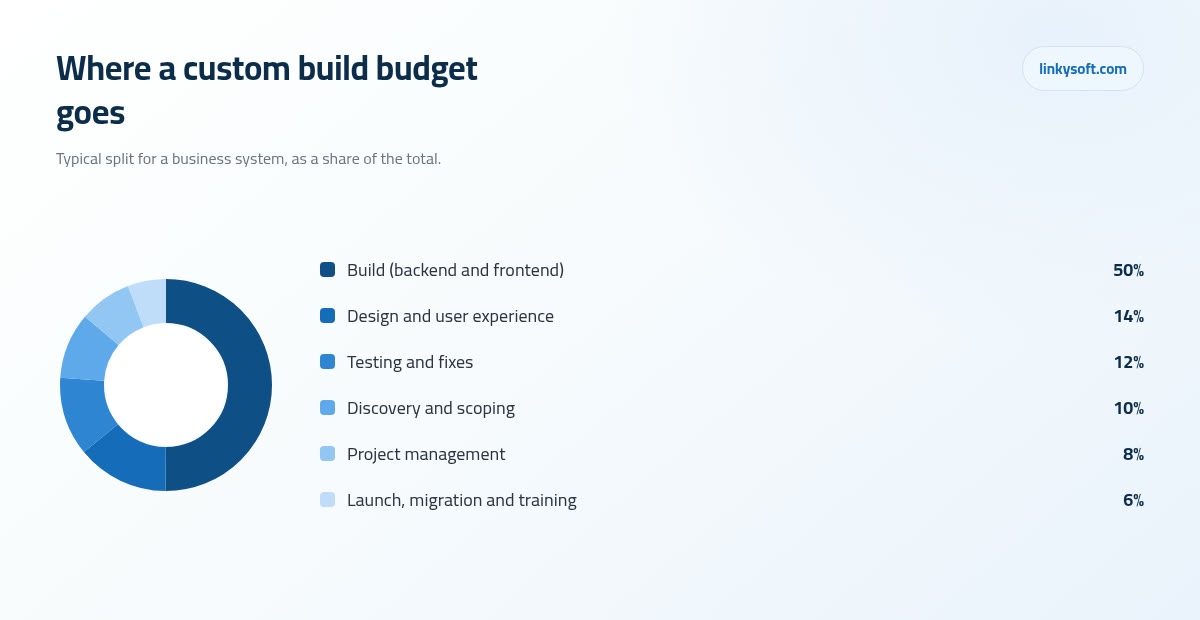
The practical consequence matters more than the exact percentages. A quote with no discovery line and no testing line is not a cheaper project, it is the same project with those two costs moved to after you have signed, where they come back as change requests and emergency fixes at a worse price. So when you are comparing two proposals and one of them is forty percent lower, the useful question is not why is this one so cheap, it is which of these six slices has gone missing.
Design is a genuine cost driver rather than decoration, because the difference between a system your team tolerates and one they keep properly up to date is usually how few clicks the most common task takes. That is the work described under interface and experience design, and trimming it to save eight percent of the build normally costs more in wasted minutes than it ever saved in fees.
The bill that arrives after launch
Every custom system carries a second, quieter cost, and the working rule we give clients is to budget 15 to 20 percent of the original build price every year afterwards. On a 60,000 dollar system that is roughly 9,000 to 12,000 a year, and it covers four things: hosting, security updates, the small changes every business asks for, and having somebody to call when something stops working at nine in the morning.
Splitting it out makes it feel less abstract. Hosting for a typical business system runs somewhere between 50 and 400 dollars a month depending on how many people use it and how much data it holds, so it is real money but it is not the bulk of the line. Almost all of the rest is human time, which is the honest way to describe it, because software does not wear out, it falls out of step with the world around it.
The security part of that is not optional, and it is the one place we push back hardest when a client wants to trim. Every system is built on top of other people's components, and those components get security patches constantly, so a system nobody has updated for a year is not a system that has been left in peace, it is a system with a growing and publicly documented list of ways in. That is why ongoing security maintenance belongs in the running budget rather than in the nice to have column, and if you want to read more about maintenance before committing to a number, that is the right place to begin.
Skipping year two support to save money is the most expensive economy in this whole article. A system left alone for eighteen months usually needs a paid rescue, and that rescue regularly costs more than the support would have, because someone now has to update two years of components in one go and repair whatever quietly broke in between.
To be fair to the other side, ready-made software has an equivalent hidden line. It is not called maintenance, it is called consulting, and it arrives every single time you want the product to behave slightly differently from the way it behaves for everybody else who rents it.
The subscription arithmetic that decides most cases
This is the calculation that settles more of these conversations than any argument about features, so let us do it slowly, with numbers you can swap for your own.
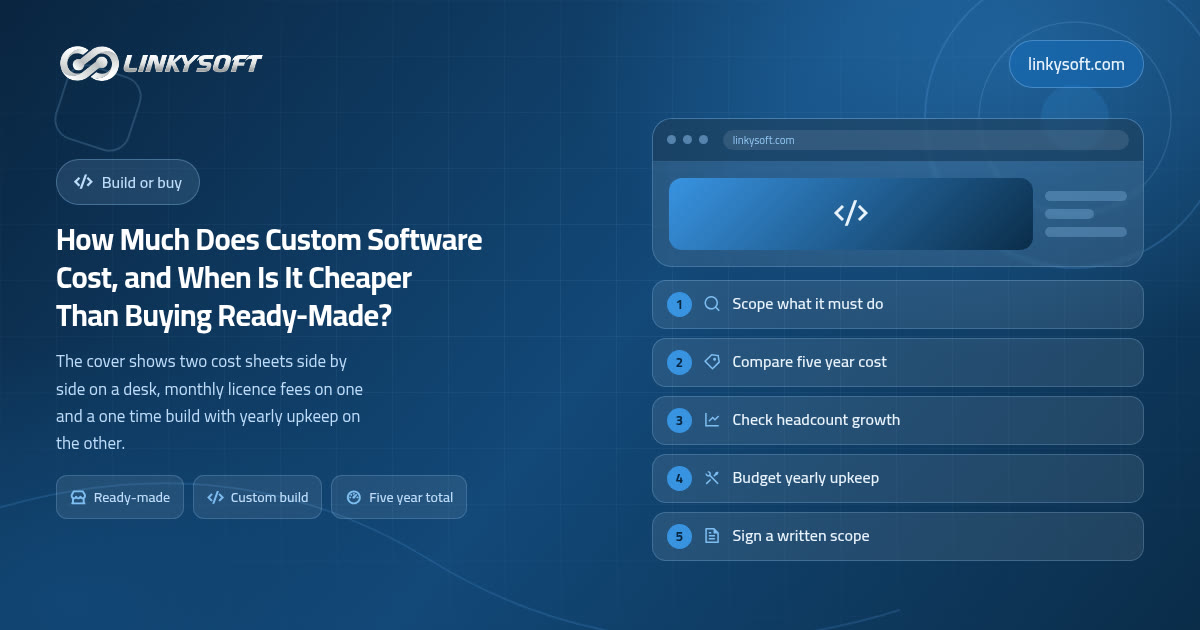
Take a company with 40 staff who all need an account, at a fairly ordinary 45 dollars per user per month. That is 1,800 dollars a month, 21,600 dollars a year and 108,000 dollars across five years. That figure is before the one time setup and data migration the vendor charges at the start, which commonly adds another 5,000 to 15,000, and before the add-on modules that turn out to be extra once you are past the demo.
Now put the custom side next to it. A 60,000 dollar build, which buys a solid band two departmental system, plus upkeep at 18 percent a year, comes to about 10,800 dollars annually. Five years of that is 54,000, so the total is roughly 114,000 dollars.
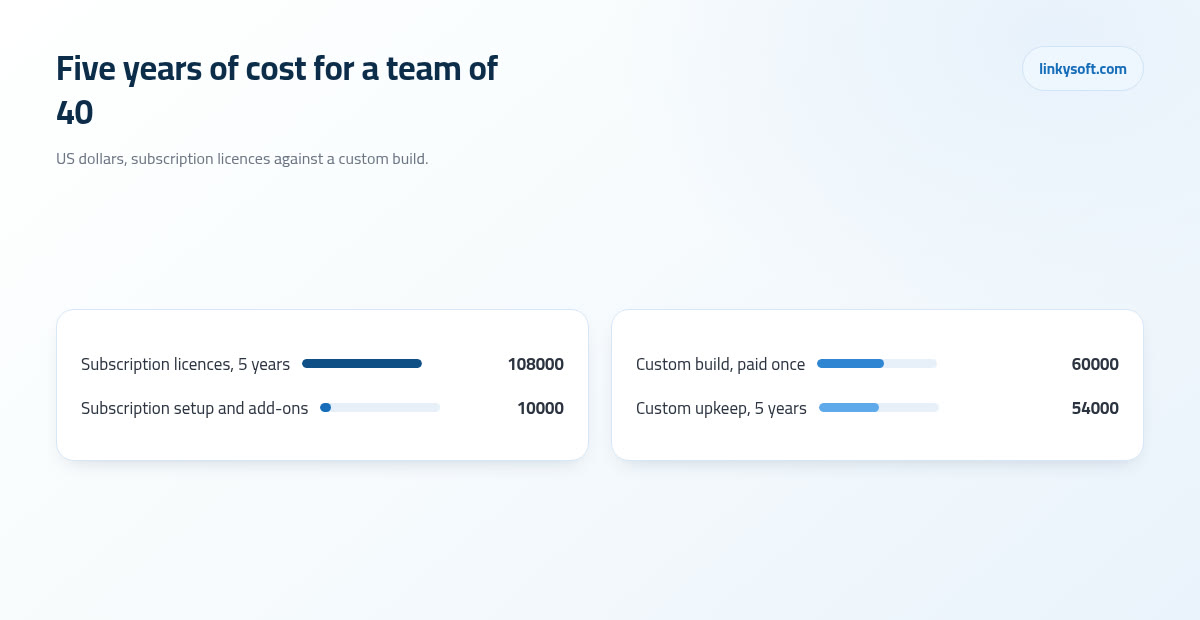
The insight hiding inside those two numbers is the one worth carrying away: subscription cost scales with headcount, while custom cost scales with change. A growing team therefore pushes the answer towards building, because every new hire is another licence for as long as they stay, while a business whose way of working is still shifting every few months pushes it the other way, because each change to a built system is a small piece of paid work and it is cheaper to let somebody else absorb that churn until things settle.
Growth makes the point sharper still. At 80 users the same subscription doubles to about 216,000 dollars over five years, since the price per person does not fall just because there are more of them, whereas the built system typically needs only around ten percent more across that period to carry the extra load, because capacity is mostly a hosting question rather than a licensing one. That single line is why a company of 15 people and a company of 80 people can read exactly the same two proposals and both be right to choose differently.
Run your own version now rather than later, because it takes about ten minutes: your headcount, times your licence price, times sixty months, set against a build estimate plus 18 percent a year. If it helps to see how we lay out pricing on other kinds of project while you do it, the working is always shown the same way.
When buying ready-made is the right call, and we will say so
Some jobs should simply never be built, and there is no hedging in this section. If what you need is accounting, payroll, email, a standard online shop or an ordinary customer contact list, buy it. Thousands of companies have already paid to make those products good, the rules they follow are much the same in every business, and nothing you build in six months will catch up with fifteen years of other people's bug reports.
After that, three tests, any one of which is enough on its own.
The team size test. Below roughly ten to fifteen users the subscription arithmetic almost never justifies a build. Ten people at 45 dollars a month is 5,400 a year, so a 40,000 dollar system would take the better part of a decade to draw level, and a decade is far longer than most business processes survive unchanged.
The process test. If the way you do this particular task is the same as the way everyone else in your industry does it, then building it means paying to reinvent something that is not making you any money. Keep the build budget for the part of the business your competitors cannot copy.
The speed test. If you need this running inside the quarter, a bought system that fits eighty percent of your needs beats a perfect one that lands in nine months, because being roughly right in April is worth more than being exactly right in December.
We say all of that out loud because it comes up so often. Linkysoft has told clients to buy rather than build, more than once, including on projects we had already been invited to quote for, and a supplier who never says it is selling rather than advising. The difference between those two usually shows up in your accounts about two years later.
Five signs your ready-made system is already costing you more
The reverse case is easier to spot than people expect, because a system that no longer fits leaves the same five marks in almost every company.
One, the spreadsheet ring. Staff keep private files beside the official system, because the official system cannot hold something they need every day. Each of those files is a piece of your business living outside your backups, your permissions and your reporting, and it is usually the first sign to appear.
Two, the re-keying tax. This is the one worth putting real numbers to. Six people each losing forty minutes a day copying data from one system into another is four hours a day, which comes to about 1,000 hours a year, and at a loaded cost of 20 dollars an hour that is roughly 20,000 dollars of salary spent on copying. Nobody has ever written that line into a budget, which is exactly why it survives for years.
Three, licences for people who barely log in. Licence counts drift upwards over two or three years and they almost never drift back down, so it is common to find a quarter of the seats belonging to people who have left, or to people who open the system twice a month.
Four, the change quote. You ask for a small adjustment and it comes back at 20 to 60 consultant hours, billed at somewhere between 80 and 200 dollars an hour. Two or three of those in a year and you are paying custom development prices for a product you still do not own.
Five, your data is hard to get out. This is the quiet one that decides your next three years, because a company that cannot export its own records in a usable shape has already made its decision about staying, whether it has noticed or not.
If two or three of those look familiar, the arithmetic in the previous section stops being theoretical. Our case studies show what replacing that kind of setup looked like in practice, including which parts stayed bought and which turned out to be worth building.
How to spend less on a custom build without losing what makes it worth having
There is a good way and a bad way to make a build cheaper. The bad way is to cut discovery, design and testing, which we have already been through. Here is the good way, in the order we normally apply it.
Phase it. A first release covering only the features people touch every day typically lands in eight to twelve weeks at 30 to 40 percent of the full budget, and it starts paying you back while the rest is still being written. It also does something more valuable than that, because it tells you which of the remaining features you actually wanted, and nearly every project discovers that a few of them were never needed at all.
Reuse the ordinary parts. In most business systems only about 20 to 30 percent of the features are genuinely specific to the client, while the other 70 to 80 percent, the logins, the roles and permissions, the notifications, the reports and the exports, are the same shape in every company and should never be invented from scratch. When a quote prices those as bespoke work, that is where the fat is hiding.
Buy the boring pieces and build only the piece that earns money. Rent the accounting package, keep the email you have, and spend the build budget on the scheduling engine, the pricing logic or the inspection workflow your competitors cannot copy. This one decision halves more budgets than any negotiation over day rates ever will.
Settle the requirements before the build starts. A change made during discovery is a conversation and a rewritten paragraph, whereas the same change made halfway through the build commonly costs three to five times as much, because work already finished has to be unpicked first. The written scope really is the cheapest document in the entire project.
Count the integrations honestly. Every connection to an existing system, whether that is a payment gateway, a shipping carrier, an accounting package or a government portal, adds roughly 2,000 to 8,000 dollars and one to three weeks. Four of them is a month of calendar time and up to 20,000 dollars, so decide which ones earn their place in the first release and let the others wait for phase two.
One last note, briefly, because it now comes up in every conversation. Where automation genuinely removes work, for example reading incoming documents or sorting requests before a human ever sees them, automation and AI features can be worth what they cost. Putting them into a first release, though, usually buys delay rather than value, so get the system running and then decide what is worth automating with real data in front of you.
What to ask before you sign anything
Five questions, and the answers belong in the contract rather than in a friendly email, because emails do not survive a change of account manager.
- Who owns the code and the data? The only comfortable answer is that you do, in writing, including the right to hand the whole lot to another company without asking permission.
- What does year two cost? Ask for a number, not a promise of goodwill, because a supplier who will not say what support costs before you sign will certainly decide it afterwards.
- What happens if we leave? Can you export everything in a usable format, and could a different team pick the work up without starting again? Anyone confident in their own work answers this without flinching.
- How is change priced? Fixed price protects your budget and time and materials protects your ability to change your mind, so neither one is a trick, they just suit different projects, and a well run build often uses a fixed price for a clearly defined first phase and an hourly rate for whatever follows.
- Can we see the discovery document before the build begins? This is the question that matters most, because a supplier who cannot write down what they are about to build has not understood it yet, and you will pay for that misunderstanding somewhere around month three.
If you want more on scoping and requirements before you take a proposal to your board, that is where the rest of our writing on the subject sits.
How we price it at Linkysoft, and what to do next
Our sequence is deliberately unexciting. It begins with a short paid discovery that produces a written scope and a real number, then a fixed price first phase built from that scope, then agreed phases after it, each one quoted once the previous one is working in front of real users. Nobody signs for a year of unknown work on day one.
We quote a range early and a fixed figure only after discovery, and the reason is plain honesty about what anyone can actually know. A number given before the work has been understood is a guess wearing the clothes of a commitment, and it ends either in a padded price or in an argument in month four, while a week or two of proper discovery removes both of those outcomes for a fraction of what they cost.
The promise from the top of this article still holds at the bottom of it. Our job is your outcome rather than our invoice, so if the arithmetic says rent, we will show you the arithmetic that says rent and help you choose the product. That has cost Linkysoft work more than once, and it has also brought those same clients back three years later with the build that finally made sense.
If you would like a real number for your own case, send us three things: what you use today, how many people will use the new system, and what it has to do that your current setup cannot. That is enough for a sensible range within a couple of days, and you can start that conversation on our contact page. If you would rather keep reading first, the rest of our blog covers the same ground for websites, online stores and mobile applications.