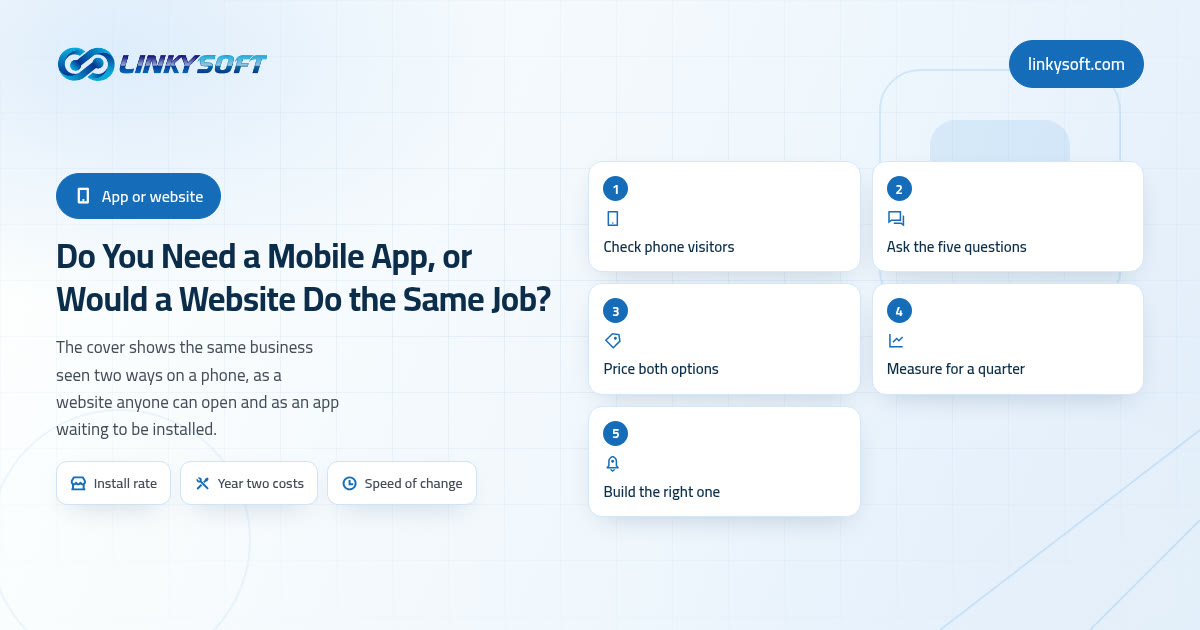
The honest answer, before the detail
Of the businesses that walk in with this exact question, roughly eight in ten need a good phone friendly website first, and an app later or never. That is the short version, and we would rather hand it to you in the first paragraph than hold it back for two thousand words, because getting this wrong is expensive in a way that is genuinely hard to reverse once the money is spent. The rest of this article is simply the arithmetic that gets you to your own answer, which may well be the other one.
It helps to notice what the question underneath is. Almost nobody actually wants an app; what they want is to reach their customers on the phone that never leaves those customers' hands, and somewhere along the way they were told that reaching people on a phone means having something in the App Store. It does not. A website that reshapes itself to fit a small screen is already on that phone, already one tap away, and already reaching people the app never will.
Because these three words get used loosely in most conversations, here is what each one means in this article and nowhere else. A website is a set of pages anybody opens in a browser by tapping a link, with nothing to install and nothing to agree to. An app is a program the person has to find in Apple's App Store or Google Play, download and keep on their phone. Responsive simply means the same website rearranges itself for whatever screen it lands on, so the menu becomes a tap out list and the columns stack up on a phone while the accountant still sees the wide version on a desktop.
Three numbers decide this, and none of them is a feature list. The first is your install rate, meaning how many of the people who see your business on a phone will really put your app on it. The second is what the thing costs to keep alive in year two and year three, long after the launch photos. The third is how often one single customer would open it, because that number alone separates the apps that survive from the ones quietly deleted when a phone runs out of storage. We will walk all three, and if by the end the numbers point at simply building the website properly, we will say so out loud rather than sell you the bigger project.
What a website does better than an app
The website's biggest advantage is the thing it does not ask for, which is permission. There is no install step at all, so one link works on an iPhone, on an Android, on a laptop, on the shared computer at the office and on the tablet somebody's mother uses. You can put that link in a text message, on a receipt, on the side of a van or in an email, and every single person who taps it arrives at your business within a couple of seconds, with no store account, no password and no storage warning in the way.
Then there is search, which is the part people underestimate most. A website can be found by somebody who has never heard of you and typed "dentist near me" or "birthday cake same day" into their phone, and that stream of complete strangers is where most small businesses get their growth. No app store search will ever do that for a bakery or a dental clinic, because nobody in human history has opened the App Store hoping to discover a local bakery. If new customers are what you are short of, the money belongs in the site and in the work that makes people find it, not in a store listing nobody browses.
Changes are the third advantage, and for some businesses it is the only one that matters. A price, a menu item, a holiday closure or a sold out line goes live on a website in minutes, so what your customers see is what is actually true right now. That sounds like a small operational detail until the day you put your prices up and realise the alternative would have taken a week.
There is also the plain economics of building one thing instead of two. The same pages serve the phone, the tablet, the laptop and the desktop, so you buy one design, one set of content and one set of tests, and you pay one bill to keep them current. On top of that, a website is the cheap way to discover whether the idea has customers at all. You can put a real offer in front of real people for a fraction of an app budget, watch what they do, and only then commit to something bigger with evidence in your hand instead of a hunch.
What a mobile app genuinely buys you
None of that means apps are a waste of money, because there are four things an app does that a website cannot, and they are real advantages that nobody can argue away.
- A permanent icon on the home screen, which puts your business one tap from the customer's thumb every day rather than one memory away.
- Push notifications, which reach the customer at a moment when they were not thinking about you at all.
- Working with no signal, so the person can carry on in a basement, a lift, a farm or a moving van, and the work catches up with your system once the phone finds a network again.
- Deep access to the phone's hardware, meaning the camera, GPS, Bluetooth, the fingerprint sensor and barcode scanning, at a level a browser will not give you.
A push notification, in plain words, is a short message that appears on somebody's lock screen without them opening anything at all, the way a message from a bank or a delivery company does. It is powerful precisely because it does not wait to be asked for. In practice we see 40 to 60 per cent of Android users allow notifications and a lower share on iPhone, where the person has to say yes explicitly to a prompt most people have learned to dismiss. Of those who do allow them, a well timed message moves 3 to 10 per cent of people to actually do something, against 1 to 3 per cent for the same message sent by email, which is the single strongest argument for an app that exists.
Those four advantages fit a recognisable set of businesses, and the pattern is easy to spot once you know what you are looking at. Delivery drivers and field engineers need the offline part together with the camera, while warehouse staff are really buying the barcode scanner, and a loyalty scheme lives or dies on the icon and the notification. The same is true of anything a customer genuinely touches every week, whether that is ordering, booking, tracking a job or checking a balance. If your business sits somewhere in that list, the app is not a luxury but the tool for the job, and it should be built properly rather than cheaply.
What we would gently push back on is the fifth reason people give, which is that our customers would love an app. That is a wish rather than a requirement, and a wish will not pay the second year of maintenance. If you cannot point at one of the four advantages above and say which of them your app is for, the honest reading is that you do not need one yet.
The install barrier nobody puts in the budget
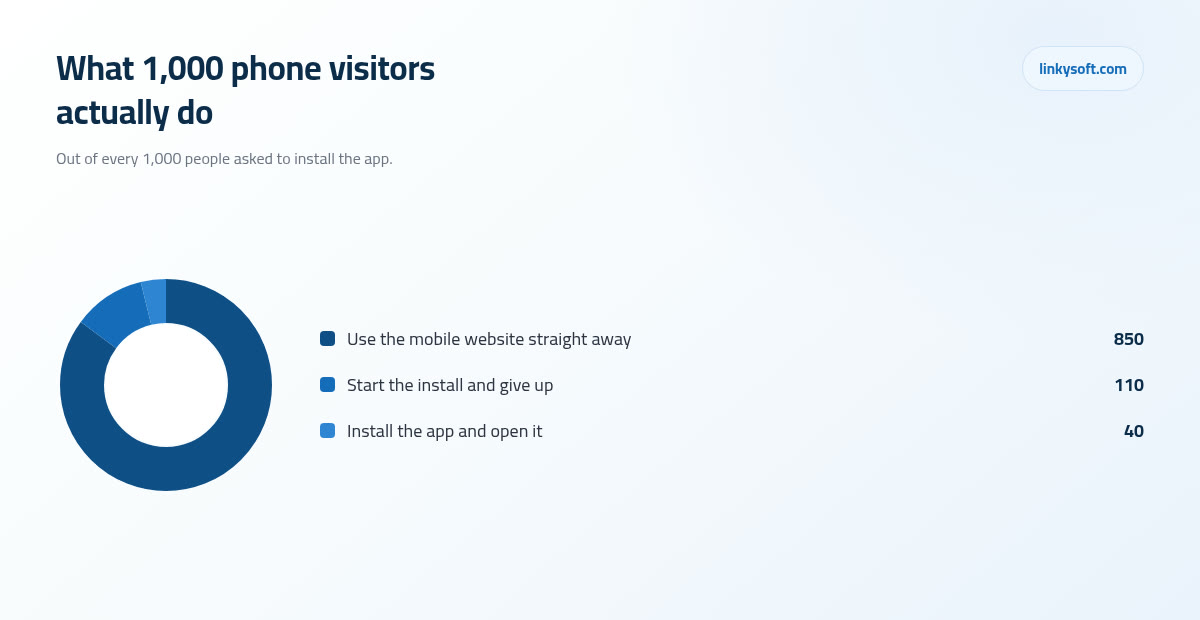
Here is the number that changes most minds, and it is worth walking slowly. Take 1,000 people arriving at your business on a phone, all of them asked to install your app. About 40 of them finish the install and open it. Another 110 or so tap install and give up somewhere along the way, because the store wanted a password, or the download was 80 megabytes on a weak connection, or the phone said there was no space, or they simply lost interest between one screen and the next. The remaining 850 never engage with the idea at all and carry on using your mobile site quite happily.
The second half of this is where the store myth comes apart. Almost every install we can trace back to a source came from somebody who already knew the business: they saw a sign, read a receipt, got an email, followed a link from a search result, or were told by a member of staff at the counter. Store search brought in a rounding error. That is not a criticism of anybody's app, it is just what happens when millions of listings compete for people who arrived looking for a game.
Put those two facts together and you get the conclusion the decision really turns on. An app is a tool for keeping and deepening the relationship with customers you already have, while a website is the tool for finding new ones, which means the order you build them in is not a matter of taste. Build the thing that brings strangers in first, then build the thing that keeps them, because doing it the other way round leaves you with a beautiful app and nobody to install it. If you want to see how far the reminder side of this can be pushed without an app at all, our writing on notifications covers the ground.
What each option costs to build
Prices vary by market and by ambition, but the ranges we quote cluster tightly enough to be useful. Two words in the list need unpacking before you read it. Native means the app is written twice over, once specially for the iPhone and once specially for Android, because the two phones do not understand the same code. The backend is the part on the server that nobody ever sees, where the accounts, the orders and the rules actually live, and it sits behind a website and an app alike.
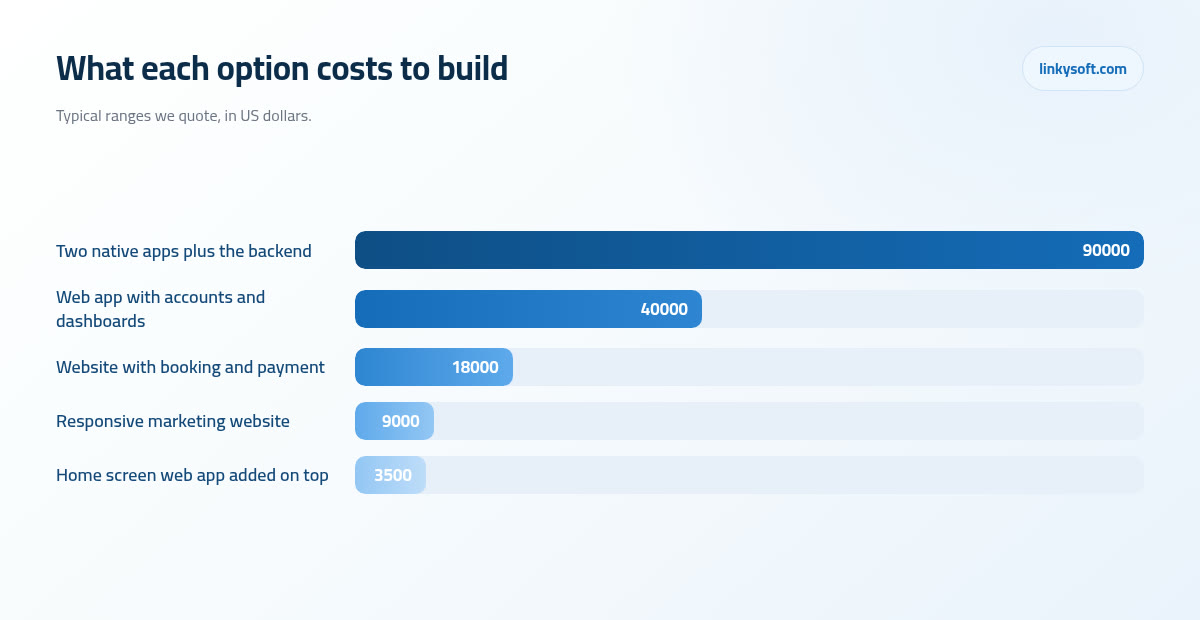
- A responsive marketing website, meaning the pages that explain who you are and get people to contact you: 5,000 to 12,000 USD, in 4 to 8 weeks.
- That same site with real booking and online payment on it: 12,000 to 25,000 USD, in 8 to 12 weeks, because money and calendars have to be right every single time.
- A web app, which is a website people log into in order to work rather than just to read, with customer accounts, staff roles and dashboards, meaning screens that sum up the state of the business at a glance: 25,000 to 60,000 USD, in 12 to 20 weeks.
- Two native mobile apps plus the shared backend that feeds them: 60,000 to 150,000 USD, in 20 to 28 weeks, since every screen is built twice and then tested across dozens of real devices.
Four things push a project up or down inside its band, and they are worth knowing before you read anybody's quote. The number of screens is the obvious one. The number of user roles is the sneaky one, because a customer, a member of staff and a manager each need their own view and their own permissions, so three roles is far more than three times one screen. Payments add a whole layer of care. And the number of other systems it must talk to, such as your accounting package, a delivery partner or an existing database, is usually where the surprises live.
People often assume two platforms means double the money, and it does not: expect around 1.6 to 1.8 times the cost of one. The design is drawn once, the backend is built once, the test plan is written once, and only the screen code itself has to be produced twice. Cross platform frameworks, which are tools that let one set of code run on both phones, typically save 20 to 35 per cent of the build, and we are happy to use them. We are equally honest that the saving shrinks as soon as the app leans hard on the camera, on live maps or on Bluetooth, because that is exactly where the two phones stop behaving alike.
One more thing that quietly protects your budget: that backend costs the same whether the front of it is a website or an app, because it is the same accounts, the same orders and the same rules either way. So if you build the web version first and add an app in two years, you are not throwing the first build away, you are reusing the expensive half of it.
The bills that arrive after launch
The store costs themselves are public and small. Apple charges 99 USD a year for a developer account and Google charges 25 USD once, and that is genuinely all. The commission is the part that is not small: both stores take 15 to 30 per cent of anything digital sold inside the app, against roughly 2 to 3 per cent for a card payment taken on your own website. If you sell subscriptions or credits, that gap is not a detail, it is your margin.
Then comes maintenance, which is where most owners are caught out. Budget 15 to 25 per cent of the build cost every single year, so a 90,000 USD app is a 13,500 to 22,500 USD annual commitment before you have added one new feature. That number is not padding. Apple and Google each ship a major operating system release every year, on their schedule and not yours, and each release breaks something: a login flow, a camera permission, a layout that suddenly has a notch through it. The maintenance is the price of standing still.
What happens if you do not pay it is predictable. An app that nobody touches for 18 to 24 months usually stops working or gets pulled from the store for failing to meet the current rules, and by then the fix costs more than the original screens did. A website left alone for the same two years still loads, still takes enquiries and still looks tired rather than broken, which is a very different kind of neglect.
There is also staff time nobody costs in advance. Two stores means two review queues, two rulebooks and two ways to be rejected, and in our experience about one app in three comes back at least once before it is accepted. Somebody in your business has to own that process, answer the reviewer, and resubmit. And because an app holds accounts, locations and payment details on a device people leave in taxis, your duty of care goes up the moment you launch, so protecting customer data stops being an optional line on the quote.
Speed of change, minutes against days
Change one price on a website and every visitor in the world sees the new one in under ten minutes, because there is only ever one copy of the site and it lives on your server. Nobody has to update anything, nobody is looking at last month's menu, and if you got it wrong you fix it again just as fast.
An app works nothing like that. The same change has to be built, submitted and reviewed, which normally takes 24 to 48 hours for a first submission and 1 to 7 days once the queue is busy, and only then does it start reaching people. In the first week you will typically have 50 to 70 per cent of your users on the new version, with a long tail running for months, because a real proportion of people never update anything on their phone until it stops working.
The consequence is worth stating plainly, since it catches out even careful owners. For a while, you are running two versions of your own business at the same time: one set of customers seeing the old prices and the old opening hours, and another set seeing the new ones. A price change in an app is not really a change, it is a migration, and it needs to be planned like one.
Which gives you a rule you can apply this afternoon. If your prices, your stock or your content move weekly, the web wins on this point alone, and for most shops, restaurants and clinics that single fact settles the whole question before you get to any of the others.
The middle option most people are never shown
There is a third thing sitting between a website and an app, and it goes unmentioned in most sales conversations because it is the cheapest of the three. It is a website the customer can add to their home screen, so it gets its own icon next to everything else, opens without a browser bar around it, remembers who they are between visits, keeps working when the signal drops out, and on modern phones can send notifications too. To the customer it looks and feels like an app, because in every way they care about, it behaves like one.
The numbers are the appeal. Adding this on top of an existing site usually costs 2,000 to 5,000 USD and takes one to three weeks, with no developer account to open, no review queue to wait in, no rejections to argue with, and no store commission on anything you sell. Updates go live in minutes, exactly as they do on the rest of the site, because it is the site.
Where it stops is worth being straight about. Heavy use of Bluetooth, background location tracking that runs while the phone is in a pocket, and some payment and wallet flows are still app territory. It also does not appear in the App Store or Google Play, so if being listed there matters to you for credibility, this will not give you that.
The sequence we recommend to clients is simple, and its whole point is to keep the big spending behind the evidence. Ship this version, watch the numbers for one quarter, and see how many people add the icon, how often they come back and whether they let you send notifications. Then decide about a native app with evidence rather than opinion, and if you do build it you will already know exactly which screens people actually use.
Five questions that decide it
When an owner sits down with us, this is the conversation we have, and you can run it yourself in ten minutes with a pen.
- How often would one customer open it? Weekly, which is about fifty openings a year, is a yes. Monthly, which is twelve, is a maybe, and it only turns into a yes when each of those twelve visits is worth real money to you. A few times a year is a no, and that icon is the first one deleted when the phone runs out of storage.
- Does the core job have to work with no signal at all? Not as an inconvenience but as a genuine blocker, in a basement, a lift, a farm or a moving van where the work still has to be recorded.
- Does the main task truly need the camera, GPS, Bluetooth or the fingerprint sensor? Not as a nice extra somewhere in the settings, but as the thing itself, the way scanning a barcode is the whole job for a stock take.
- Is a message that arrives within the minute worth real money to you? A delivery that has just left the kitchen, a cancellation that freed up tomorrow's ten o'clock, a bid about to close. If a message an hour later would do just as well, email is cheaper.
- Can you fund year two and year three? That is 15 to 25 per cent of the build cost, every year, without resenting it or arguing about it internally.
The scoring is deliberately blunt. Three or more clear yes answers and the app earns its place, so build it and build it properly. Fewer than three and you should build the website, keep the difference, and revisit the question in six months when you have real numbers instead of a feeling. Those six months cost you nothing but time, and the numbers you collect in them stay useful whichever way the decision finally goes.
Three real situations and what we recommended
Ranges are useful, but worked examples are what people remember, so here are three that come up constantly.
The restaurant paying a delivery marketplace
A marketplace taking 25 to 30 per cent means about 5 USD gone from every 20 USD order, which is often the entire profit on that order. An ordering website of their own has to take the order and the money, so it sits in the 12,000 to 25,000 USD band above, and at 5 USD saved per order it pays for itself somewhere between 2,400 and 5,000 orders. At the forty orders a day this restaurant was already doing comfortably, that is two to four months. No app was needed at all, because people order dinner from whatever is in front of them and a link in a text message is in front of them. The money that would have gone into an app went into getting the ordering page in front of local customers instead.
The clinic with a full reception desk
Around 900 appointments a month, with reception spending about four minutes on each booking call, comes to close to 60 hours a month spent on the phone arranging times. Moving even 60 per cent of those bookings online gives back around 36 hours a month, which is a part time salary, and it happens on the website that already existed. So online booking was the win, and the app was parked until the repeat prescription workflow grew big enough to justify it, which is exactly the sort of weekly, personal, notification driven job that eventually does.
The field service company with 40 vans
Here the app was obviously right and we said so in the first meeting. Engineers fill in forms, take photographs of the work and collect a customer signature, often in plant rooms and rural properties with no signal at all, so the work has to be captured offline and sent when the phone finds a network again. That is three of the four app advantages in one job. What we did not do was put the customer facing side in the app: booking, quotes and invoices all stayed on the web where customers could reach them without installing anything. If you want to see how these decisions played out in full, our case studies go through them properly.
How to decide this week, and what to bring us
The order we recommend out loud, to almost everybody, is this. Build the website, measure for three months, then answer the app question with numbers rather than a feeling, because after three months you will know things about your customers that no amount of planning could have told you.
Before any meeting with us or with anybody else, collect four numbers, and none of them takes longer than an afternoon to find. First, the share of your visitors who are on a phone, which your website statistics already know. Second, how many times a month a returning customer comes back, since that is question one answered with evidence. Third, how many bookings, orders or enquiries your staff currently handle by hand, on the phone or on paper. Fourth, what commission you are paying a marketplace or an agency right now, because that is often the whole business case sitting in plain sight.
What happens on a first call with Linkysoft is that we run those five questions with you, and if the answers say do not build the app, we will tell you not to build it, even though the app is the bigger invoice. A smaller project finished properly and kept alive for five years beats a large one abandoned in year two, and we would rather have the client than the contract. That is also why we mention the cheaper middle option before anybody asks for it.
One last thing worth knowing before you spend anything. A good deal of what people imagine they need an app for, such as answering the same twenty questions at eleven at night, helping somebody find the right product, or checking an order status, is now handled perfectly well on a website by a chat assistant or a smarter search, and those assistants can be added for a fraction of an app budget. It is worth ruling that out before you rule an app in.
If you want a straight opinion on your own situation, bring us those four numbers and we will give you one, including the version where we tell you to spend less. Start on our contact page, or read the rest of this series on the Linkysoft blog where we take the other budget questions apart the same way.