

If you want to plan an online store for a small retail shop you already run, the platform is the last decision, not the first. Before it, you need one stock count your till and website share, a short launch list of products, pickup as your first delivery option, written returns and privacy rules, and a named person for daily orders. Pick the platform first and you often end up switching later, when your till and website show different stock levels.
Start with about 10 to 50 products, not everything in your shop, because every item you add is more photos and text to prepare before you can open.
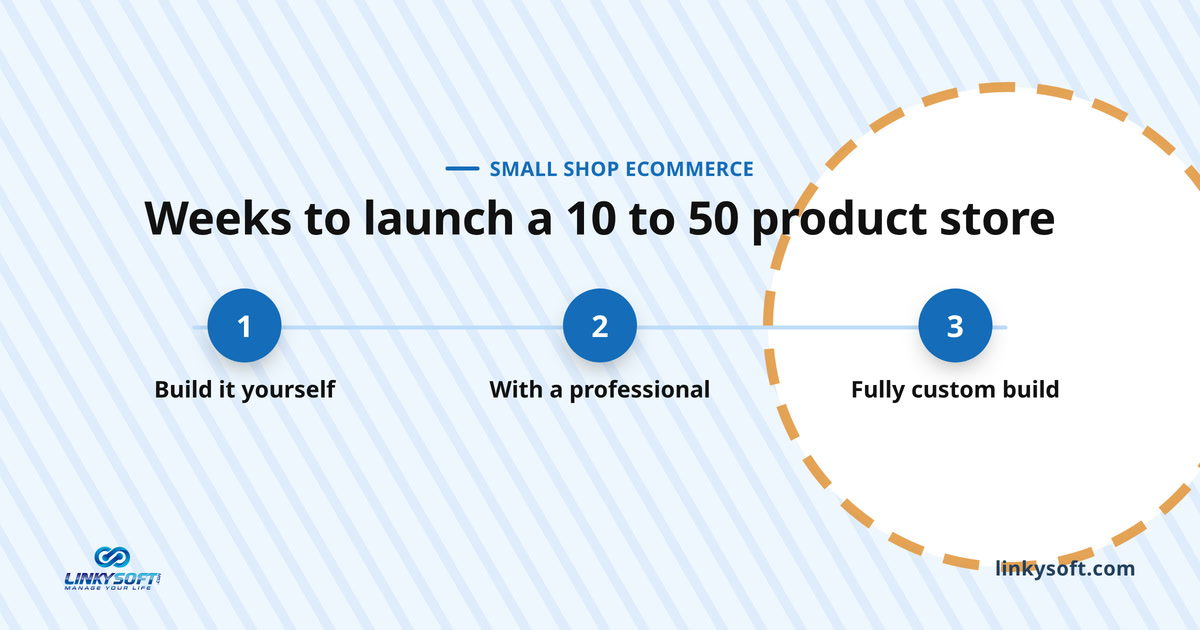
Setting up a store with 10 to 50 products takes about 3 to 6 weeks if you do it yourself, about 8 to 12 weeks with a professional, and 3 to 6 months for a fully custom build. Most of that time goes into decisions, photos and product details, not the building itself.
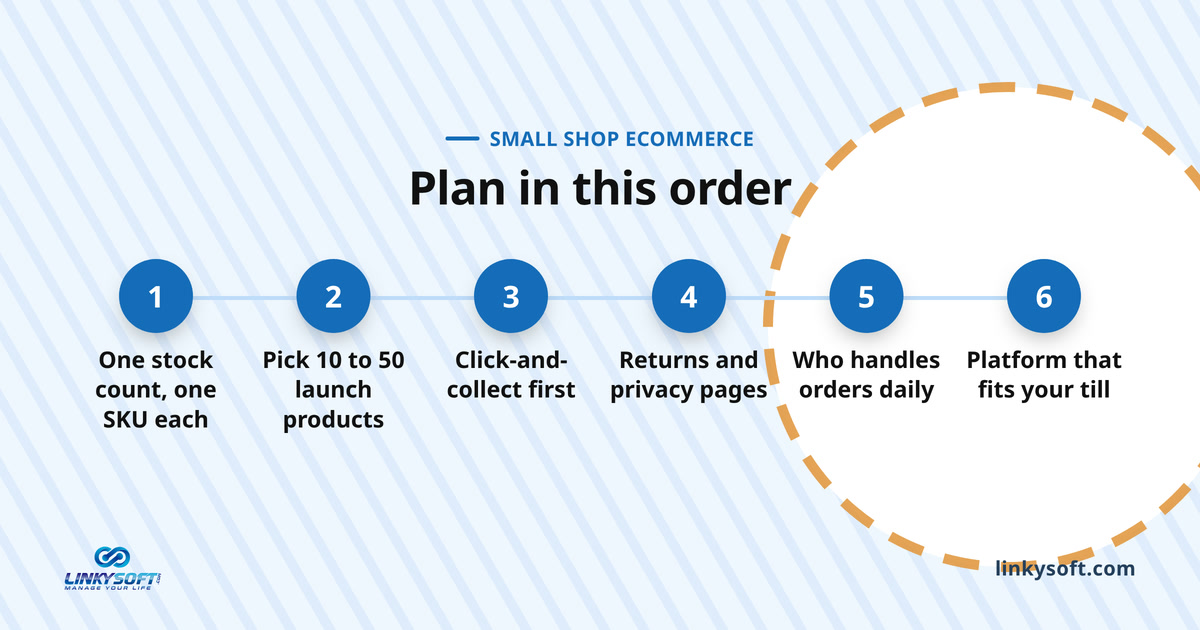
Decide how one stock count will serve the counter and the website
This is your first major choice, and it comes before the platform. Your till, the point-of-sale system you use in the shop, and your website must read the same stock numbers, so a scarf sold in person shows as one less online straight away. A shared count is the one thing you cannot skip when you sell in two places. If you are still choosing a till, see our guides on point of sale systems.
What goes wrong if the two counts are separate
Imagine a gift shop with one special candle left. At 2 pm someone buys it at the counter, and at 2:40 someone else buys it online because the website still shows it. Now you have to cancel the order, refund the buyer and apologise to someone who could have become a regular.
Good software stops these double sales, but it cannot spot broken or stolen items, so you still need to count the shelves now and then. Our articles on stock explain why shelf numbers drift away from the records.
Give every product one SKU before anything else
Systems share stock by matching SKUs. A SKU (stock-keeping unit) is a unique code for one exact version of a product, so a blue mug and a green mug need two, and a shirt in four sizes needs four. The code must be identical on your till and your website, or the systems cannot tell they mean the same item.
Clean up your list now by deleting duplicates, giving each size and colour its own code and removing codes for items you no longer sell, because fixing it after launch means changing pages while customers are buying.
When a spreadsheet is still enough
Updating a spreadsheet by hand can keep both counts accurate, but only for a while, and in practice it becomes unreliable past about 50 products.
Under about 50 products, a shared spreadsheet can work if one named person updates it every day and staff note every counter sale of an item that is also listed online. It costs nothing, but it falls apart the day that person is off.
Past about 50 products, one forgotten update is enough to cause a double sale, so choose a system that links your till and online store automatically. Our separate article explains how to tell when you have outgrown spreadsheets.
Which products should go online first?
Do not put everything online at once. The number of products you start with sets how many photos you take and descriptions you write, and that directly controls how soon you can open. A small, focused list usually beats showing everything: a carefully picked group of 12 to 18 items is reported to outsell a 60-item store at launch, because shoppers find what they want and check out instead of leaving.
How many products is enough to open with?
Most advice says to open with 10 to 50 products, while some suggests as few as 3 to 5. The range is wide because shops differ, and a jewellery maker needs far fewer items than a hardware store to look like a real business.
For a shop that is already trading, 10 to 50 is a sensible target. Stay near the low end if you do the photos and text alone, and aim higher if someone can help.
A simple filter for choosing them
Only choose products that pass four tests:
- Does it sell well in the shop?
- Does the supplier always deliver it on time?
- Will it survive a trip in a delivery van?
- Does it look good in a photo?
Save fragile, bulky, seasonal and one-of-a-kind items for later, and sell from the stock you already have rather than buying extra before you know what sells online. Then do the arithmetic: 30 products with four photos each is 120 photos, and at 5 minutes a photo that is 10 hours of shooting before any editing or writing.
Start with click-and-collect before you ship across the country
Click-and-collect means people buy on your website and pick the item up in your shop. For a small shop it is the safest way to start, because you need no delivery contract, no shipping boxes and no nationwide dispatch on day one. People who use it tend to complete their purchase more often than shoppers who need shipping, and nearly half buy something extra when they come in to collect.
Why pickup suits a small shop
Pickup avoids the hardest parts of online selling, such as lost parcels, broken items and slow returns, and it brings people into your shop, where they may spot something else to buy. Set up three things before you open:
- A pickup shelf, with bags labelled by name and order number.
- A "ready to collect" message that goes out as soon as the bag is packed.
- A quick check of ID or order number at handover, so the right person gets the right items.
When to add local delivery and national shipping
Once pickup runs smoothly, local delivery is the next step. Keep it small, with a short radius around the shop and set days such as Tuesday and Friday afternoons, so one named person with a car or bike can handle it. National shipping comes later, once your daily routine is steady, because it adds sturdy boxes, a courier, tracking numbers, breakages and slow returns.
Each parcel's cost depends on its weight, size, speed, distance and insurance. Whatever you charge, show the price early, on the product page or in the basket, for the reason covered in the checkout section below.
Write the returns, privacy and terms pages before the build starts
Most advice says to write legal pages just before launch, but if you already have a shop, write them during planning, because your returns policy decides what the checkout says, what the shipping page promises and how your team handles refunds. In many countries, online buyers get a legal right to cancel and send items back even if your shop never offers refunds. In France, for example, that right lasts 14 days. Check the consumer laws in your own country instead of copying rules from somewhere else.
The pages almost every store needs
Wherever you trade, you need these pages:
- Returns and refunds: how long people have to return an item, what condition it must be in, who pays for postage and how the money comes back.
- Privacy: what details you collect, why you need them and how long you keep them.
- Terms of sale: availability, delivery promises and how you put problems right.
- Contact and business details: your business name, street address and how to reach you, which proves to shoppers that a real shop exists.
Online order, returned at the counter
Online-only stores never face this, so plan it now. When someone buys online and brings the item back to your counter, decide who checks it, refund the money to their card rather than paying cash from the till, and add the item back to the shared stock count so the website can sell it again.
Most people assume they can return in person, and letting them is good service, but without a written process your stock numbers drift quickly.
Which payment methods does your checkout actually need?
A payment gateway is the service that takes a customer's payment online and moves it to your bank account, and the payment types it accepts matter more than the brand. Start from your counter: look at a normal week, note how many people pay by card, tap a phone or use cash, and make sure the website takes the same cards plus the digital wallets your customers already use. If you sell in the Gulf, local cards and wallets matter as much as global ones.
Two checkout choices that lose sales
Two common checkout setups push people away, and the losses are well measured:
- Forcing people to create an account. About 19% of shoppers who abandon a basket say this is why. Let them check out as a guest, then offer to save their details after they pay.
- Revealing delivery costs at the last step. About 39% leave because of extra costs shown late. Show pickup and shipping prices while they are still looking at their basket.
Both problems are fixed by changing a setting.
What to ask a payment provider
Fees depend on how much you sell, which cards you accept and how fast you need the money, so look past the lowest advertised rate and ask:
- Which local cards and digital wallets do you accept here?
- How fast does the money reach my bank account?
- What is the fee per sale, and are there monthly or setup fees?
- Who pays when a refund or disputed payment goes through?
- Can you also process my counter sales, so all my reports sit in one system?
Who handles online orders when the shop is busy, closed or short-staffed?
Most guides skip this question, but it makes or breaks a small shop's website. With two or three staff, every online order takes time from the shop floor, so decide before you open who checks for orders, when, and how fast you reply. Set a daily cut-off as well, such as orders placed before 2 pm being ready the same day, and set aside a packing corner so nobody wraps parcels on the main counter on a busy Saturday.
A simple daily order routine
Checking orders twice a day is enough for most small shops, with a named person for each check. The owner might look first thing in the morning and pack the pickups, and an assistant checks again at 3 pm, before the delivery run or the after-work rush.
Two scheduled checks beat "whenever someone has a minute", because in a busy shop that minute never comes.
When the one person who packs is away
One person usually ends up doing all the online orders, so plan for their day off. Write down three steps another staff member can follow without calling them: where to find orders, how to pack and label the bags, and how to close an order in the system.
If the whole shop closes for a holiday, switch on the website's holiday message and let it add days to delivery times, because people are happy to read that their order ships on Monday and unhappy to be ignored.
Choose the platform last, and make sure it talks to your till
By now you know how you will handle stock, which items you will launch, how people will collect them, what your rules are and who does the work, which is exactly the brief a software supplier needs. Choose a platform that connects directly to your existing till and stock setup rather than a separate tool. The look matters less, because a design changes in a few hours but a broken link to your stock is hard to repair.
The one question that rules out most options
Ask every supplier whether their tool shares stock with your till automatically, matched by SKU, with no manual file uploads. If they say yes, ask them to prove it by selling an item on a test till while you watch the website number drop.
If the answer is that it updates overnight, needs a spreadsheet, or "we can set that up later", walk away. Our list of questions to ask before buying business software covers the rest.
Four routes compared in plain words
You have four main paths, and they differ mostly in how much technical work you take on yourself. Our separate articles compare ready-made versus built from scratch and what drives their cost, so here is only what each means for a shop that already uses a till.
Whichever route you choose, the test is the same: can it share one stock count with your till by SKU? Keep that question in mind as you read each option.
- All-in-one builder. An online service where you pick a design, list your items and switch on the checkout. It suits a small list and an owner who wants no technical work, and the price depends on the plan, payment fees and extras. Check the till link first, because some builders expect you to buy their own till.
- Open-source plugin. Tools like WooCommerce add a store to a website you already have. You get many options, but you or your developer look after the server, updates and security, and linking your till usually means buying another add-on.
- Ready store management system. One piece of software runs the website and your back-room stock, so you get one product list and one stock count from day one. Linkysoft's Storek works this way. It suits shops that want the website and the stockroom in one system rather than two linked ones, and the price follows your product count, staff users and features.
- Custom build. A store built around the way you work, for very unusual items, several locations or an uncommon till. It takes the most effort and time, and the price reflects how complex your needs are, so choose it only when the other three routes cannot do the job. We build these through our web design and development service.
How long it really takes from first decision to first online order
It takes weeks, and most of that time depends on you, not the developer. The ranges at the top of this page (3 to 6 weeks DIY, 8 to 12 with a professional, 3 to 6 months custom) come from typical small-store projects of 10 to 50 products, and the chart below shows the upper end of each. The fastest simple stores are cited at about 2 weeks from start to finish, but those are almost never real shops that have to connect to a physical till.
Where the weeks actually go
A store project usually runs in four phases:
| Phase | Typical time |
|---|---|
| Research and preparation | 1 week to 3 months |
| Design planning | 1 week to 3 months |
| Building | 1 day to 2 weeks |
| Testing and launch | 1 to 3 days |
Notice where the delays sit. The first two phases depend almost entirely on how fast you make choices, and the builder cannot start real work until those choices exist. If you already know your launch products, policies and delivery options, research and preparation can shrink toward its one-week minimum.
Why a quick build does not mean a quick launch
The building stage itself is short: typical ranges run from a single day to about two weeks, and testing and launch take another 1 to 3 days. That makes it sound as if you could open within a fortnight. In practice the builder finishes the basic page layouts and then waits for your photos, text, returns policy and delivery areas.
Finish that content before the developer starts, with clean SKUs, approved policies and settled pickup and shipping choices, and the build can begin at once. If you are also installing a new till, read about its setup time and keep both projects away from your busiest season.
Product photos and descriptions you can produce with a phone
You do not need a photographer for your first products. A modern phone camera is enough, as long as the light and background stay the same for every shot, because shifting backgrounds and shadows are what make photos look amateur. Write the descriptions from the questions people already ask at your counter, such as how big an item is, what it is made of and whether it is dishwasher safe, and use your own words rather than the supplier's paragraph, which fifty other websites already copy.
A one-corner photo setup
Pick a quiet corner near a large window and keep it for photos, with side light softened by a thin white curtain, white card curving up behind the product and a phone stand or a stack of books holding the camera at the same height.
Take at least four photos of every item, because the shopper cannot pick it up: a clear front view, the side or back, a close-up of details such as stitching or a zip, and a size shot next to an everyday object. Name each file after the item, like blue-ceramic-mug-front.jpg, and add alt text, a short description that helps visually impaired visitors and search engines understand the photo.
Run these tests before the first customer does
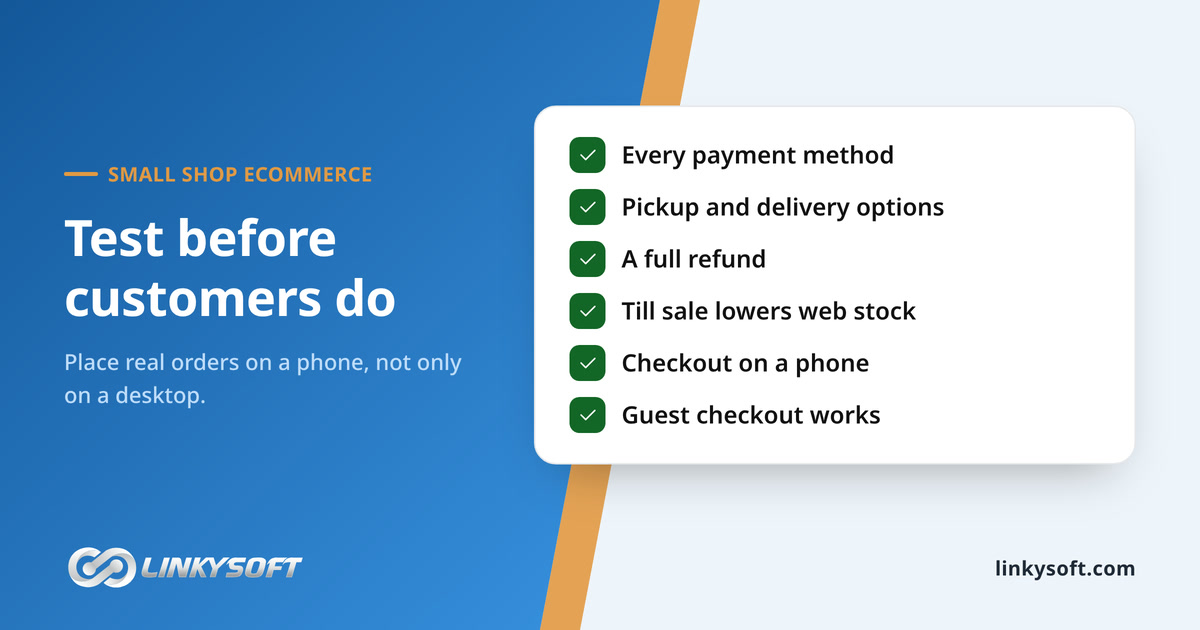
Online shoppers give up easily: on average, about seven in ten baskets are abandoned before payment. Some of those people are only browsing, but every awkward step on your site adds to the number. Phones make it worse, because most shopping traffic now comes from mobile devices and people give up faster on a small screen. So put the computer away, buy something on an ordinary phone using only your thumb, and then watch two regular customers do the same on their own phones, noting every moment they get stuck.
Test the checkout end to end
Place real test orders with real cards, at least one as a guest without an account, using every payment method and every delivery option you offer. Check that each receipt email arrives with the right details.
Then fully refund one order, confirm in your bank that the money moved back, and confirm in the system that the stock count went up again. Do not skip this step, because any broken part you miss, your first buyers will find.
Test the link between shop and website
Finally, test the most important part of this plan. Ring up an item on your till and check that the website count drops, buy one on the website and check that the till count drops, then process a return and check that both go back up.
Use an item that comes in several sizes and colours, because that is where mistakes hide. If the numbers do not match, fix it now, while you are the only customer.
Questions people ask
Shop owners usually ask these questions when they start planning. Each short answer points back to a decision covered earlier, so you can jump to the details you need.
If your question is not here, add it to your one-page plan and bring it to your first supplier meeting, where a good supplier should answer it in plain words.
Do I need a mobile app, or is a mobile-friendly website enough?
A mobile-friendly website is fine to start with, because most people will not download an app to buy something once in a while. An app only makes sense once you have a group of loyal customers who order almost every week. Until then, put the effort into making the website fast and simple on a phone screen, which is where most of your visitors arrive.
Should I build the store myself or hire someone?
Doing it yourself works if you have a short product list, simple shipping and a few free evenings a week. Hire someone if the website must talk to your current till, needs special features or has to run in several languages. Either way, get your photos, text and policies ready first, because that is what takes the most time.
Do I need a registered business before selling online?
If your shop is already a registered business, that registration normally covers your online sales too. Selling online does add rules about returns, product details and privacy, so check the laws in the country where you trade. Put your business details clearly on your contact page, so shoppers can see they are dealing with a real, trustworthy company.
What happens if an item sells in the shop and online at the same moment?
If your till and website share stock, the first sale drops the count to zero and the second buyer sees the item as out of stock. If the counts are separate, both sales go through, and you have to cancel one order and apologise to a disappointed buyer. That is why a shared stock count comes first on your list, before any platform decision.
Write your one-page online plan this week
You can start today without hiring anyone. Take a single sheet of paper and write your plan in the same order as this article, then finish your photos and text before you talk to a software supplier. Having your content ready ahead of time means the builder can move straight into the building stage, which typically takes between a day and two weeks, instead of waiting on you for weeks.
The six lines on your page
Your page needs one line for each decision in this article:
- Stock: Does every item have a unique SKU, and how will your till and website share stock numbers?
- Products: Which 10 to 50 items will you launch with, and are their photos and text ready?
- Fulfilment: Will you offer click-and-collect only, or add local delivery on set days?
- Policies: What is your return window, can online buyers return items in the shop, and how do you protect privacy?
- Staffing: Who checks orders and when, and who covers if that person is off sick?
- Platform: Which questions will you ask suppliers, starting with how they connect to your till?
Any blank line is your next piece of work, and it is far easier to settle now than after you open.
What to bring to your first supplier meeting
Bring the plan and four other things: your product list with SKUs, the exact make and model of your till, your written policies and your target launch week. Then ask the supplier to show you, live, how their system links to your till.
If you want a second opinion, contact Linkysoft for a quote that fits your shop and your market. We can set up Storek as an all-in-one system or build a store around the till you already own, and Linkysoft also runs digital marketing for small shops once the store is live.
Keywords: online store for a small retail shopplan an online storesmall shop ecommerce planclick and collect for small shopssync shop and online stockecommerce platform for small retailersweb design and developmentecommerce store management system