

The Real Operational Gap Between Paper Logs and Digital Systems
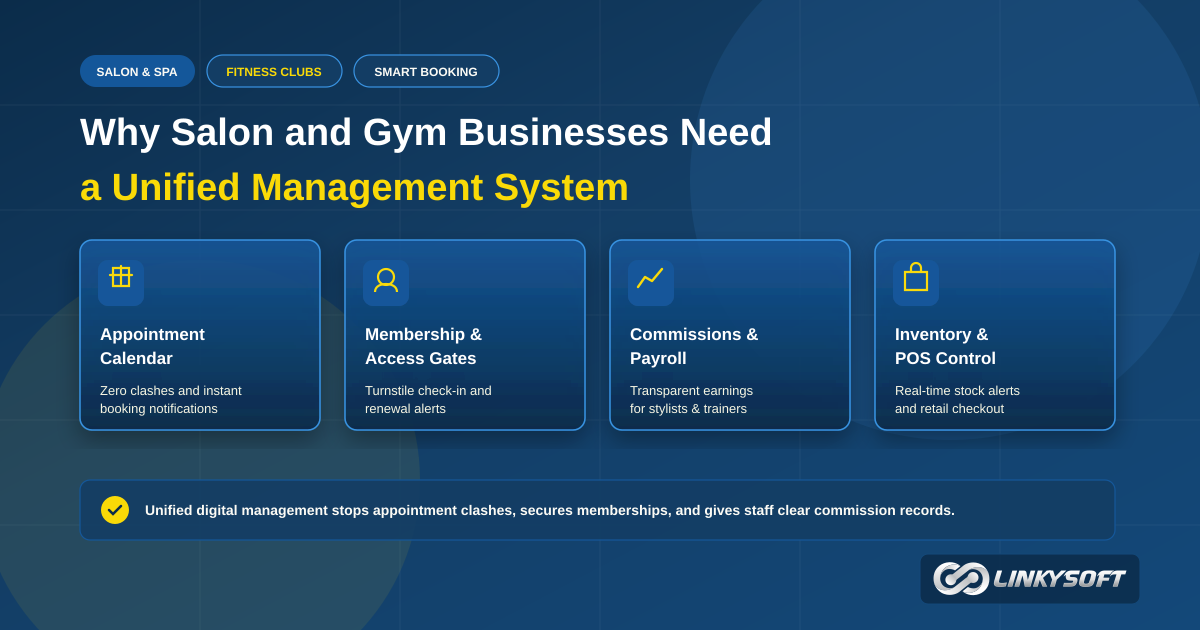
The true importance of a salon and gym management system lies in protecting daily revenue from unrecorded losses and keeping customer appointments on a dependable schedule. When your daily business relies on paper notebooks or scattered messaging apps, staff spend hours coordinating schedules and untangling double bookings. A centralized platform gives business owners, clients, and front desk workers shared visibility into open chairs and training slots, putting an immediate end to the operational confusion that damages service businesses.
A digital platform gives you full control over daily operations, from spotting vacant stylist chairs and training times to monitoring product stock and calculating staff commissions accurately. Workplace disagreements over attendance, completed client sessions, and sales percentages disappear once every transaction is recorded in a verifiable ledger. This clarity improves the client experience directly; guests arrive to find prompt service and calm front-desk reception without long delays or the need to repeat their requests on every single visit.
Your business shifts from relying on personal memory and receptionist guesswork into an organized company guided by consistent operational standards. You can make expansion decisions, introduce new membership packages, or invest in equipment using factual reports that reveal your most profitable hours and popular services. Building a solid software foundation protects your brand reputation and marks the practical difference between a struggling counter and an organized business that grows with steady confidence.
What Manual Paper Diaries Cost Your Counter Every Day
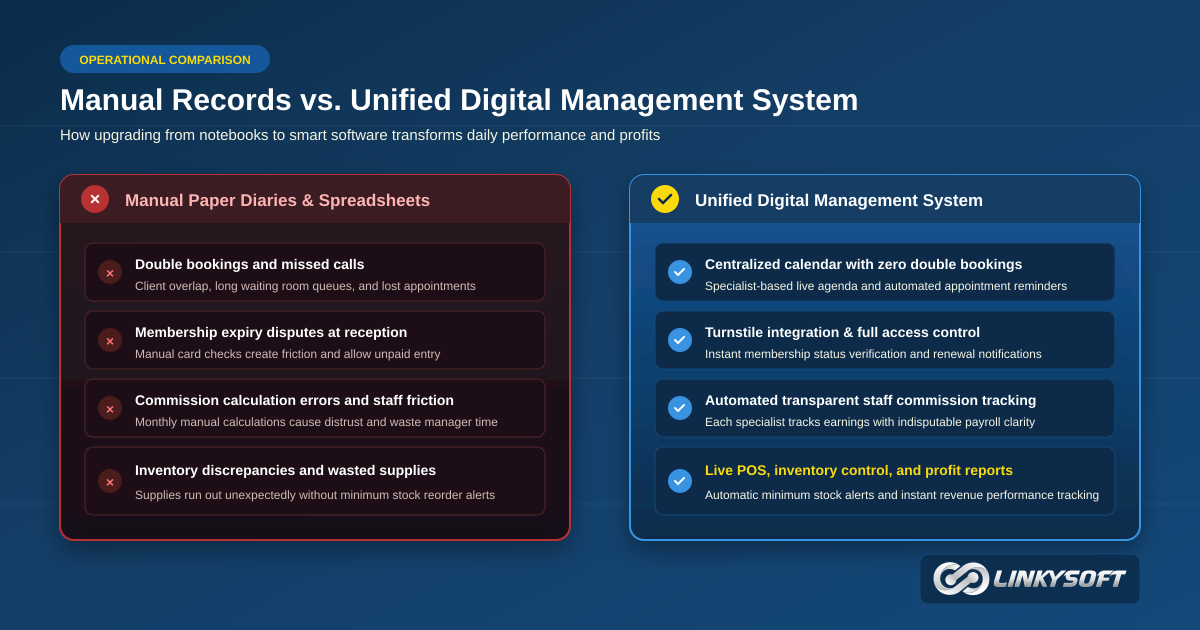
Jotting down appointments in paper books looks simple at first glance, but it creates steady leaks in time and profit that only show up when reviewing monthly accounts. Booking two clients into the same time slot for a single stylist or personal trainer is one of the most common mistakes in busy salons and fitness centers. When a customer takes time out of their busy day only to discover their booking was doubled, their confidence in your business drops, and they may never book with you again. The front desk staff also faces awkward moments trying to calm unhappy guests with hurried apologies.
Physical appointment books are vulnerable to accidental damage and misplacement, and looking up a client's past treatment notes or preferred hair color formula takes far too long. Paper diaries also make it difficult to track expiring gym memberships accurately, allowing lapsed members to walk through turnstiles and use facilities without paying their dues. A dedicated management system solves these leaks by linking entry gates to active membership records and logging every completed service under the correct client profile immediately.
How Immediate Organization Shapes Customer Loyalty
Clients notice a massive difference when your front desk answers their booking requests in seconds instead of flipping back and forth through notebook pages. The software allows receptionists to view previous visit records, preferred treatments, and favorite fitness coaches right on the screen. Greeting a returning customer by name and remembering their styling preferences creates genuine appreciation, turning first-time guests into loyal regulars who recommend your business to friends and colleagues.
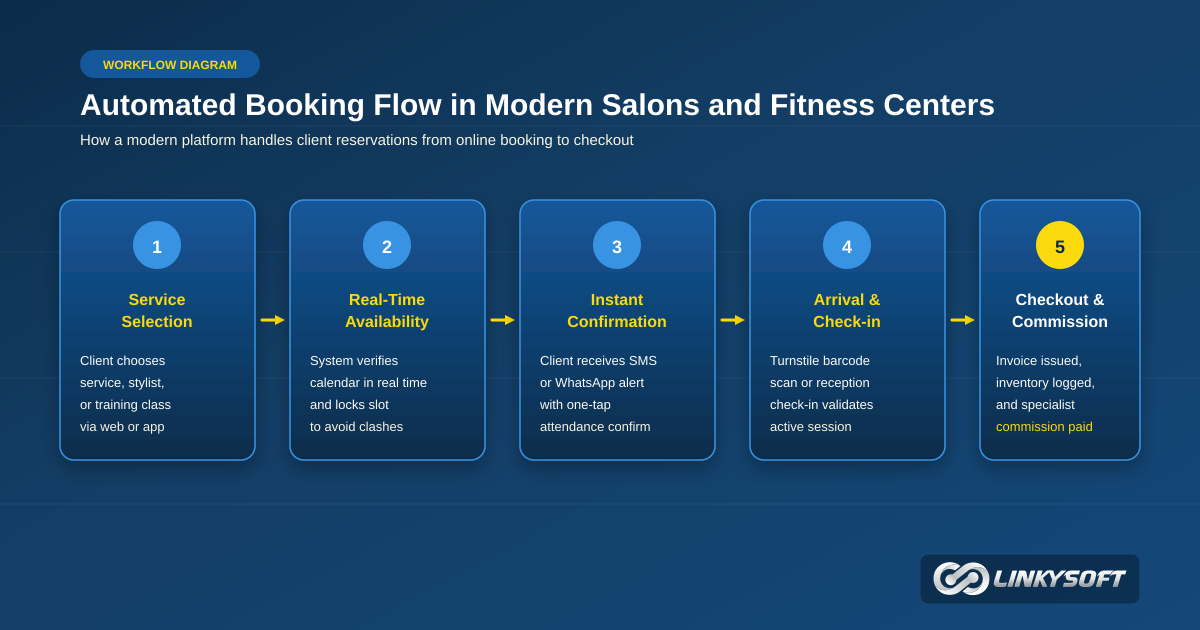
Modern management tools also allow customers to book services directly from their smartphones at any hour of the day. Clients receive clear confirmation details and automated reminder notifications that prevent forgotten appointments and allow easy rescheduling when personal plans change. Removing waiting room crowding creates a relaxing, welcoming atmosphere that encourages guests to enjoy their visits and return on a regular routine.
How to Prevent Schedule Clashes and Stop Daily Booking Losses
The appointment calendar is the operational engine of any beauty salon or fitness studio, and any small breakdown can disrupt the entire working day. Management software provides a visual interactive calendar showing bookings minute by minute across every treatment room, styling chair, and studio space. The platform blocks overlapping bookings automatically, maintaining a balanced flow of visitors without chaotic peaks or long unpaid gaps that waste staff hours.
This organized schedule relieves supervisors of the mental strain of memorizing complex daily details. A business manager can inspect tomorrow's schedule at a glance, checking room occupancy rates and preparing needed supplies and styling tools in advance. This practical preparation raises operational efficiency, creating a pleasant working environment for employees and guests alike throughout every shift.
Practical Steps to Deal with Sudden Cancellations and No-Shows
Clients who fail to show up without advance warning represent one of the heaviest financial drains on salons and personal trainers. A missed appointment leaves a specialist sitting idle while turning away other paying customers who wanted that time slot. A management system curbs this problem by sending automated notifications ahead of time, such as a confirmation request the day before and a friendly reminder two hours before the session.
The software can also maintain a live waiting list that springs into action whenever an appointment is cancelled. The moment a client frees up a spot, the system alerts the next person in line, filling open chairs without requiring manual phone calls from receptionists. You can also establish clear advance booking terms that encourage guests to respect scheduled times and keep cancellations to a minimum.
Balancing Working Hours Fairly Across Your Staff
Business owners often struggle to distribute client workloads evenly when certain stylists or trainers attract higher customer demand than others. The administrative dashboard displays booked hours and assigned tasks for each employee across the day or week clearly. Supervisors can assign open bookings to capable team members who have available openings, balancing the workload fairly and preventing staff burnout.
Each specialist can open their own portal to review their daily client list and appointment details without repeatedly walking up to the front counter to ask questions. Clear job visibility builds positive teamwork and reduces internal friction over client allocations. It also allows management to evaluate completed services against attendance records objectively to reward top performers with total fairness.
Reliable Methods for Managing Gym Memberships and Turnstile Gates
Fitness clubs and sports centers depend on regular monthly and annual membership revenue to maintain steady profitability and cover facility overheads. Dedicated software records plan start dates, expiration schedules, package categories, and allocated training sessions with complete precision. Digital record-keeping eliminates the mistakes and payment disputes that frequently occur when staff check paper cards at the entrance door.
The platform also simplifies membership hold requests when members travel, take holidays, or deal with temporary health issues. Rather than scribbling manual notes in paper files, the system freezes the account for the approved duration and pushes the expiration date forward automatically. This accurate handling reassures members that their rights are protected while preventing unpaid facility usage during pause periods.
Connecting Electronic Entrance Turnstiles with Membership Status
Integrating your management software with electronic entrance turnstiles is the most effective way to protect your gym from unauthorized entries and expired passes. Members scan a dynamic mobile QR code, key fob, or biometric credential at the gate, which verifies their account status in less than a second. If the membership is active and fees are up to date, the gate unlocks immediately, while lapsed accounts are directed to reception for renewal.
This automated verification allows front-desk employees to focus on greeting newcomers and presenting facility services instead of checking membership cards by hand all day long. The system also tracks real-time headcounts inside the facility, preventing crowded workout zones and ensuring equipment is used safely. Your fitness club projects a modern, orderly impression that members respect from the moment they step through the door.
Automated Renewal Reminders That Keep Members Active
Many gym members lose track of their subscription end dates and drop out of their fitness routines simply because nobody reminded them to renew. The system sends polite automated messages one week before expiration, followed by a final notice three days prior, encouraging members to maintain their health progress. Including direct online payment links allows members to renew their plans in minutes without waiting in line at the desk.
Consistent communication lifts renewal rates significantly and protects the recurring cash flow your facility needs to maintain quality equipment and clean facilities. You can also present early renewal incentives to dedicated members to reward their loyalty and encourage longer commitments. Membership management turns from an administrative headache into an ongoing relationship that keeps members engaged year after year.
Controlling Retail Stock and Calculating Staff Earnings Cleanly
Salons, spas, and sports clubs generate a healthy portion of their profits through retail sales of hair treatments, cosmetics, vitamins, and fitness supplements. Running this retail side smoothly requires strict oversight of inventory movement and sales registers to prevent stock shortages and unexplained losses. The management software links your point of sale directly to stock records, deducting purchased items from inventory counts the moment a sale closes.
This tracking also applies to professional products used during salon treatments, such as coloring bowls and skin creams, matching material usage against specific appointments. This visibility helps owners calculate the true cost of each service and monitor staff product efficiency. For comprehensive stock control across multiple rooms or branches, dedicated retail systems like storek handle supplier orders, warehouse transfers, and inventory audits with dependable clarity.
Monitoring Cosmetic Products and Sports Supplements in Storage
Running out of a popular shampoo or protein powder results in lost sales and frustrates clients who count on purchasing products during their visits. The software lets you define minimum safety stock levels for every product, triggering an immediate notification when quantities drop near the reorder point. This early warning gives managers sufficient time to place supplier orders before retail shelves stand empty.
Regular digital inventory audits highlight discrepancies between recorded stock and physical units on the shelves, reducing accidental waste and unaccounted losses. Reports also separate fast-selling favorites from slow-moving products that might need bundle promotions to clear shelf space. You keep working capital invested in profitable items rather than tied up in dormant inventory on storage shelves.
Setting Clear Commission Rules to Prevent Payroll Friction
Stylists and trainers often earn a substantial portion of their income through performance commissions tied to treatments and retail product sales. Calculating these earnings by hand from paper books at the end of every month takes hours and invites calculation errors that spark staff distrust. A management system resolves this friction by applying preset commission formulas automatically whenever an invoice is closed at checkout.
Staff members can review their accumulated commission balances on their private screens daily, which motivates them to deliver attentive service to every visitor. The management dashboard generates comprehensive payroll summaries showing individual sales numbers, completed hours, and total payouts without manual bookkeeping headaches. A transparent calculation system fosters trust and harmony across your entire team.
When Does Your Business Need Custom Software Over Generic Templates?
Small businesses might start out using basic spreadsheet apps to track appointments, but growing customer volume and expanding facilities expose the limits of basic tools. Venues offering diverse services, such as combined hair styling, day spa treatments, and private fitness coaching, follow workflows that generic off-the-shelf software cannot accommodate. When your business model combines multiple departments under one roof, you need software designed around your specific operating steps.
Commissioning custom software ensures complete ownership of your application code and customer database without ongoing user licensing restrictions. Enterprise software teams delivering Web Applications & Management Systems build platforms that mirror your daily operational routines exactly. The technical experience of Linkysoft provides businesses with adaptable management software that expands alongside branch openings while maintaining high data security standards.
Weighing Off-the-Shelf Packages Against Tailored Solutions
Commercial packages offer fast setup for single-chair barbers or independent trainers working with limited client numbers. However, off-the-shelf programs often force teams to navigate unnecessary menus that slow down front-counter service during peak hours. Furthermore, monthly subscription fees that climb as your staff roster and customer list expand can become expensive over the long haul.
Tailored development provides an interface shaped around your exact service steps, keeping screens clean and focused on daily priorities. Custom software integrates smoothly with your selected payment hardware, receipt printers, and entrance turnstiles without third-party workarounds. Specialized engineering teams like Linkysoft build software matched to your facility workflows, giving you the flexibility to adapt features as your business expands in the market.
How Dedicated Mobile Apps Strengthen Member Retention
Modern clients prefer managing their bookings and membership plans through smartphone screens rather than making phone calls during business hours. A branded mobile app allows members to check studio timetables, book classes, and renew passes with a single tap on their screens. Having your logo on a customer's phone builds brand recognition and gives you a direct channel for sending important announcements and seasonal offers.
Coaches can also use mobile interfaces on the gym floor to take class attendance and record training milestones without visiting the front desk. Professional Mobile App Development delivers smooth mobile experiences across iOS and Android devices, placing your brand ahead of competing facilities. Integrating intelligent AI Systems allows you to answer client inquiries automatically around the clock through helpful interactive assistants.
Common Questions Salon and Gym Owners Ask Before Upgrading
Business owners who consider leaving paper records behind naturally have practical questions regarding staff training, setup time, and information safety. Most inquiries focus on how quickly employees can learn the software, whether mobile devices suffice without buying new computers, and how customer data stays safe. We address the most common operational questions below to give you a clear roadmap before starting your software upgrade.
Understanding these practical answers helps you plan a calm transition that keeps your front counter running smoothly while your team adopts the new tools. Good preparation and an understanding of daily workflows turn the upgrade into a positive step that boosts team morale and service quality in a short period of time.
How Long Does It Take for Front-Desk Staff to Master the System?
Most receptionists and floor supervisors become completely comfortable with basic booking and billing functions within three to seven working days. Modern interfaces follow simple layouts similar to everyday mobile apps, so employees do not require advanced technical training to book appointments or issue receipts. Practicing with sample client profiles during the first few days builds confidence and speed before dealing with live customers.
Providing brief reference guides and short video demonstrations helps new hires learn operational steps quickly as your team grows. Having an experienced team member supervise counter operations during the first week resolves minor questions immediately and removes any hesitation about using the new tools.
Can the Management Platform Run on Tablets and Mobile Phones?
Yes, modern cloud platforms adapt cleanly to web browsers on iPads, Android tablets, and smartphones without requiring high-powered desktop computers. Trainers can carry tablets across the fitness floor to check in members, and stylists can inspect upcoming appointments directly from their phones. This mobile accessibility removes the need to clutter treatment rooms and workout spaces with heavy office equipment.
Mobile access also allows business owners to review daily revenue figures and booking schedules securely while away from the venue. Real-time reports sync across every connected device simultaneously, keeping you in complete touch with daily operational performance wherever you are.
What Protects Client Records During Sudden Internet Disruptions?
Modern management software saves customer information to protected cloud databases continuously while running automated daily backups. Advanced systems incorporate local offline modes that allow front counters to log turnstile entries and record cash payments even if an internet line drops temporarily. The moment connectivity returns, the platform synchronizes all stored transactions back to the central database without data loss.
This protective setup keeps turnstiles working and stops front-desk queues from forming during occasional service outages. Encrypted backup protocols ensure your business records remain intact so your operations continue smoothly under varied working conditions.
How Does the Software Help Bring Back Inactive Members?
The platform reviews client visit dates automatically, compiling lists of guests who have stayed away longer than their regular schedule. You can send polite personalized messages or special trial invitations to encourage these clients to resume their styling sessions or fitness routines. This thoughtful reminder brings back a meaningful share of customers who paused their visits due to busy personal schedules.
Reviewing response rates to these messages helps management understand why clients drift away and improve service quality where needed. Reconnecting with existing customers is far more cost-effective than finding brand-new prospects, which directly improves long-term profitability and builds a stable community around your brand.
Does the Software Comply with Electronic Invoicing Standards?
The system generates compliant electronic receipts complete with required tax details, unique sequential invoice numbers, and scannable QR verification codes. Every transaction is stored securely without risk of accidental alteration, ensuring complete compliance with local fiscal regulations. This accuracy protects your business from bookkeeping errors and legal penalties associated with manual calculations.
Managers can export period-end tax summaries with a single click, providing accountants with organized documentation for timely tax filings. Automating sales tax reporting eliminates weeks of paper sorting, giving business owners peace of mind and more time to focus on customer satisfaction.
Practical Steps to Transition Your Facility to Digital Management
Switching from manual paper diaries to an integrated software platform requires methodical planning to ensure existing client appointments continue without disruption. Begin by collecting your active client contact details, current membership dates, and package balances into an organized spreadsheet for easy import. Write down a precise list of your services, realistic session durations, and the specific staff members qualified to deliver each treatment or workout session.
Our team at Linkysoft works with salon and fitness business owners to plan and deploy secure management systems fitted to their operational goals. You can arrange a consultation to discuss hardware integrations, turnstile controls, and self-service booking options tailored to your venue. Follow these organized steps to launch your new management software successfully:
- Compile client contact lists, service menus, and active membership dates into clean spreadsheets before starting data migration.
- Define clear system roles and access permissions for every employee, from front-counter receptionists to senior facility managers.
- Run a two-day internal practice test with your team to rehearse booking appointments, issuing invoices, and checking reports.
- Notify your active members about the new online booking and automated reminder platform, highlighting the convenient benefits for their upcoming visits.