Every few weeks somebody sits down with us convinced their website needs tearing down and starting again, and a good share of the time they are wrong. Not because the site is fine, but because the thing genuinely bothering them is a problem that a rebuild does not touch and will not solve. So before you commit a serious amount of money to a new website, it is worth spending twenty minutes working out what you are actually buying, which is what this article is for.
The question nobody asks before spending on a redesign
The decision in front of you is not old site versus new site. It is much narrower than that, and it goes like this: which specific problem are you paying somebody to fix? A redesign is a tool rather than a treatment, in roughly the way a new van is a tool. If the van keeps breaking down, a new one helps enormously. If the actual problem is that the phone never rings, a new van is an expensive way to feel better about the parking space.
So here is the test we put to every owner before anything else gets discussed. Name the number you want to move: enquiries a month, completed checkouts, phone calls, form fills, booked appointments. Pick one, write down where it sits today, then write down where you would like it to be. If you cannot fill in that second blank, a rebuild will change how your site looks and nothing else, and in eighteen months you will be in the same chair having the same conversation with a different agency.
Every symptom in this article has two possible answers, a cheap repair and an expensive rebuild, and we will tell you which one applies rather than leaving you to guess. That distinction costs us money, because Linkysoft turns work away over it several times a year. A site rebuilt for the wrong reason usually gets rebuilt again two years later, which is bad for the client and, once word gets round, worse for us. If you already know your situation needs the larger option, our web design and development work is where that conversation goes, but read the next section first, because it is free and it takes ten minutes.
Start with the four numbers already sitting on your dashboard
Almost every website already collects the evidence needed to settle this argument, and most owners have never once looked at it. Analytics is simply a free report, usually Google Analytics, that counts how many people visited your site and what they did once they arrived. If nobody ever installed one, that is the first thing to fix and it costs nothing at all, because spending on the building before you have fixed the measuring means you will never know whether the money worked.
Four numbers do most of the work here.
- Visitors a month, and more importantly the shape of the last twelve months. Rising, flat or falling tells you far more than any single month can, since one quiet August proves nothing.
- Conversion rate, which is the share of visitors who do the thing you actually want. The arithmetic is easy to follow: 2,000 visitors in a month and 30 enquiries is a rate of 1.5 percent. Lift that to 2.5 percent and the same 2,000 visitors produce 50 enquiries, so 20 more every month without a single extra person arriving.
- The share who land and leave without ever touching a second page. A high figure on your homepage means people are looking at what you offer and deciding, within seconds, that it is not for them.
- Mobile share of traffic, meaning the proportion arriving on a phone rather than a computer. For most local, retail and clinic sites this now sits between 60 and 80 percent, so a site that only behaves properly on a laptop is failing most of the people who see it.
The trick is to read them together, because taken alone each one misleads. Falling traffic alongside a decent conversion rate points at content and search rather than design, since the people who do arrive are converting perfectly well, there are simply fewer of them arriving. Steady traffic with weak conversion points squarely at the pages themselves, which is where a refresh earns its keep. And a mobile share well under 60 percent in a trade where customers obviously use their phones usually means the phone experience is pushing people away before they ever register as a visit worth counting.
Seven symptoms that genuinely mean rebuild
These are the cases where we stop hunting for a cheaper answer, because there honestly is not one.
- It does not work on a phone, and we do not mean the text is a bit small. We mean the menu will not open, the contact form cannot be sent, buttons sit on top of one another and half the page hangs off the edge of the screen. Retrofitting mobile onto a fixed width site, meaning one built to a single desktop size in the years before pages learned to rearrange themselves for whatever screen they land on, usually costs more than starting again, and what you get at the end of it stays fragile.
- The software underneath is no longer supported. Security updates have stopped arriving, so every month the site stays online the risk climbs rather than holding steady.
- Nobody can edit it. When changing one sentence needs a developer and a two week wait, the site has quietly stopped being an asset and turned into a running cost.
- Five different hands have patched it over eight years. Every small change breaks something unrelated, and every estimate comes back higher than the work looks, because the work is not really the work: the untangling is.
- The business it describes no longer exists. New services, new markets, a different sort of customer, and a website still selling what you sold years ago to people you no longer want.
- It is slow at the foundation rather than merely heavy with pictures. That distinction decides the whole question, so we separate the two carefully further down.
- You are about to add something the current site structurally cannot hold, such as online bookings, customer accounts, payments, a second language or a live stock feed. This is usually the point where web application work enters the conversation, because you have stopped needing a brochure and started needing a system.
If you can honestly tick three or more of those, the rebuild conversation is a fair one to be having. A single tick on its own almost never is.
Five complaints that are almost never worth a rebuild
- I am bored of it. Familiarity fatigue is entirely real for the owner, who has seen that homepage four thousand times, and entirely invisible to a first time visitor who has never seen it once. Your customers do not share your boredom because they do not share your exposure.
- A competitor launched something shiny. That tells you about their marketing budget, not about your conversion problem. Open their site on your own phone before you envy it, because a surprising number of impressive looking rebuilds are slower and more confusing than what they replaced.
- The colours feel dated. A refresh of palette, type and spacing on your existing template is normally a few days of work rather than a project, and it buys most of the visual improvement for a small fraction of the cost.
- It is slow. When we test these, the culprit is almost always four megabyte photographs loaded straight off a camera plus eleven tracking scripts nobody remembers adding, a script being nothing more than a small extra piece of code that a chat box, an advert tracker or a visitor counter leaves on every page, and both of those can be fixed in place inside a week.
- We are not on page one. This is a content, search and authority problem, and it survives a redesign completely untouched, because rebuilding a site with thin content simply hands you a prettier site with thin content, ranking exactly where it did before. What actually moves that is patient digital marketing work on what your pages say and who links to them.
None of those five complaints is silly, and we hear all of them from sensible people running good businesses. They are just complaints whose real fix is smaller, faster and cheaper than the one being proposed, which is why an honest answer is worth asking for.
Repair, refresh or rebuild: three options and what each really costs
Most of the anguish around this decision comes from treating it as a yes or no question when it actually has three answers.
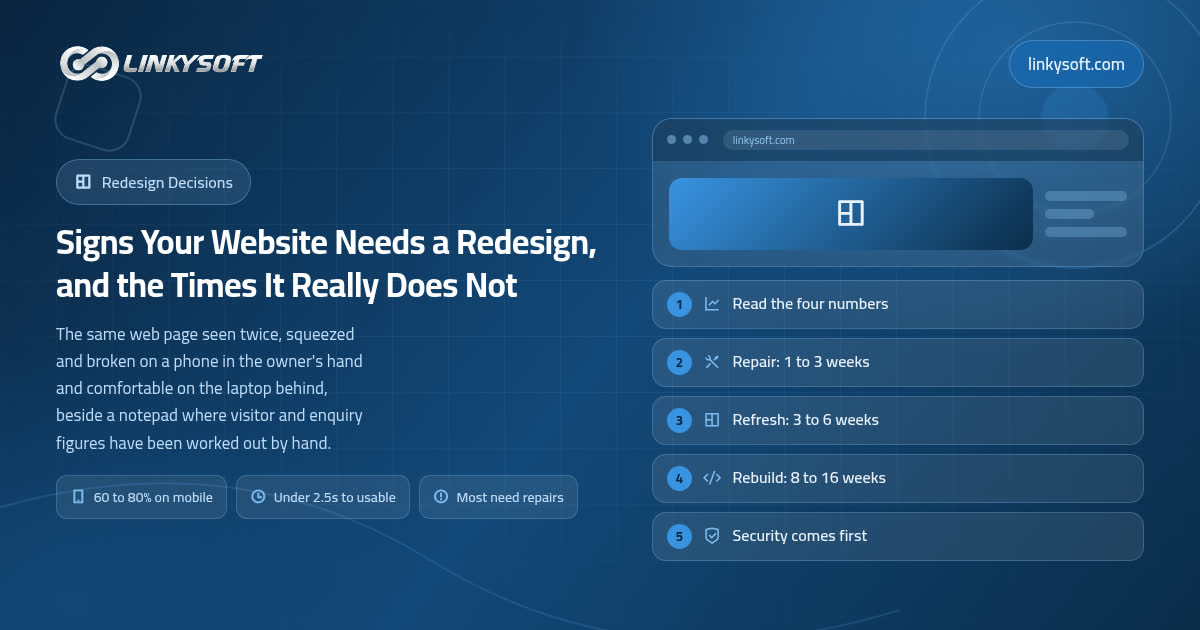
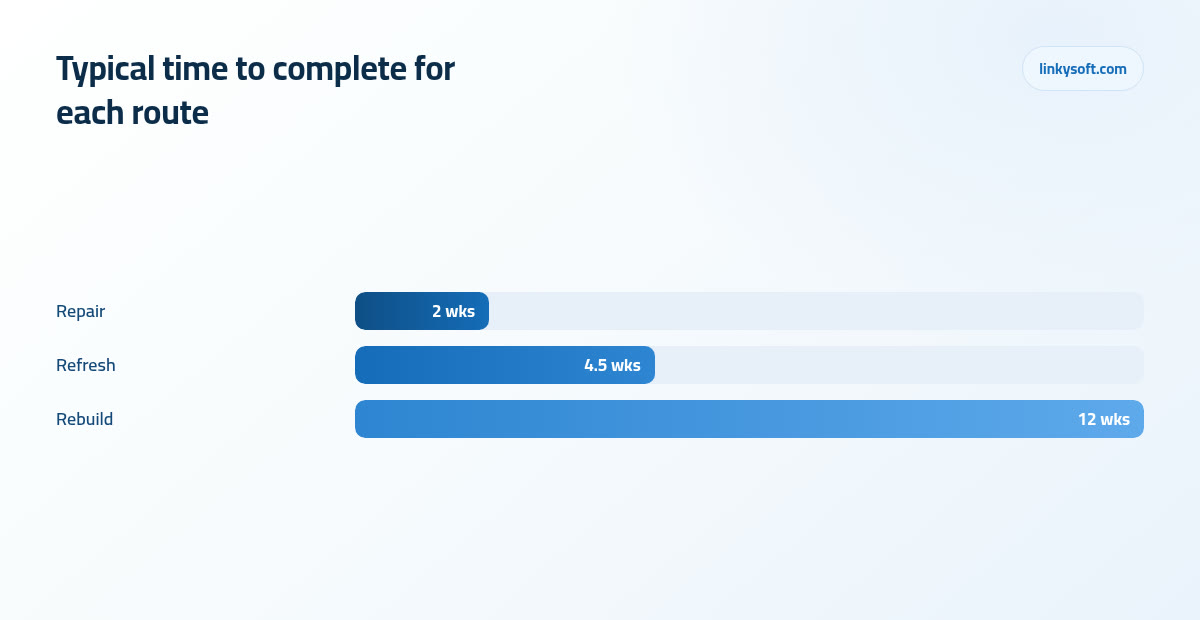
- Repair means targeted fixes to the site you already own: compressing the images, mending the mobile menu, rewriting the contact page, stripping out dead scripts and bringing the platform up to date, the platform being the software the whole site is built and run on. Work of that size normally takes one to three weeks.
- Refresh means the same foundation carrying a new visual layer, with the key pages rewritten as part of the job, so the plumbing stays exactly where it is while the surface and the words change, and three to six weeks is the usual span.
- Rebuild means a new foundation and a new structure, with content migrated and reworked as it moves across, which runs to eight to sixteen weeks for a business site and closer to twenty or twenty four weeks once a shop or a customer account area is part of it.
On cost, we prefer honest multiples to invented prices, since rates differ so much between countries that any figure printed here would be wrong for most readers. What holds fairly well is the ratio: a targeted repair usually lands at roughly 5 to 15 percent of what rebuilding the same site would cost, and a refresh at roughly 25 to 40 percent of it. Do that sum before you sign anything, because buying the repair first and then the refresh on top of it comes to somewhere between 30 and 55 percent of the rebuild, which leaves 45 to 70 percent of the money you had set aside still sitting in the bank.
Which gives us a decision rule simple enough to remember. If the foundation is sound and editable, buy the smaller option first and then measure for 60 to 90 days before spending anything more. Sixty days is not caution for its own sake, it is the shortest window that means anything, because a fortnight of numbers tells you about the weather rather than about your website.
Speed: telling a heavy site apart from a broken one
Page speed, with the jargon taken out, is the time between somebody tapping a link and being able to read and use the page. Not when the first pixel appears, but when the thing is genuinely usable, because a page that shows a logo for three seconds and then jumps about while the rest loads feels broken even if a stopwatch says otherwise.
The thresholds we work to, measured on a normal mobile connection rather than on the office wifi, are these: under 2.5 seconds is healthy, 2.5 to 4 seconds is quietly costing you people, and past 4 seconds it is expensive enough to show up in your monthly numbers whether or not you know why.
The arithmetic of that last point is worth doing on paper. Take 3,000 visitors a month converting at 2 percent, which is 60 enquiries. If a slow load costs you a fifth of arrivals before the page even settles, you are losing around 12 enquiries a month, so 144 across a year. Multiply that by your average job value and you usually find the speed work pays for itself several times over, which is a rare thing to be able to say about website spending.
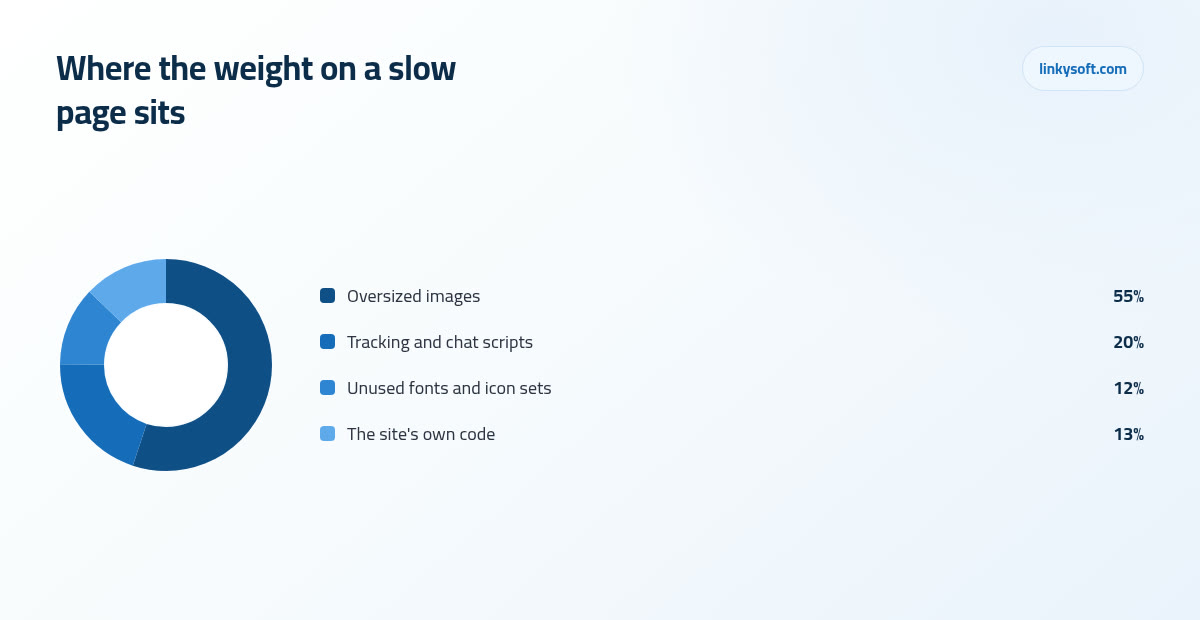
Now the diagnostic that decides repair versus rebuild, and it costs nothing. Run the free PageSpeed Insights test on your homepage and on one interior page, then look at where the weight is sitting. If it is concentrated in images and in third party scripts, meaning the code that the chat box, the advert trackers and the measurement tools bring along with them, you have a heavy site, and heavy sites get fixed in days. If the delay is in the site's own code and its database work, meaning the page takes a long time to be produced before anything is even sent, that is a foundation problem and no amount of image squeezing will rescue it.
The repair wins are consistent enough that we can predict them before starting. Sizing and compressing images properly removes 40 to 70 percent of a page's weight on a typical site, and removing tracking, chat and analytics scripts that nobody uses any more commonly returns a further 0.5 to 1.5 seconds. If you want to read further on this, our writing on speed goes through the testing step by step.
The security question that overrides everything else on this list
Everything above is a judgement call about money. This one is not. Once the platform, or one of its plugins, stops receiving updates, the known ways into it get published openly, and they are never closed again, so an unsupported site is not sitting still, it is drifting toward an incident at a pace nobody controls. A plugin is simply a small add on installed on top of the platform to provide one feature, such as a shop, a booking form or a photo gallery, and it needs looking after just as often as the platform underneath it.
Here are the red flags any owner can check alone, without help and without logging into anything technical.
- No padlock in the address bar when you visit your own site.
- A login page that has looked exactly the same for years.
- Plugins or extensions last updated three or more years ago.
- No backup routine that anybody in the building can actually name.
- Nobody who currently knows the hosting login, because the person who set it up left.
This is the one symptom on the entire list where waiting is not neutral, and it is worth being blunt about why. The cost of a hacked site is not the repair bill, which is usually modest. It is the days offline, the customer data you now have to explain, and the search damage that follows a site being flagged as unsafe, which takes months to undo. If any of those flags apply and you would rather have somebody look before you decide anything, that is what our cybersecurity team does first.
There is an honest middle path here too, and we would rather you heard it from us than found out later. A hardening and update project, meaning the platform brought current, the abandoned plugins removed, backups put on a schedule and access tidied up, is often perfectly possible without touching the design, and it costs a fraction of a rebuild. Sometimes the site is too far gone for that, but it is always the first thing worth pricing.
Content is usually the real problem wearing a design costume
Here is the pattern we run into more than any other. The pages answer the questions the business finds interesting rather than the questions the buyer is actually asking, so the site reads like a company describing itself to itself. The history section is three paragraphs, the service that pays the wages gets one sentence, and the price question that every caller opens with is not addressed anywhere.
A visitor decides five things in the first 10 to 20 seconds, and they decide them in this order.
- What you do.
- Whether you serve people like them.
- Whether you cover their area.
- Whether you look credible.
- How to begin.
Which gives you an audit you can run yourself in an afternoon, for nothing. Open your homepage on your own phone, read only what fits on the first screen before you scroll, and then ask whether a stranger could answer those five questions from what is in front of them. Do the same on your busiest service page. If the answer is no, the layout is not your problem, the writing is, and a new layout will present the same unanswered questions in a nicer typeface.
Rewriting the top five pages usually takes two to four weeks, and most of that is the client's own review time rather than ours. In our experience it moves conversion more reliably than a new layout does, which is exactly why we keep pushing people toward it before the bigger spend. The chart below makes the same argument from the technical side, and the two arguments meet in the same place.
What a rebuild actually involves, so the timeline stops surprising people
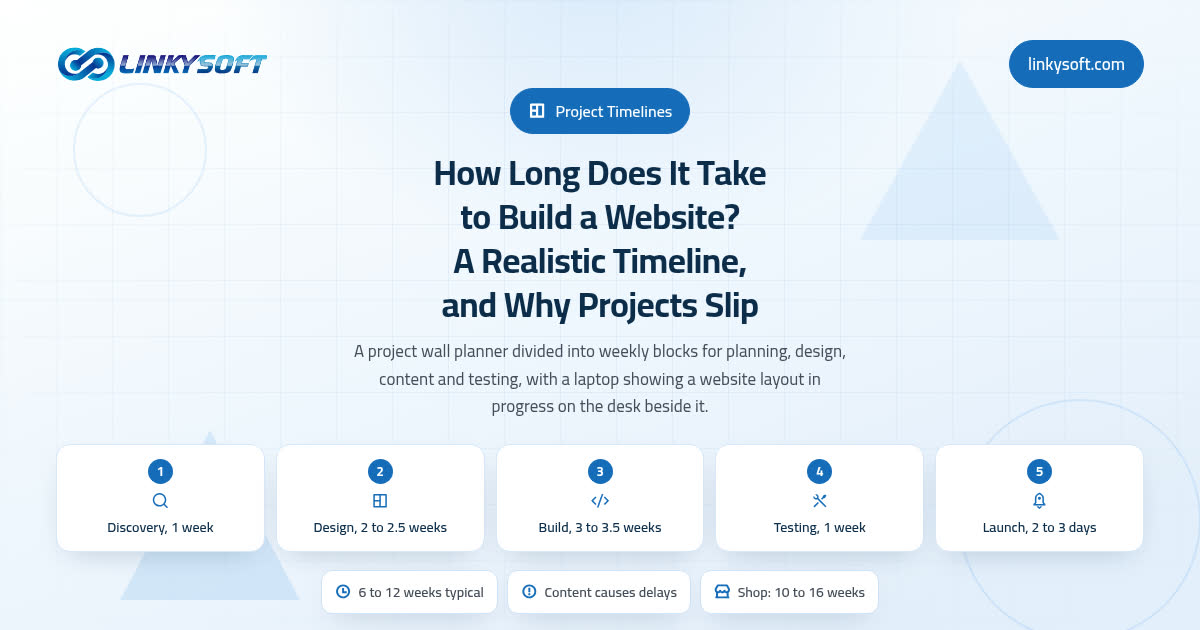
When a rebuild is genuinely the right call, the next disappointment is usually the calendar, so it helps to see the phases laid out honestly. For a business site without a shop attached, expect discovery and structure to take one to two weeks, design two to three weeks, build three to six weeks, content migration one to three weeks, and testing and launch one to two weeks.
The phase that overruns is content, almost every time, and it is worth understanding why. It waits on your own time and your own approvals rather than on the development team, so it is the one part of the schedule that no agency can rescue by working harder. The clients whose projects finish on time are the ones who booked the writing into their own diary at the start instead of assuming it would happen between other things.
The other thing that must be protected is what happens at launch. Your existing pages have web addresses that search engines have indexed and that other sites link to, so wherever possible those addresses should stay exactly as they are, and every page that does move needs a redirect pointing from the old address to the new one. Skip that and search traffic falls off a cliff in the first fortnight, which is a horrible way to begin life with a site you just paid for.
Set your expectations for the dip accordingly, because there is usually a small one even when everything is done right. A well managed migration with redirects in place normally recovers its search traffic within 4 to 8 weeks, while a careless launch with broken addresses can permanently lose 20 to 40 percent of it, and that loss does not come back on its own. A good rebuild also leaves something behind that is easy to overlook while you are looking at the design: a site your own team can edit without phoning anybody. Our case studies show what that looks like in practice once the agency has gone quiet.
A ten-minute self-test to run before you call anybody
Do this today, before you speak to a single agency, and you will have a far better conversation when you do.
- Open your site on your own phone, on mobile data rather than wifi, and try to contact yourself the way a customer would.
- Time how long the homepage takes to become usable, counting out loud.
- Find out when the software was last updated, and when the plugins were.
- Ask who can change a paragraph on the homepage, and how long that takes them.
- Look at twelve months of traffic and write down whether the line is rising, flat or falling.
- Read the first screen of your homepage as though you had never heard of your company.
Score it simply. Three or more hard failures among the foundation items, meaning mobile, security, editability and speed, points toward a rebuild. One or two point toward repairs, and you should buy the repairs first. Then, when you do call somebody, bring the numbers rather than the frustrations, because an agency handed a list of frustrations will quote a rebuild almost every time, and it will not even be dishonest of them. It is simply the only thing a list of feelings can be answered with.
One more piece of advice that will save some readers a great deal of money: get the diagnosis separately from the quote. An opinion from somebody who profits either way is worth considerably more than a free one attached to a proposal, and a paid half day audit that concludes you need three weeks of repairs is the cheapest thing you will buy all year.
How we make this call, and when we say no
For the sake of transparency, this is the order we work in when a site arrives on our desk. Analytics first, then the platform's update state, then the editing workflow, meaning who is allowed to change what and how much effort it costs them, then the top five pages. Design comes last and it does not get discussed at all until those four are understood, because a design opinion formed before that is just taste, and taste is not a diagnosis.
The honest outcome is this: of the sites brought to Linkysoft by owners already convinced they need a full rebuild, a meaningful share need repairs or a refresh instead, and we tell them so even when the bigger project would have been ours to sell. Some of them come back two years later for the rebuild once the business has genuinely outgrown the site, and that one is the right rebuild at the right time.
If you take one sentence away from all of this, take this one. If the foundation is safe, fast enough and editable, keep it and fix the pages, and if it is unsafe, unmaintainable or structurally unable to carry what the business needs next, rebuild once and rebuild properly. Almost every website sits clearly on one side of that line, and the ten minute test above will tell you which.
If you would like to talk it through with somebody who will say when the smaller option is the right one, get in touch with Linkysoft and we will look at the four numbers with you before anybody mentions design. There is no pressure in that conversation, and there is often no project at the end of it. In the meantime our writing on conversion covers the repairs that tend to pay for themselves fastest.