What losing something actually looks like in a clinic
When a clinic manager tells us they are afraid of losing records in a move to software, the picture in their head is usually a whole folder vanishing off a shelf. In practice that almost never happens. What goes missing is far smaller and much harder to notice: a single loose page that stayed in the pile when the rest of the folder went to the scanner, an allergy a doctor wrote in the margin three years ago that nobody retyped, a mobile number typed into a plain text box so the leading zero was quietly dropped, or one patient who now lives in the system twice because her name was spelled two different ways on two different days.
Those four failures are not equal, and ranking them honestly is what tells you where to spend your checking effort. A missing balance costs money, but it is recoverable, because the paper is still sitting in the box and the figure can go back in next week. A missing allergy or an incomplete medicine list belongs in a different category altogether, because it can hurt somebody, and there is no version of next week that undoes that. So the working rule is simple: the heaviest checking goes on the handful of fields that can cause harm, and everything else gets a lighter touch.
Before anybody touches a keyboard, write down what finished looks like. A migration is finished when every folder is accounted for by count, when every critical field has been verified by a second pair of eyes, and when the paper is still in its box because nothing has been destroyed until the digital copy has been proven good. Hold on to one idea while you read the rest of this, because it shapes every decision below: moving records is a stock control job with medical consequences, not a software purchase. The software is genuinely the easy part.
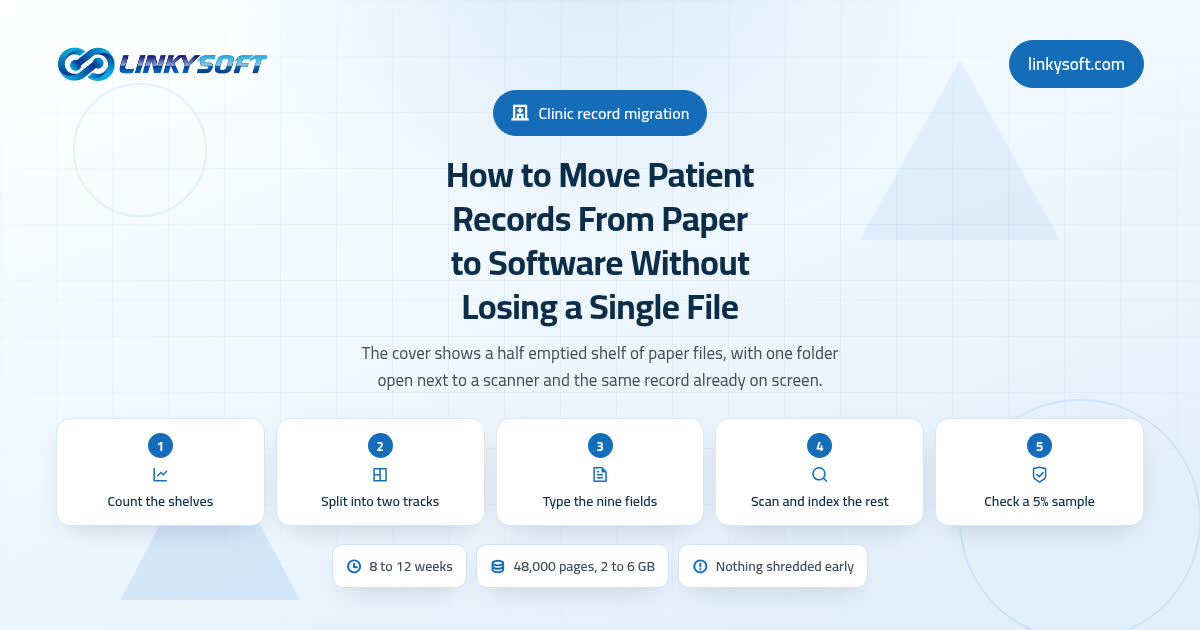
Count the shelves before you buy any software
Give the first week to a tally sheet and a quiet hour at the filing cabinets, because four numbers decide everything that follows. How many folders do you actually hold? How many linear metres do they occupy on the shelves? What is the average page count, measured by pulling thirty folders at random and counting the pages rather than guessing? And how many of those patients have set foot in the clinic in the past 24 months?
If you want a yardstick you can use the same afternoon, a four drawer filing cabinet holds roughly 2 to 2.5 linear metres of files, which usually works out at about 300 to 500 patient folders, and a general practice folder averages 8 to 15 pages once you count the registration form, the visit notes and the lab results. Three full cabinets, then, is somewhere near 1,200 folders and perhaps 14,000 pages, and you can sanity check that against your appointment book in ten minutes.
The order matters far more than it looks, because every quote you receive, every timeline anybody promises you and every staffing decision you make is calculated from those four numbers. A supplier who prices the work without them is guessing, and the clinic is the one who pays for the guess when the job turns out to be twice the size of the estimate. So ask any supplier what their price assumes about folder count and average page count, then watch how quickly the answer comes back. If you want to see how work gets scoped from real counts rather than optimism, our case studies show the numbers those projects actually started from.
Not every file needs typing in: the two track rule
This is the decision that saves a clinic the most money, and it is the one most sales conversations skip, because it shrinks the invoice. Split the shelf into two tracks and treat them completely differently.
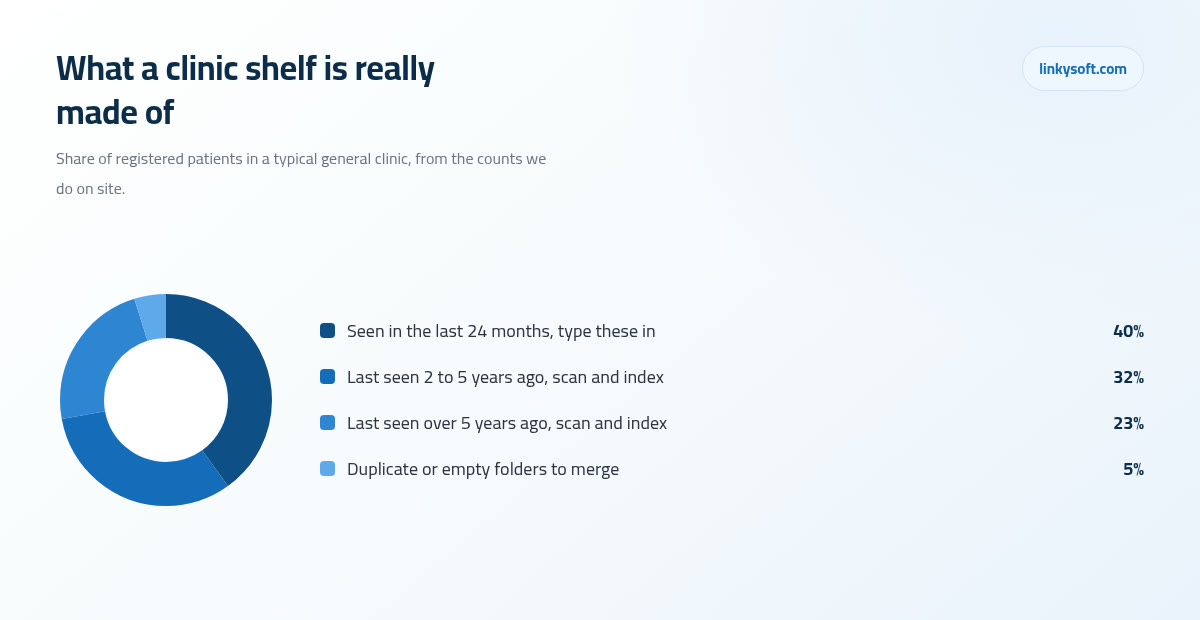
Track one is your active list, meaning every patient seen in the last 18 to 24 months. These get typed in properly as real fields, so the name sits in a name box and the allergy sits in an allergy box, which is what lets the system search, filter, warn and report. Track two is everybody else, and they get scanned and indexed by three things only: name, ID number and date. The file is then findable in seconds when somebody asks for it, and nobody has paid a typist to rekey fifteen years of history that may never be opened again.
The reason this works is arithmetic rather than wishful thinking. In most general clinics, 55 to 70 percent of registered patients have not visited in the past 24 months, which means the must type now list is usually only 30 to 45 percent of the shelf. A clinic holding 4,000 folders and quietly dreading 4,000 units of typing is really looking at 1,200 to 1,800, and that one fact often takes a third off the quote before anybody has negotiated a thing.
Better still, the shelf converts itself over time at no extra cost. When a track two patient walks back in next spring, reception types their header at the counter in about four minutes while the patient is standing right there, and they quietly become a track one patient. Six months of ordinary clinic days pulls in almost everybody who matters, and the patients who never come back were never worth paying to type.
The nine fields that have to be perfect
Not every field deserves the same care, and pretending otherwise is how a three month job turns into a twelve month one. Nine fields have to be right, every time, for every active patient:
- Full name, spelled exactly as it appears on the identity document
- Patient number or national ID number
- Date of birth
- Mobile number
- Allergies
- Long term conditions
- Current medicines
- Date of last visit
- Outstanding balance
Everything else, and that includes old visit notes, historic blood pressure readings and previous prescriptions, can stay as a scanned page rather than a typed field. Saying that plainly, out loud, in front of the doctors, is the single sentence that shortens the project most, because the instinct in any clinic is to want all of it searchable, and every page retyped instead of scanned gets paid for twice, once at the keyboard and once again in the checking, while the scan has already made that same page findable by name and date.
On those nine fields, use double keying, which simply means a second person retypes the same nine and the system flags any mismatch for a human to settle. Single pass typing normally produces 1 to 3 errors per 100 fields, and no typist should be embarrassed by that, because it is just what human hands do over long hours. Double keying brings it down to well under 0.5 errors per 100 and adds roughly a third to the typing time on those fields alone, which is a small premium to pay on the only fields that can hurt somebody.
Then agree the formatting rules before a single key is pressed, because rules invented halfway through are worse than no rules at all. Decide the date order, decide that phone numbers carry the country code, decide one spelling standard for names that were transliterated by hand over the years, and insist on an explicit no known allergies entry rather than an empty box. A blank box means nobody asked, and nobody asked is not the same thing as nothing to report.
What it really costs and how long it takes
Take a clinic with 4,000 folders averaging 12 pages, which is 48,000 pages in total, and follow the arithmetic the whole way, because you can redo every line of it with your own numbers in about five minutes.
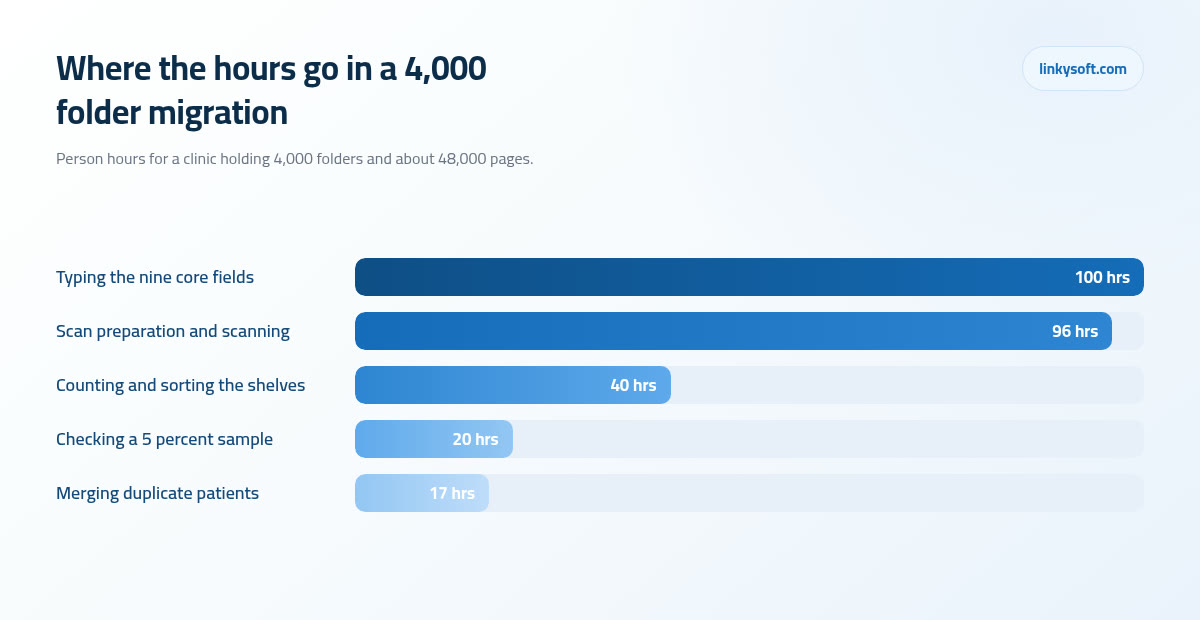
Typing the header of one patient, meaning the nine fields above, takes a practised typist 3 to 6 minutes. At 4 minutes across all 4,000 folders that is 16,000 minutes, or 267 hours, which is about 33 working days for one person and roughly seven days for a team of five. Apply the two track rule and only 1,200 to 1,800 folders need it now, so the real typing bill is nearer 80 to 120 hours.
Scanning has its own arithmetic and it is the one people get wrong. A desktop duplex scanner is rated at 30 to 60 pages a minute, and that rating is honest only about the machine, not about the day. With staples to remove, folds to flatten and double sided sheets to separate, the realistic sustained rate is 400 to 700 pages per person per hour. Divide 48,000 by those two speeds and you get 69 hours at best and 120 at worst, so budget 70 to 120 person hours for the scanning and ignore the number on the box. Add about 17 hours to merge duplicate patients, since 3 to 8 percent of any paper register turns out to be the same person twice, and about 20 hours to audit a 5 percent sample against the original paper.
Money should always come in ranges rather than promises. Outsourced typing commonly runs 0.35 to 1.20 US dollars per patient header and scanning 0.02 to 0.06 dollars per page, and because only the 1,200 to 1,800 active folders are being typed, this clinic lands near 420 to 2,160 dollars for the typing and 960 to 2,880 for the scanning, which does cover all 48,000 pages, before any software licence is counted. Type the whole shelf instead and the typing alone climbs to 1,400 to 4,800, which is the price of a decision nobody is forcing you to make.
Storage, meanwhile, is the part people worry about for no reason. A black and white page scanned at 300 dpi is about 40 to 120 KB, so all 48,000 pages come to only 2 to 6 GB in total, which is roughly the size of one film. The same pages scanned in colour are eight to ten times larger, which is precisely why colour gets reserved for the few pages that genuinely need it.
End to end, a three doctor clinic with 4,000 folders usually takes 11 to 15 weeks, and the sum is worth writing out in full: about one week counting and deciding, then two weeks of setup and training, then four to six weeks of typing and scanning alongside normal clinic days, and finally the four to six weeks of running paper and software together while the checks are done. Only that middle stretch is heavy work, and it is the part everyone mistakenly assumes is the whole project.
There is one more cost worth naming while you are still holding the calculator. Renting a system that nearly fits often costs more across five years than building one that fits exactly, once you add up the little workarounds your staff perform every single day. Where a clinic's way of working is genuinely its own, a web application built around that workflow tends to be the cheaper answer over time, and it is a comparison worth making before the migration starts rather than after. At Linkysoft we price both routes side by side, because for plenty of clinics the rented system really is the right call and it would be dishonest to pretend otherwise.
Scanning the old files once, and doing it properly
Preparation is the slow half of scanning, and it is the half that gets left out of every plan. Somebody has to pull the staples, flatten the folds, unstick the notes taped to page four, repair torn edges and separate the sheets that were written on both sides. Budget more time and more table space for the preparation than for the machine itself, and the whole job stops feeling like it is running late.
The settings are simpler than they sound. Scan at 300 dpi, which means 300 dots per inch, and that is enough detail to read a doctor's handwriting and enough for software to read typed text. Use duplex, which just means the scanner captures both sides in one pass. Keep everything in black and white apart from the pages where colour carries the information, which in a clinic means ECG traces, wound photographs and skin images.
Ask for PDF/A in writing, and put it in the order or the contract rather than in a conversation. It is a version of the PDF format built so the file still opens and looks correct in twenty years, which is the entire point of scanning a medical record in the first place.
Text recognition, usually called OCR, reads the words in the picture so you can search inside a scan for a word rather than opening files one by one. It runs at roughly 90 to 98 percent accuracy on clean typed text and is far weaker on handwriting, and that gap is exactly why it must never be trusted for the nine critical fields. It is a search tool, not a data entry clerk, and treating it as the second is how a dosage ends up wrong.
Decide one file naming rule on day one and never bend it, for example patientID_surname_date_documenttype. Renaming 48,000 files six months later is a second project that nobody budgeted for and nobody enjoys.
For clinics buried in handwritten intake forms, modern AI systems read messy handwriting considerably better than plain text recognition does, and we build that kind of tool. The caveat is not negotiable though: a human still confirms anything clinical before it lands in a field a doctor will act on.
Who types it all in, and when
There are three realistic routes, and most clinics end up blending two of them:
- Reception types each patient in at the counter as they arrive.
- Your own staff work paid batches after hours, which is straightforward but tiring.
- An outside data entry team works through the records inside your own system, under named and supervised accounts.
Capturing records on arrival is usually both the cheapest and the most accurate route, and the reason is human rather than technical: the patient is standing right in front of the person typing, so they confirm their own phone number, their own spelling and their own allergy on the spot. Nobody is deciphering handwriting from 2016 and hoping. Within about six months of ordinary clinic days you have captured almost everyone who matters, and you paid for it in minutes rather than invoices.
If you do outsource, no complete record leaves the building without a signed confidentiality agreement, and strongly prefer a team working inside your own system under named accounts to anybody copying records into a spreadsheet on their personal laptop. You cannot audit what you cannot see. Plenty of clinic managers arrive at this decision after searching for a scanning supplier, and the first question to put to any of them is where the paper will physically sit while they work on it.
Now the unprofitable thing, said plainly: a single doctor practice with fewer than about 800 active patients almost never needs a data entry company at all. Reception can do the identical work for the cost of a few overtime hours, spread across a few quiet weeks, and the clinic keeps both the money and the knowledge in house.
Run paper and software side by side, then stop
Plan 4 to 6 weeks in which every visit is written on paper and entered in the system, so that nothing yet depends on trusting the new tool. This is the safety net, and it is cheap while it lasts.
What makes it dangerous is leaving it open ended, so announce the hard stop date in advance and give one named person the authority to enforce it. Double running without a deadline is how a clinic ends up still on paper a year later while paying a software bill every month, which is the worst of both worlds and surprisingly common.
Tell your staff in advance what normal is going to feel like. Visits typically run 20 to 40 percent slower in week one and are back to the old speed by week three or four, so when Tuesday morning is chaos nobody panics and declares the system a failure on day three. Slower at first is the plan, not a fault.
During those weeks, watch the signals rather than the mood, which in practice means noticing which screens the staff quietly avoid, which fields keep getting skipped, and which report the doctor still writes out from memory instead of pulling it from the system. Every one of those is a fixable design problem rather than a sign of clumsy people, and all three are far cheaper to put right in week two than in month six. Train on real patient files rather than demo data too, because staff then learn the software and clean up the records in the same hour, which makes it the most productive training you will ever pay for.
Proving nothing was lost: the count back
Three checks, in this order, and none of them is optional:
- The count. Folders in must equal records out, reconciled to the exact number, and every gap gets a written note explaining what happened to it rather than a shrug in a corridor. Twelve folders unaccounted for is not a rounding error in a clinic.
- The sample. Pull 5 percent of the migrated records, and never fewer than 50, then compare them field by field against the original paper. It is slow, boring work that takes about six minutes a record, which is where the 20 hours in the costing came from, and it is the only thing that turns a belief that the migration went well into evidence that it did.
- The critical field sweep. Every record with a blank allergy field or a blank date of birth gets chased down and filled, because those blanks are questions rather than answers, and they have a habit of staying blank forever once the project is declared finished.
Set the accept and reject rule before the sampling starts, for example that more than 2 errors in 50 sampled records on any critical field sends the whole batch back for rework. Agreeing that in advance keeps the argument about the rule rather than about the person who typed it, which matters enormously in a small team where everybody has to work together on Monday. Finish with a one page sign off naming who checked what and when, and only then does the paper get boxed and stored, never shredded, until the legal retention period has genuinely run out.
Privacy, backups and the boring parts that save you
Give every person their own login and never allow a shared reception account, because the software keeps a running list of who opened or changed each record, and a list on which every action was recorded as done by reception tells you nothing at all on the one day you need to know who did what. That day always arrives eventually.
Set roles early, while the system is still empty and nobody has strong habits yet. Decide who may open clinical notes, who may only see the appointment book and the balance, and who may export data at all, because export is the quiet risk that everybody forgets. A person who can download the whole patient list can take the whole patient list.
For backups, the 3-2-1 rule is worth learning in ordinary words: keep three copies of your data, on two different kinds of storage, with one of them somewhere else entirely. Then add a restore test every quarter, where somebody actually pulls a file back from the backup and opens it, because a backup nobody has ever restored is a rumour rather than a safety net. Clinic managers who want the longer version can read our other pieces on backups before they sign anything.
Encryption in transit means the data is scrambled while it travels between the clinic and the server, and encryption at rest means it is scrambled while it sits on the disk, and you want both as standard rather than as an upgrade. Remember too that the laptop at reception and the phone in the doctor's pocket are part of the system, so both need a screen lock and neither should hold the only copy of anything. If you want that side handled properly, it is what our cybersecurity work exists for.
Retention rules deserve one honest warning. Adult records are commonly required to be kept for 6 to 10 years after the last contact and children's records for considerably longer, but the rules genuinely differ by country and sometimes by speciality, so confirm your local requirement in writing before anything is destroyed. Nothing goes in the shredder until the rule is confirmed and the digital copy exists in two separate backups.
When the smaller option is the right one
Not every clinic should pay for a full migration, and a supplier who never says so is selling rather than advising. If your practice has fewer than roughly 300 active patients, or the doctor plans to retire within two years, do the scan and index track only and skip the typed migration entirely. The money you save buys far more as online booking and appointment reminders than it ever will as retyped history, and that is patient records digitization done in proportion to the practice.
If the clinic already owns a system it dislikes, resist the urge to replace it first. Fix the fields, fix the permissions and fix the two reports that actually matter, then reassess in a month. A migration never cures a workflow problem, it only carries the problem into a more expensive place, and moving patient records to software for the second time costs more than doing it once.
When the full job is warranted, this is how Linkysoft runs it. We count first and quote from those four numbers rather than from a feeling, then move the records in named batches so that any problem stays contained to one batch instead of loose across the whole shelf, with the accept and reject rule written down before a single record is checked. We also stay through the double running weeks rather than packing up on the day the software is switched on for real, since switching it on is not the finish line, it is the point where the checking starts. A good clinic management system earns its keep in the weeks after that day, not in the demo.
We will also tell you when the smaller option is the better one, and we do that more often than you might expect, particularly for small practices where a lighter setup and a bit of staff time beat any invoice we could write. If you want a second opinion on a quote you have been given, or a straight answer about whether your clinic should move at all this year, tell us your four numbers through our contact page and we will give you the honest arithmetic. There is more of this sort of thing on our blog, and once the records are in order, the reminders and booking side is a natural next step with a mobile app built for your patients.